







Question: Below is the narrative for you to complete a: Table of entities and activities Context diagram Physical data flow diagram Annotated table of entities and
 Below is the narrative for you to complete a:
- Table of entities and activities
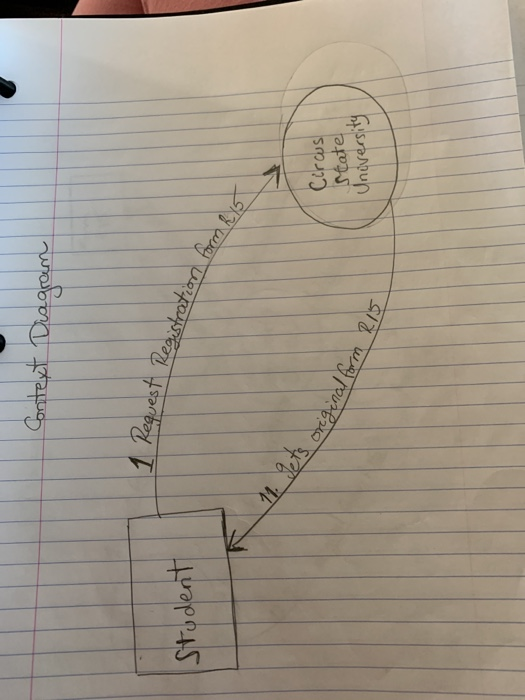
- Context diagram
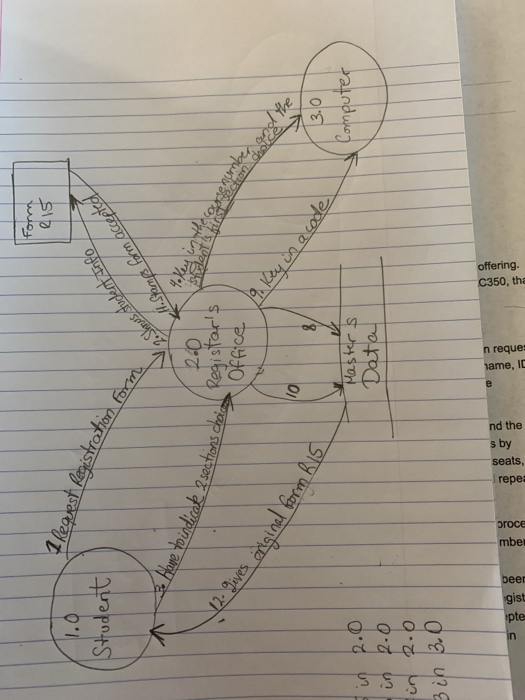
- Physical data flow diagram
- Annotated table of entities and activities
- Logical data flow diagram
The narrative describes the system for registering for AIS at Circus State University:
At Circus State University, students register for courses in the semester preceding the course offering. The narrative assumes a student is registering for a section of an AIS course designated as AC350, that there are multiple sections of the course, and the course has certain prerequisites.
NARRATIVE
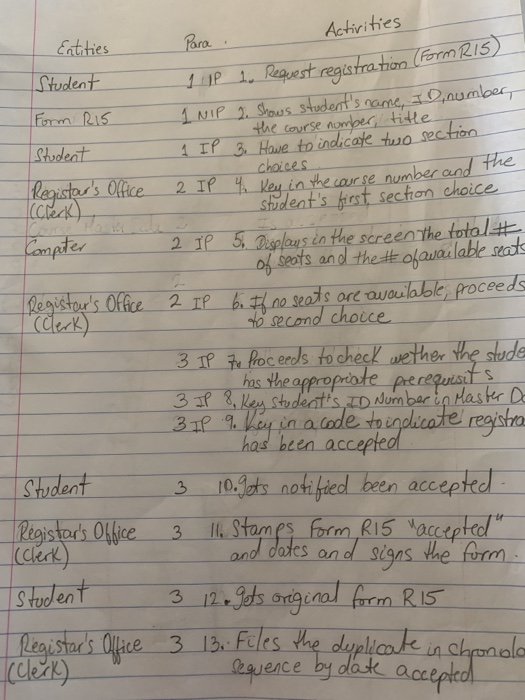
To initiate the registration process, a student presents a two-part completed course registration request (Form R15) to a clerk in the Registrar's Office. The completed form R15 shows the student's name, ID number, the course number (AC350), title (AIS), and section numbers requested. Students are encouraged to indicate at least 2 section choices in case their first choice is not available.
From a computer terminal in the Registrar's Office, the clerk first keys in the course number and the student's first section choice. The course master data is accessed and the computer responds by displaying on the screen the total number of seats in the section and the number of available seats, if any. If no spaces are available, the clerk proceeds to the student's second section choice and repeats the process.
Once an available seat in one of the student's section choices has been confirmed, the clerk proceeds to check whether the student has the appropriate prerequisites. By keying in the student's ID number, the clerk can obtain a display of the student's transcript from the student master data. Once the prerequisites have been verified, the clerk keys in a code to indicate that the registration has been accepted. Both the course and the student master data are updated to reflect the accepted registration (available seats in the course section are reduced by one). The clerk stamps Form R15 "accepted" and dates and signs the form. The original is given to the student and the clerk files the duplicate in chronological sequence by date accepted.
Activities Entities Student Form Ris Student Para . 1 P 1. Request registration Form 1 NIP 2 shows student's name, ID number, the course number, title 1 IP 3. Have to indicate two section IP 4. Key in the course number and Student's first section choice choices Registar's Office 2 (check) Computer 2 IP 5. Ooplays in the screen the total of seats and the #ofavailable seats Registar's Office 2 IP 6. Il no seats are available, proceeds (Clerk) o second choice 3 IP to proceeds to check wether the stude has the appropriate prerequisits 3 IP 8, Key student's ID Number in Master Do 3 11 9. Key in a code to indicate registra - has been accepted. Student 3 10. gets notified been accepted Registar's Office 3 11. Stamps form R15 "accepted" (Clerk and dates and signs the form. Student 3 12 gets original form R15 Registar's Office 3 13. Files the duplicate in chonolo sequence by date accepted 1 Context Diagram 1 Request Student Registration form 11. gets origina Circus state, University is original form Ris Student 2. Shows student info H.Stang form accepted tration 1 Request Registration for Form 7016 2.0 mons choid Registar's 3. Have to indicate 2 sections choice of e dent's finestre numbe in the content 900 The 12. Gives iniginal form R15_ 3.0 9 Rey on a code Masters & Computer Data in 2.0 in R.O 3 in 3.0 pte gist beer mbe proce repe seats, s by nd the jame, n reque C350, th offering. Activities Entities Student Form Ris Student Para . 1 P 1. Request registration Form 1 NIP 2 shows student's name, ID number, the course number, title 1 IP 3. Have to indicate two section IP 4. Key in the course number and Student's first section choice choices Registar's Office 2 (check) Computer 2 IP 5. Ooplays in the screen the total of seats and the #ofavailable seats Registar's Office 2 IP 6. Il no seats are available, proceeds (Clerk) o second choice 3 IP to proceeds to check wether the stude has the appropriate prerequisits 3 IP 8, Key student's ID Number in Master Do 3 11 9. Key in a code to indicate registra - has been accepted. Student 3 10. gets notified been accepted Registar's Office 3 11. Stamps form R15 "accepted" (Clerk and dates and signs the form. Student 3 12 gets original form R15 Registar's Office 3 13. Files the duplicate in chonolo sequence by date accepted 1 Context Diagram 1 Request Student Registration form 11. gets origina Circus state, University is original form Ris Student 2. Shows student info H.Stang form accepted tration 1 Request Registration for Form 7016 2.0 mons choid Registar's 3. Have to indicate 2 sections choice of e dent's finestre numbe in the content 900 The 12. Gives iniginal form R15_ 3.0 9 Rey on a code Masters & Computer Data in 2.0 in R.O 3 in 3.0 pte gist beer mbe proce repe seats, s by nd the jame, n reque C350, th offering
Step by Step Solution
There are 3 Steps involved in it

Get step-by-step solutions from verified subject matter experts
 Study Help