







Question: bicoeff function: Full code to compute binomial coefficients from Lab Problem 4: Program Bionomial integer :: n integer :: i print *, 'Please enter for
 bicoeff function:
Full code to compute binomial coefficients from Lab Problem 4:
Program Bionomial
integer :: n integer :: i print *, 'Please enter for value for n' read *, n print *,'Binomial coefficient:' print *, ' k n!/(k!(n-k)!)' print *, '------------------' do i = 0, n WRITE(*,"(I3,3X,I7)") i, bicoeff(n, i) end do
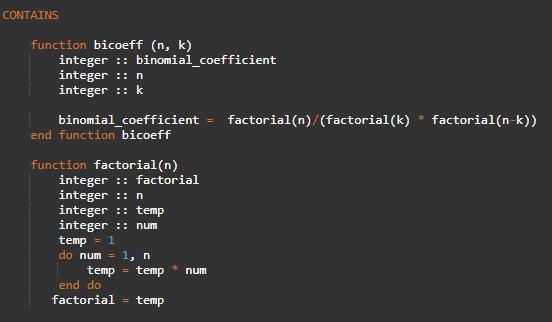
CONTAINS
function bicoeff (n, k) integer :: binomial_coefficient integer :: n integer :: k
binomial_coefficient = factorial(n)/(factorial(k) * factorial(n-k)) end function bicoeff
function factorial(n) integer :: factorial integer :: n integer :: temp integer :: num temp = 1 do num = 1, n temp = temp * num end do factorial = temp
end function factorial
End Program Bionomial
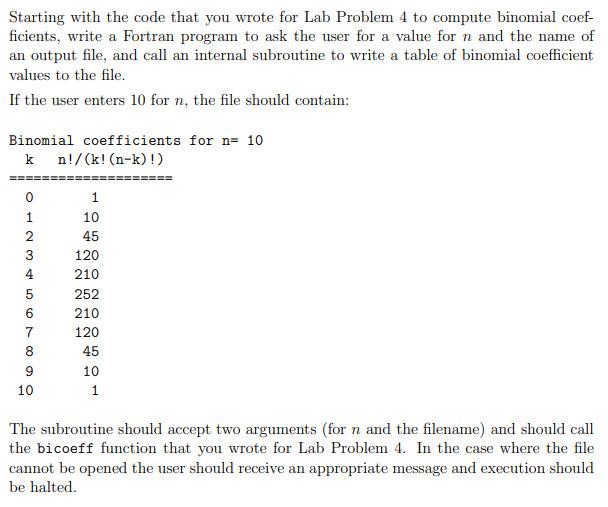
Starting with the code that you wrote for Lab Problem 4 to compute binomial coef- ficients, write a Fortran program to ask the user for a value for n and the name of an output file, and call an internal subroutine to write a table of binomial coefficient values to the file. If the user enters 10 for n, the file should contain: Binomial coefficients for n= 10 k n!/(k! (n-k)!) 0 1 2 3 4 5 6 7 8 1 10 45 120 210 252 210 120 45 10 1 9 10 The subroutine should accept two arguments (for n and the filename) and should call the bicoeff function that you wrote for Lab Problem 4. In the case where the file cannot be opened the user should receive an appropriate message and execution should be halted. CONTAINS factorial(n-k)) function bicoeff (n, k) integer :: binomial_coefficient integer :: n integer :: k binomial_coefficient factorial(n)/(factorial(k) end function bicoeff function factorial(n) integer :: factorial integer :: n integer :: temp integer :: num temp = 1 do num = 1, n temp = temp end do factorial temp num
Step by Step Solution
There are 3 Steps involved in it

Get step-by-step solutions from verified subject matter experts
 Study Help