







Question: bin boot dev etc home lib mnt media opt sbin group passwd zarul chia hello.cpp test project test recent main.cpp OS list.txt semi output Lab.txt
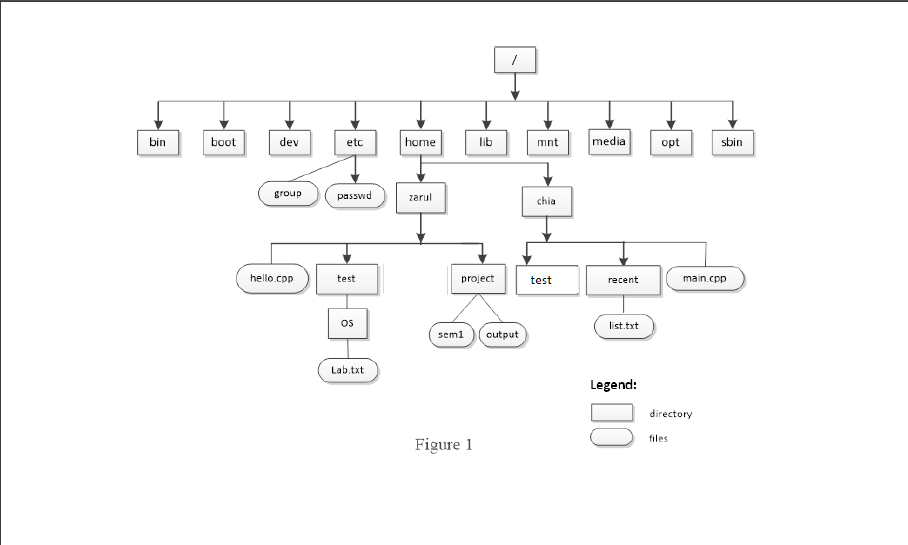
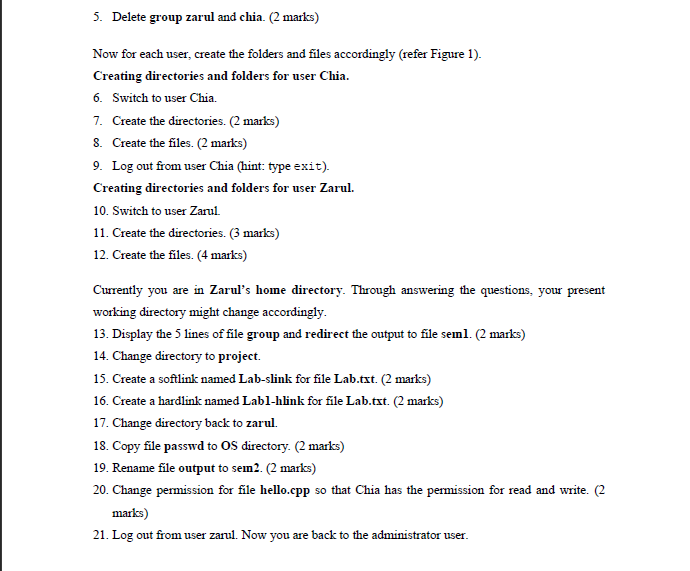
bin boot dev etc home lib mnt media opt sbin group passwd zarul chia hello.cpp test project test recent main.cpp OS list.txt semi output Lab.txt Legend: directory 10 files Figure 1 5. Delete group zarul and chia. (2 marks) Now for each user, create the folders and files accordingly (refer Figure 1). Creating directories and folders for user Chia. 6. Switch to user Chia. 7. Create the directories. (2 marks) 8. Create the files. (2 marks) 9. Log out from user Chia (hint: type exit). Creating directories and folders for user Zarul. 10. Switch to user Zarul 11. Create the directories. (3 marks) 12. Create the files. (4 marks) Currently you are in Zarul's home directory. Through answering the questions, your present working directory might change accordingly. 13. Display the 5 lines of file group and redirect the output to file semnl. (2 marks) 14. Change directory to project. 15. Create a softlink named Lab-slink for file Lab.txt. (2 marks) 16. Create a hardlink named Lab1-hlink for file Lab.txt. (2 marks) 17. Change directory back to zarul. 18. Copy file passwd to OS directory. (2 marks) 19. Rename file output to sem2. (2 marks) 20. Change permission for file hello.cpp so that Chia has the permission for read and write. (2 marks) 21. Log out from user zarul. Now you are back to the administrator user
Step by Step Solution
There are 3 Steps involved in it

Get step-by-step solutions from verified subject matter experts
 Study Help