







Question: Binary, Decimal, and Hexadecimal Read these instructions carefully. For this assignment, you will write a C++ program that converts integers to and from binary, decimal,
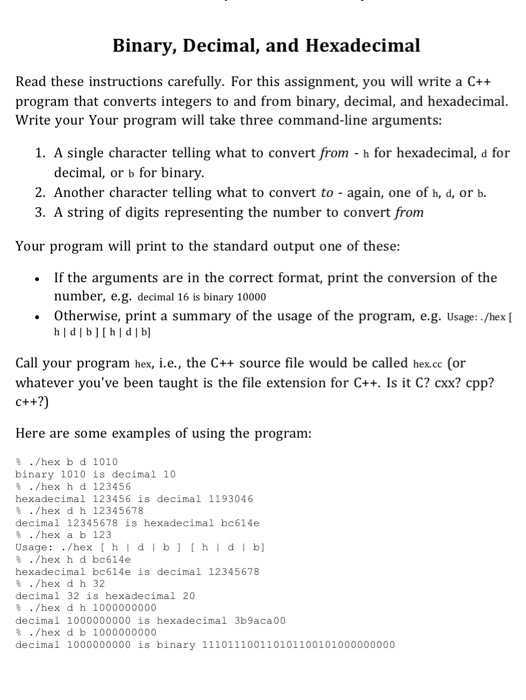
Binary, Decimal, and Hexadecimal Read these instructions carefully. For this assignment, you will write a C++ program that converts integers to and from binary, decimal, and hexadecimal. Write your Your program will take three command-line arguments: 1. A single character telling what to convert from h for hexadecimal, d for decimal, or b for binary 2. Another character telling what to convert to - again, one of h, d, or b. 3. A string of digits representing the number to convert from Your program will print to the standard output one of these If the arguments are in the correct format, print the conversion of the number, e.g. decimal 16 is binary 10000 Otherwise, print a summary of the usage of the program, e.g. Usage: -/hex [ Call your program hex, i.e., the C++ source file would be called hex.cc (or whatever you've been taught is the file extension for C++. Is it C2cxx? cpp? c++?) Here are some examples of using the program: ./hex b d 1010 binary 1010 is decimal 10 % ./hex h d 123456 hexadecimal 123456 is decimal 1193046 % ./hex d h 12345678 decimal 12345678 is hexadecimal bc614e ./hex a b 123 Usage: /hex hldlb[hldlb] % ./hex h d bc614e hexadecimal bc614e is decimal 12345678 % ./hex d h 32 decimal 32 is hexadecimal 20 % . /hex d h 1000000000 decimal 1000000000 is hexadecimal 3b9aca 00 % . /hex d b 1000000000 decimal 1000000000 is binary 111011100110101100101000000000
Step by Step Solution
There are 3 Steps involved in it

Get step-by-step solutions from verified subject matter experts
 Study Help