







Question: Blackboard Lab 4 - BB-Lab4 -- Create a formatted Block December Calendar This assignment still needs to be developed! Create a BB-Lab4 document and include
 Blackboard Lab 4 - BB-Lab4 -- Create a formatted Block December Calendar
This assignment still needs to be developed!
- Create a BB-Lab4 document and include your name on the document. You will use this document your algorithms, code and the screen shots of the running program.
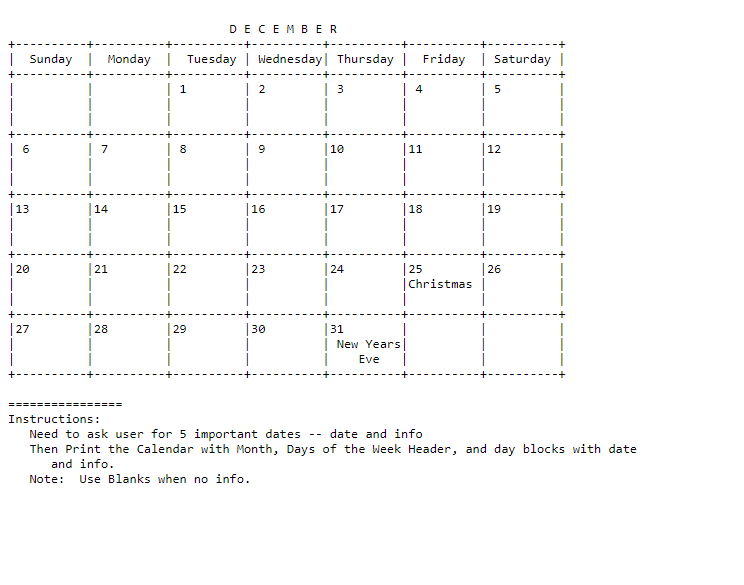
- Design a program that creates a Block ASCII Text December Calendar that can include some daily events like Christmas and New Year's Eve
- The Calendar needs to display the December Heading
- The Days of the Week Sunday to Saturday as headings
- Each day of the month block is 10 spaces wide and 3 lines tall with vertical and horizontal boarders around it
- All days are to have boarders '-' /'+' on horizonantal spacers and '|' on vertical spacing
- Make sure to include Christams and New Years Eve events in the calendar.
- Leave none December Days Blank -- Sunday, Monday at start of Calendar and last two days in 5th week.
- See the attached December Calendar Design text file to see what it looks like.
- Ask the user for 5 important dates to add to the Calendar -- EventName plus Date
- Add these 5 dates to the calendar
- Print the Calendar to the screen with all 7 events (2 standard plus 5 user-supplied.
- Create an algorithm (flowchart or pseudo-code) for this program and add it to the BB-Lab4 document.
- Open either your installed or Web-based Compiler/IDE from BB-Lab1 to complete this lab.
- Implement the Calendar Program in C++. -- add the text listing of the source code to the BB-Lab4 document.
- Design and create a main program
- Display a program message that you are creating a Decemeber Block Calendar that will include 5 user-specified events
- Ask the user to input 5 events with their corresponding day of the month.
- Print the December and Day of the Week Headings fo the calendar.
- Print out the rest of the Calendar and be sure to include all 7 events.
- Test and debug your program until it works
- Copy and paste your code into the BB-Lab4 document.
- Take a screen shot of your running program and add it the BB-Lab4 document.
- Be sure to save your code as a *.cpp source code file.
- Submit your BB-Lab4 document and your *.cpp source file for assignment credit
DECEMBER | Sunday Monday Tuesday Wednesday Thursday Friday Saturday | 1 2 3 5 6 7 8 9 10 11 12 | 13 14 15 16 |17 |18 19 | 20 21 22 23 24 26 25 Christmas | 27 28 29 30 31 New Years Eve | Instructions: Need to ask user for 5 important dates -- date and info Then Print the Calendar with Month, Days of the Week Header, and day blocks with date and info. Note: Use Blanks when no info. DECEMBER | Sunday Monday Tuesday Wednesday Thursday Friday Saturday | 1 2 3 5 6 7 8 9 10 11 12 | 13 14 15 16 |17 |18 19 | 20 21 22 23 24 26 25 Christmas | 27 28 29 30 31 New Years Eve | Instructions: Need to ask user for 5 important dates -- date and info Then Print the Calendar with Month, Days of the Week Header, and day blocks with date and info. Note: Use Blanks when no info
Step by Step Solution
There are 3 Steps involved in it

Get step-by-step solutions from verified subject matter experts
 Study Help