







Question: Bluegrass Community and Technical College Programming Requirements Document Tile Game CLASS OVERVIEW-NOTES ALL STUDENTS SHOULD LEARN READ CAREFULLY. THIS CONTAINS A REVIEW OF READING
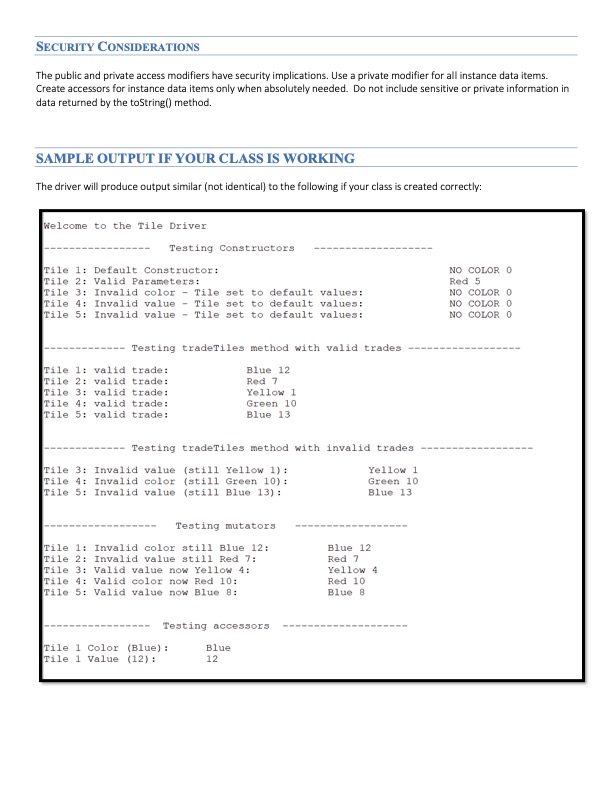
Bluegrass Community and Technical College Programming Requirements Document Tile Game CLASS OVERVIEW-NOTES ALL STUDENTS SHOULD LEARN READ CAREFULLY. THIS CONTAINS A REVIEW OF READING MATERIAL. Learning how to create and use classes and objects in Java is one of the most important concepts you will learn this semester. This is a KEY chapter on learning how to program in an object-oriented language. This assignment is designed to assess your ability to create a new class using a UML diagram (described in the Lewis textbook). This week (and most going forward) you will need multiple files in your application. They will contain: User-defined class(es). Each of these classes contain data and the methods which use the data. This type of class DOES NOT contain a main() method and is not executable. Other programs will use these classes (instantiate objects from the class). A "driver" program. This is a Java class which performs work and often instantiates objects from 1. User-defined classes. 2. Java pre-defined classes. You have used the String class, Math class, DecimalFormat class, etc. In a real-world setting, some programmers only use classes developed by others and simply write driver programs, which are often called apps or applications. Other programmers create new classes for others to use. And some programmers do both. This week, you will create a new user-defined class. The driver program (to test your class) will be provided. When you create a new user-defined class, you will define: Instance data items which are also called data members (variables, constants, etc.) - This is data for the class. We will practice secure coding for the classes we create. All instance data items we create, at this point, will be defined using the private access modifier. The private modifier restricts an outside class (such as drivers) from directly accessing and changing the instance data items. We will not use the public access modifier for class data. The public access modifier allows any outside programs to directly access and modify class data. This is a security vulnerability. Constructor(s)- These are special methods used by other programs to instantiate objects from the class. It is not uncommon to have multiple constructors in a class. Often one of the constructors will have NO parameters and is referred to as the default constructor. Its role is to assign default values to the data members. Other constructors will have parameters which provide data to use as initial values for some or all of the instance data items. Accessor(s)- These are methods which provides indirect access to a piece of class data. We should only create accessors for instance data items that we deem appropriate for other classes (programs) to see/use. For example, you may create a student class which contains a social security number (SSN). You may decide it is not necessary for other classes to access the SSN. In this case, you would use the private access modifier for SSN when you declare the item and you would not create an accessor for SSN. Other pieces of data, such as a student's last name may be perfectly fine to share. In this case, you would declare last name as private and create an accessor for last name. Mutators(s) - These are methods which allow an outside class to modify an instance data item. We want to use extreme caution as to which mutators we provide as this can again introduce a security vulnerability. You may decide it permissible to create a mutator for a student's last name since people change their names for various reasons. We do not change our SSNS and thus it may not make sense to allow any other class to update the SSN data item. In this case, we would NOT create a mutator for SSN. toString() - This is a method which creates a nicely formatted string of class data. It does NOT print/display any data. but rather creates a String and returns the string. The driver would then decide whether or not to print/display the data. For small classes we create, it may make sense to include all class data in the string that is built. For example, a Card class may have class data for the card's suit and face value. It would make sense for the toString() method to include both data items. However, a Student class may have many data items (name, home address, residential address on campus, advisor, major, GPA, SSN, etc.). It would be voluminous and unnecessary to see EVERY piece of data. In this case, perhaps, it makes more sense to create a string of 3-5 pieces of data. Programmers should NOT include sensitive data in the string created by the toString() method as that would create a security vulnerability. Other methods - Some classes will need other methods in the class. For example, you may have a class which represents shapes (circles, squares, triangles, etc.) and a useful method may be getArea() which calculates and returns the area of the object. NARRATIVE DESCRIPTION You will create a new user-defined class this week. A driver is provided to you to test your new class. If your class is created per the UML diagram below, the driver will compile and run correctly. If you have compile error with the driver, the error will be in your class and NOT the driver. DO NOT change the code in the driver. It is VERY Important to remember that classes we create will ultimately be used by MANY drivers. We rarely create a class for one driver only. This means our classes should be secure and versatile. Some drivers may not use mutators while others do. Some drivers may not use accessors while others do, etc. This is very important to remember as we work with classes and objects for the remainder of this course and Into Java Il for those who continue on with programming. E TileDriver main (args: String[]); void Your work this week will revolve around game which uses tiles (see the image to the right from a popular Rummikub game) The game contains 106 tiles numbered from 1 to 13 in four different colors plus two "wild card" tiles called jokers. The four colors we are using are red, green, yellow, and blue. HOWEVER, to make your validation of parameters easier, we will create a game with 104 tiles (no jokers). Your assignment is to create a class called Tile. A driver program called TileDriver is provided to test your Tile class. The Tile class contains instance data for a single tile to be used in games: The color of the tile (a String): Red, Green, Yellow, and Blue are the only valid values The value of the tile (an integer): 1-13 are the only valid values. The UML class diagram for Tile and TileDriver is below: Tile -color: String value: int + Tile(): + Tile (String color, int value): + getColor(): String + getValue(): int + setColor(String color): void as1 + setValue (int value) : void + trade Tiles(String color, int value): void + toString(): String (+ represents the public modifier and -represents the private modifier) UML diagrams typically do not illustrate constructors. However, two constructors are included above (in blue font) so that you do not forget to create the constructors. Constructor ALWAYS share the same name as the class name. Steps to complete: Create the Tile class using the UML diagram illustrated above. Use the method names which are shown in the UML diagram so that the driver program runs correctly. Create 2 constructors for the Tile class (each constructor will be named Tile): 1. A default constructor with no parameters. The coding for the default constructor should set color to "NO COLOR" value to zero 2. A constructor with 2 parameters (a value passed in for color and value - in that order). Make sure the parameters are valid before updating the class data. In other words, the parameter named color is a valid color for the game, and the parameter named value is a valid tile value for the game. Valid colors are "Red", "Green", "Yellow", and "Blue". Valid tile values are 1-13. Create an accessors (getters) for each of the instance data items which are illustrated in the UML diagram (color and value). Accessors are shown in the UML diagram with "get" at the prefix for the method name. Create a mutators (setters) for each of the instance data items which are illustrated in the UML diagram (color and value). Mutators are shown in the UML diagram with "set" at the prefix for the method name. NOTE: For the Tile class, it really does not make sense to have a mutator for the color only (the tile changes color) or for the value only (the color remains but the number changes). Typically, if you change tiles, both would change. For a real implementation of this game, we would not create mutators for color and value. However, these are easy to code and helps your instructor know you can correctly code a mutator. Therefore, include a mutator for both data items. Validate the parameters before updating. If an invalid color is used or an invalid value, simply leave the class data as is and do not update anything. Do not update class data in the mutator if it would create an invalid tile. Do not reset to default values. Simply leave the class data as is. Create a toString() method which displays all class instance data in an easy to read format. Do not print anything. The Tile class will not display any data. Sample strings might look like: Red 1 Blue 12 Create a trade Tiles() method which simulates swapping tiles in the game. Validation of parameters is very similar to the second constructor. However, if the parameters were to create an invalid tile, simply do not update the class data. Leave the tile as Is. It is critical that you use the names listed in the UML diagram. The driver program that was given to you to work with your Tile class expects the names listed in the UML diagram. You are not to make modifications to the driver program. To test your Tile class: Save the TileDriver Java file in the same folder where your Tile.Java class was saved. Compile the Tile class and debug. Compile the TileDriver class. Errors found at this point in the driver will be related to your Tile class and NOT the TileDriver class. Debug Tile. When Tile and TileDriver both compile cleanly, execute TileDriver. This will take a while to complete if this is your first exposure to object-oriented programming. Zip your Tile.java and TileDriver Java files together and submit the zip file in Blackboard for grading. NEW CONCEPTS ASSESSED AND ILLUSTRATED (IN ADDITION TO ANY PREVIOUSLY LEARNED) UML Diagrams User-defined classes Constructors (default and with parameters) Accessors, Mutators, the toString() method SOFTWARE REQUIREMENTS Standard Requirements R1: Include a comment block at the top of your program to clearly identify (1) your name (2) the current date (3) your instructor (4) your class and (5) the purpose of this program (Java class). Significant penalty for missing this requirement and for poor documentation. Use the Programming Standards document introduced in Module 1 to apply documentation standards correctly, consistently, and thoroughly in all Java classes submitted for grading. If a Java class was provided by your instructor (some weeks), you must update the documentation for the given class. Significant penalty for missing this requirement and for poor documentation. R2: R3: R4: All code is free of compile-time errors. No credit is given for assignments with compile errors. R4: Incorporating what you have previously learned to date as appropriate for this assignment. For example, all input prompts should be clear to the user as to what they are to key. All output should be clear to the user as to what they are viewing as the results, including headings for the application. Correct selection of data types. Use of constants, etc. Deductions based upon what was overlooked. Properly zipped submissions for grading. No missing files. ZIP file extension. You are to zip both of your Java files even though you did not modify TileDriver. NOTE: IN FUTURE WEEKS, Standard Requirements (those above) are required even if not explicitly stated. These are now a common expectation. Requirements Specific to this Assignment R5: Create a new Tile class. R6: Create two constructors for Tile. The first constructor is a default constructor with no parameters. The second constructor has 2 parameters. Validate the parameters for the second constructor. R7: Create accessors for Tile. R8: Create mutators for Tile. Validate the parameter value and do not update class data if the change were to create an invalid tile. R9: Create the toString() method for Tile which returns a string and does not explicitly print anything. R10: Create the trade Tiles() method for Tile. Validate the parameters and do not change class data if the change were to create an invalid tile. R11: Classes compile error-free. SECURITY CONSIDERATIONS The public and private access modifiers have security implications. Use a private modifier for all instance data items. Create accessors for instance data items only when absolutely needed. Do not include sensitive or private information in data returned by the toString() method. SAMPLE OUTPUT IF YOUR CLASS IS WORKING The driver will produce output similar (not identical) to the following if your class is created correctly: Welcome to the Tile Driver Tile 1: Default Constructor: Tile 2: Valid Parameters: Tile 3: Invalid color - Tile set to default values: Tile 4: Invalid value - Tile set to default values: Tile 5: Invalid value- Tile set to default values: Testing Constructors Testing tradeTiles method with valid trades. Tile 1: valid trade: Tile 2: valid trade: Tile 3: valid trade: Tile 4: valid trade: Tile 5: valid trade: Blue 12 Red 7 Testing tradeTiles method with invalid trades Yellow 1 Green 10 Blue 13. Yellow 1 Green 10 Blue 13 Tile 3: Invalid value (still Yellow 1): Tile 4: Invalid color (still Green 10): Tile 5: Invalid value (still Blue 13): Tile 1 Color (Blue): Tile 1 Value (12): Testing mutators Tile 1: Invalid color still Blue 12: Tile 2: Invalid value still Red 7: Tile 3: Valid value now Yellow 4: Tile 4: Valid color now Red 10: Tile 5: Valid value now Blue 8: Testing accessors Blue 12 Blue 12 Red 7 Yellow 4 Red 10 Blue 8 NO COLOR 0 Red 5 NO COLOR O NO COLOR O NO COLOR O
Step by Step Solution
3.47 Rating (163 Votes )
There are 3 Steps involved in it
Java programming Tile THIS IS CLASS TILE CODE public class Tile private String color private int value Default Constructor public Tile thiscolor NO COLOR thisvalue 0 Constructor with 2 parameters publ... View full answer

Get step-by-step solutions from verified subject matter experts
 Study Help