







Question: BoggleUi.java Add member variables Of type class javax.swing.Timer Primitive data type int for the minutes Primitive data type int for the seconds Of the inner
Add member variables Of type class javax.swing.Timer Primitive data type int for the minutes Primitive data type int for the seconds Of the inner class implementing interface ActionListener for resetting the game board | ||
| Update the custom constructor to instantiate the member variable of the inner class that implements interface ActionListener for resetting the game board | ||
| Update method initComponents() to Add letters to the JButtons for the dice by calling the setText() method on class JButton passing as an argument each of the letters generated by method shakeDice() Register the inner class that implements interface ActionListener for resetting the game board to member variablesJMenuItem for New Game JButton for shake dice Instantiate the member variable of type TimerPass as an argument to the constructor 1 second represented in milliseconds An instance of the inner class that implements interface ActionListener that manages the timer Start the timer | ||
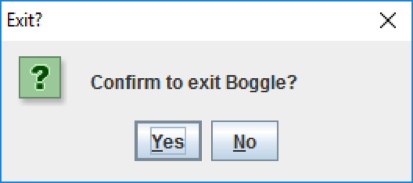
| Write an inner class to create an ActionListener that is registered to the JMenuItem with the text Exit; it should Display a JOptionPane message confirming the user wants to exit using method showConfirmDialog() If yes, exit the application by calling method System.exit() passing the value of 0 as an argument If no, do not exit the application | ||
| Write an inner class to create an ActionListener that is registered to the JMenuItem with the text New Game and the Shake Dice button; it should Call method shakeDice() on the reference object of class Board to get new letters for the dice Populate the dice using method setText() on each JButton to set the letters visually on the JButton Clear the text in the JTextPane by calling method setText() and passing an explicit empty string Clear the text in the score JLabel by calling method setText() and passing an explicit value of 0 Clear the text in the current word JLabel by calling method setText() and passing an explicit empty string Reset the time left JLabel by calling method setText() and passing an explicit string of 3:00 Call method revalidate() on the JFrame reference object Call method repaint() on the JFrame reference object Reset the timer byCalling method stop() Resetting the value of minutes to 3 Resetting the value of seconds to 0 Calling method start() | ||
| Write an inner class that creates an ActionListener that is passed as an argument to the instance of class Timer; it should Check if the minutes and seconds are equal to 0, if yes, then call the stop() method on the member variable of class Timer Check if the seconds are equal to 0, if yes, reset the seconds to 59 and decrement the minutes by 1 Decrements the seconds by 1 Check if the seconds are less than 10, if yes, then concatenate an explicit 0 to the remaining seconds Update the text on the JLabel for time left by calling method setText() |
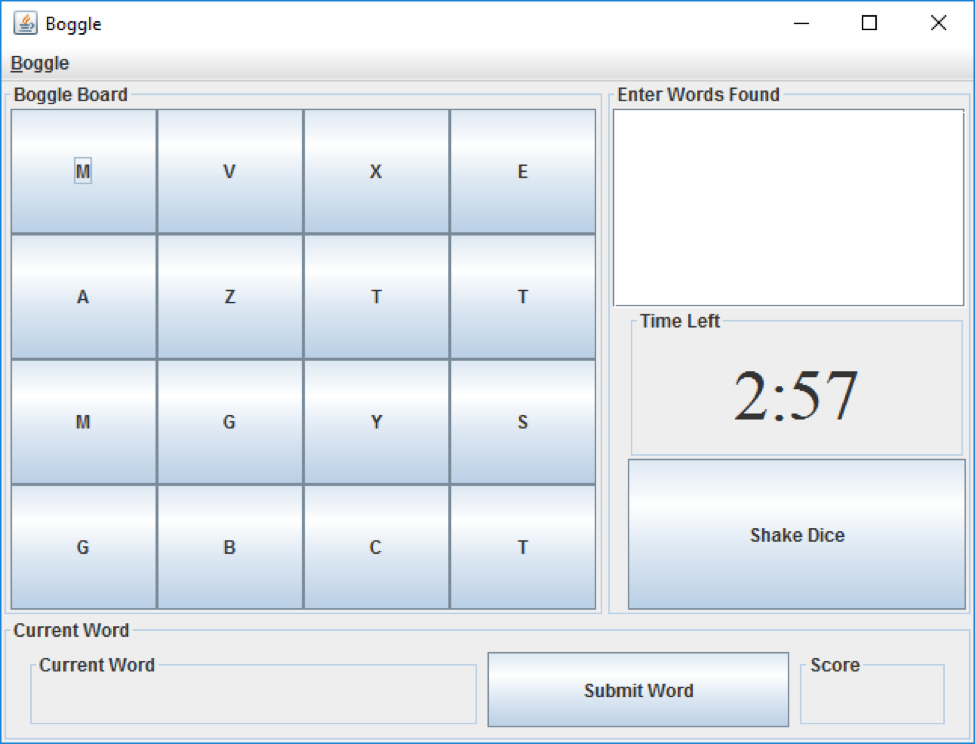
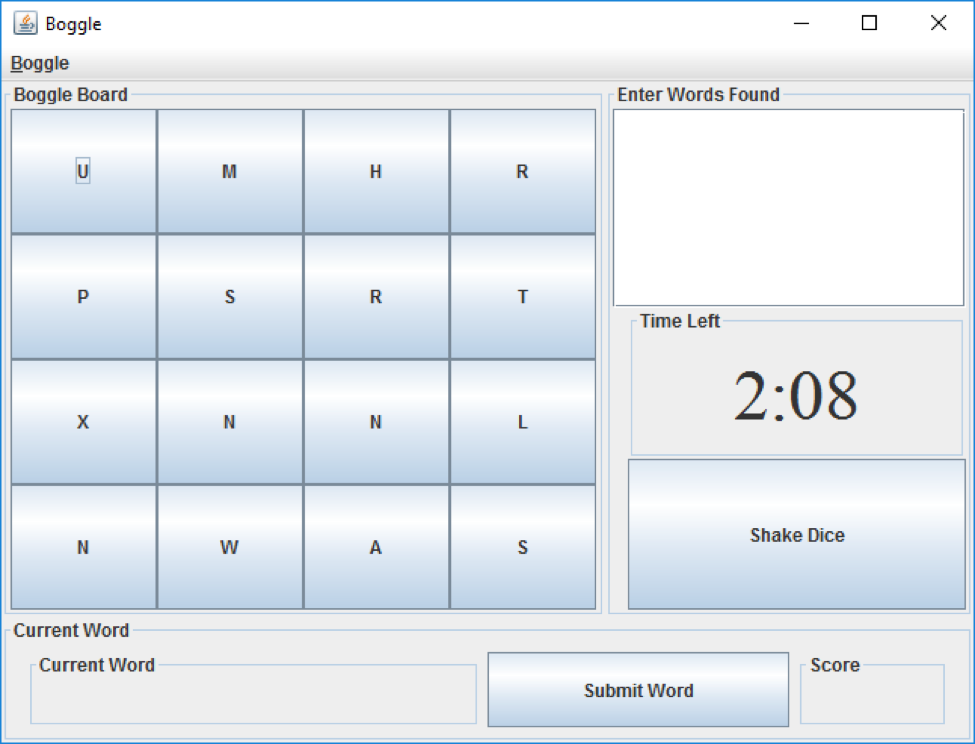
CURRENT BoggleUI
package userInterface;
import core.Board; import core.Die; import java.awt.BorderLayout; import java.awt.Dimension; import java.awt.Font; import java.awt.GridLayout; import java.util.ArrayList; import java.util.Collections; import java.util.Random; import javax.swing.BorderFactory; import javax.swing.BoxLayout; import javax.swing.JButton; import javax.swing.JFrame; import javax.swing.JLabel; import javax.swing.JMenu; import javax.swing.JMenuBar; import javax.swing.JMenuItem; import javax.swing.JPanel; import javax.swing.JScrollPane; import javax.swing.JTextPane; import javax.swing.SwingConstants; import javax.swing.Timer;
public class BoggleUi { private JFrame frame; private JMenuBar menuBar; private JMenu game; private JMenuItem exit; private JMenuItem newGame; // Boggle board private JPanel bogglePanel; private JButton[][] diceButtons;
// Enter found words private JPanel wordsPanel; private JScrollPane scrollPane; private JTextPane wordsArea; // time label private JLabel timeLabel; private JButton shakeDice;
// Enter current word private JPanel currentPanel; private JLabel currentLabel; private JButton currentSubmit; // player's score private JLabel scoreLabel;
private Board board; public BoggleUi(Board inBoard) { board = inBoard;
initComponents(); } private void initComponents() { // Initialize the JFrame frame = new JFrame("Boggle"); frame.setDefaultCloseOperation(JFrame.EXIT_ON_CLOSE); frame.setSize(660, 500); // Initialize the JMenuBar and add to the JFrame createMenu();
// Initialize the JPane for the current word setupCurrentPanel(); // Initialize the JPanel for the word entry setupWordPanel(); // Initialize the JPanel for the Boggle dice setupBogglePanel(); // Add everything to the JFrame frame.setJMenuBar(menuBar); frame.add(bogglePanel, BorderLayout.WEST); frame.add(wordsPanel, BorderLayout.CENTER); frame.add(currentPanel, BorderLayout.SOUTH); frame.setVisible(true); } private void createMenu() { menuBar = new JMenuBar(); game = new JMenu("Boggle"); game.setMnemonic('B'); newGame = new JMenuItem("New Game"); newGame.setMnemonic('N');
exit = new JMenuItem("Exit"); exit.setMnemonic('E'); game.add(newGame); game.add(exit); menuBar.add(game); }
private void setupCurrentPanel() { currentPanel = new JPanel(); currentPanel.setBorder(BorderFactory.createTitledBorder("Current Word"));
currentLabel = new JLabel(); currentLabel.setBorder(BorderFactory.createTitledBorder("Current Word")); currentLabel.setMinimumSize(new Dimension(300, 50)); currentLabel.setPreferredSize(new Dimension(300,50)); currentLabel.setHorizontalAlignment(SwingConstants.LEFT); currentSubmit = new JButton("Submit Word"); currentSubmit.setMinimumSize(new Dimension(200, 100)); currentSubmit.setPreferredSize(new Dimension(200, 50)); scoreLabel = new JLabel(); scoreLabel.setBorder(BorderFactory.createTitledBorder("Score")); scoreLabel.setMinimumSize(new Dimension(100, 50)); scoreLabel.setPreferredSize(new Dimension(100,50)); currentPanel.add(currentLabel); currentPanel.add(currentSubmit); currentPanel.add(scoreLabel); }
private void setupWordPanel() { wordsPanel = new JPanel(); wordsPanel.setLayout(new BoxLayout(wordsPanel, BoxLayout.Y_AXIS)); wordsPanel.setBorder(BorderFactory.createTitledBorder("Enter Words Found")); wordsArea = new JTextPane(); scrollPane = new JScrollPane(wordsArea); scrollPane.setPreferredSize(new Dimension(180, 330)); scrollPane.setHorizontalScrollBarPolicy(JScrollPane.HORIZONTAL_SCROLLBAR_NEVER); scrollPane.setVerticalScrollBarPolicy(JScrollPane.VERTICAL_SCROLLBAR_AS_NEEDED);
timeLabel = new JLabel("3:00"); timeLabel.setHorizontalAlignment(SwingConstants.CENTER); timeLabel.setFont(new Font("Serif", Font.PLAIN, 48)); timeLabel.setPreferredSize(new Dimension(240, 100)); timeLabel.setMinimumSize(new Dimension(240, 100)); timeLabel.setMaximumSize(new Dimension(240, 100)); timeLabel.setBorder(BorderFactory.createTitledBorder("Time Left")); shakeDice = new JButton("Shake Dice"); shakeDice.setPreferredSize(new Dimension(240, 100)); shakeDice.setMinimumSize(new Dimension(240, 100)); shakeDice.setMaximumSize(new Dimension(240, 100)); wordsPanel.add(scrollPane); wordsPanel.add(timeLabel); wordsPanel.add(shakeDice); }
private void setupBogglePanel() { bogglePanel = new JPanel(new GridLayout(4, 4)); bogglePanel.setMinimumSize(new Dimension(400, 400)); bogglePanel.setPreferredSize(new Dimension(400, 400)); bogglePanel.setBorder(BorderFactory.createTitledBorder("Boggle Board")); diceButtons = new JButton[Board.GRID][Board.GRID]; for(int row = 0; row Boggle Boggle Boggle Board Enter Words Found Time Left 2:57 Shake Dice Current Word Current Word Score Submit Word
Step by Step Solution
There are 3 Steps involved in it

Get step-by-step solutions from verified subject matter experts
 Study Help