







Question: # Breadth-First Search Algorithm # Valid for any tree graph from collections import defaultdict class Tree: def __init__(self): # Constructor function self.Tree = defaultdict(list) #
# Breadth-First Search Algorithm
# Valid for any tree graph
from collections import defaultdict
class Tree:
def __init__(self): # Constructor function
self.Tree = defaultdict(list) # default dictionary to store graph
def Branch(self,u,v): # Build the required branches for the Tree
self.Tree[u].append(v)
def BFS(self, s): # DBreadth-First Search functions
print(self.Tree)
visited = [False] * (len(self.Tree)) # Include all the nodes as not visited
print(visited)
print(len(self.Tree))
queue = [] # Create a queue for BFS
visit = []
queue.append(s)
visited[s] = True
while queue:
print ('Queue: ', queue) # Print Queue
s = queue.pop(0) # Move it out when the node is marked as visited
#print ('Visited: ', s)
visit.append(s)
for i in self.Tree[s]:
if visited[i] == False:
queue.append(i)
visited[i] = True
print(' ')
print(visit)
# Build the Tree graph
Net = Tree()
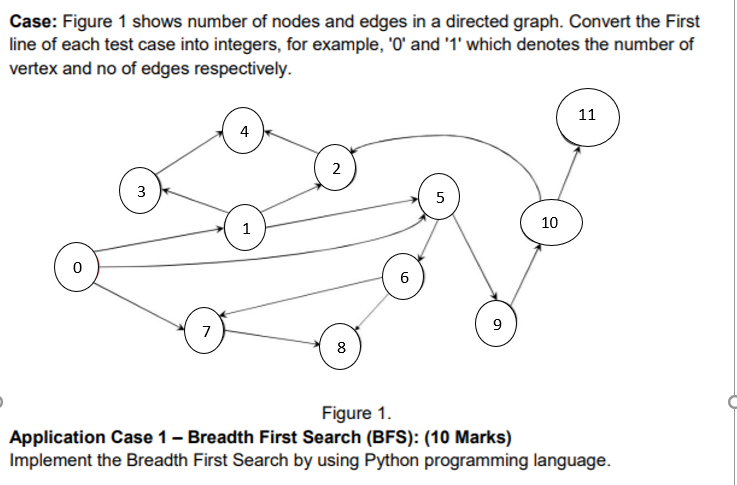
Net.Branch(0, 1)
Net.Branch(0, 5)
Net.Branch(0, 7)
Net.Branch(1, 2)
Net.Branch(1, 3)
Net.Branch(1, 5)
Net.Branch(2, 4)
Net.Branch(3, 4)
Net.Branch(5, 6)
Net.Branch(5, 9)
Net.Branch(6, 7)
Net.Branch(6, 8)
Net.Branch(7, 8)
Net.Branch(9, 10)
Net.Branch(10, 2)
Net.Branch(10, 11)
print ("The visited nodes starting from vertex 0")
Net.BFS(0)
Terminal:
if visited[i] == False: IndexError: list index out of range
How to fix the error?
Case: Figure 1 shows number of nodes and edges in a directed graph. Convert the First line of each test case into integers, for example, 'O' and '1' which denotes the number of vertex and no of edges respectively. 11 4 2 3 5 1 10 0 6 7 9 8 Figure 1. Application Case 1 - Breadth First Search (BFS): (10 Marks) Implement the Breadth First Search by using Python programming language
Step by Step Solution
There are 3 Steps involved in it

Get step-by-step solutions from verified subject matter experts
 Study Help