







Question: Break-even Point Assignment (Excel) Part 1: Using your model from the Break-even Point Lab as a starting point, revise it so that you can calculate
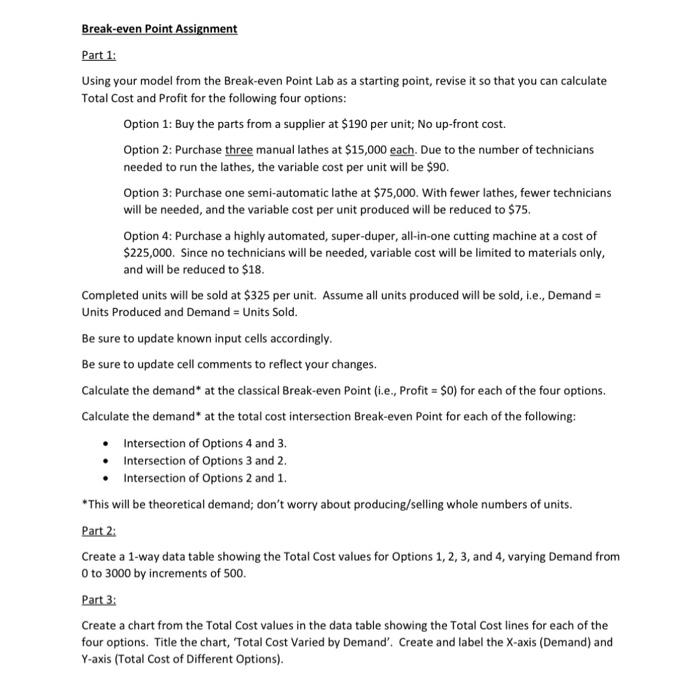
Break-even Point Assignment Part 1: Using your model from the Break-even Point Lab as a starting point, revise it so that you can calculate Total Cost and Profit for the following four options: Option 1: Buy the parts from a supplier at $190 per unit; No up-front cost. Option 2: Purchase three manual lathes at $15,000 each. Due to the number of technicians needed to run the lathes, the variable cost per unit will be $90. Option 3: Purchase one semi-automatic lathe at $75,000. With fewer lathes, fewer technicians will be needed, and the variable cost per unit produced will be reduced to $75. Option 4: Purchase a highly automated, super-duper, all-in-one cutting machine at a cost of $225,000. Since no technicians will be needed, variable cost will be limited to materials only, and will be reduced to $18. Completed units will be sold at $325 per unit. Assume all units produced will be sold, i.e., Demand = Units Produced and Demand = Units Sold. Be sure to update known input cells accordingly. Be sure to update cell comments to reflect your changes. Calculate the demand* at the classical Break-even Point (i.e., Profit =$0 ) for each of the four options. Calculate the demand* at the total cost intersection Break-even Point for each of the following: - Intersection of Options 4 and 3. - Intersection of Options 3 and 2 . - Intersection of Options 2 and 1. "This will be theoretical demand; don't worry about producing/selling whole numbers of units. Part 2: Create a 1-way data table showing the Total Cost values for Options 1, 2, 3, and 4, varying Demand from 0 to 3000 by increments of 500 . Part 3: Create a chart from the Total Cost values in the data table showing the Total Cost lines for each of the four options. Title the chart, 'Total Cost Varied by Demand'. Create and label the X-axis (Demand) and Y-axis (Total Cost of Different Options)
Step by Step Solution
There are 3 Steps involved in it

Get step-by-step solutions from verified subject matter experts
 Study Help