







Question: Build a summary sheet ( called Efficiency Summary ) ( that will allow users to quickly pick two vehicles from two different drop down lists
Build a summary sheet called Efficiency Summarythat will allow users to quickly pick two vehicles from two different dropdown lists data validation
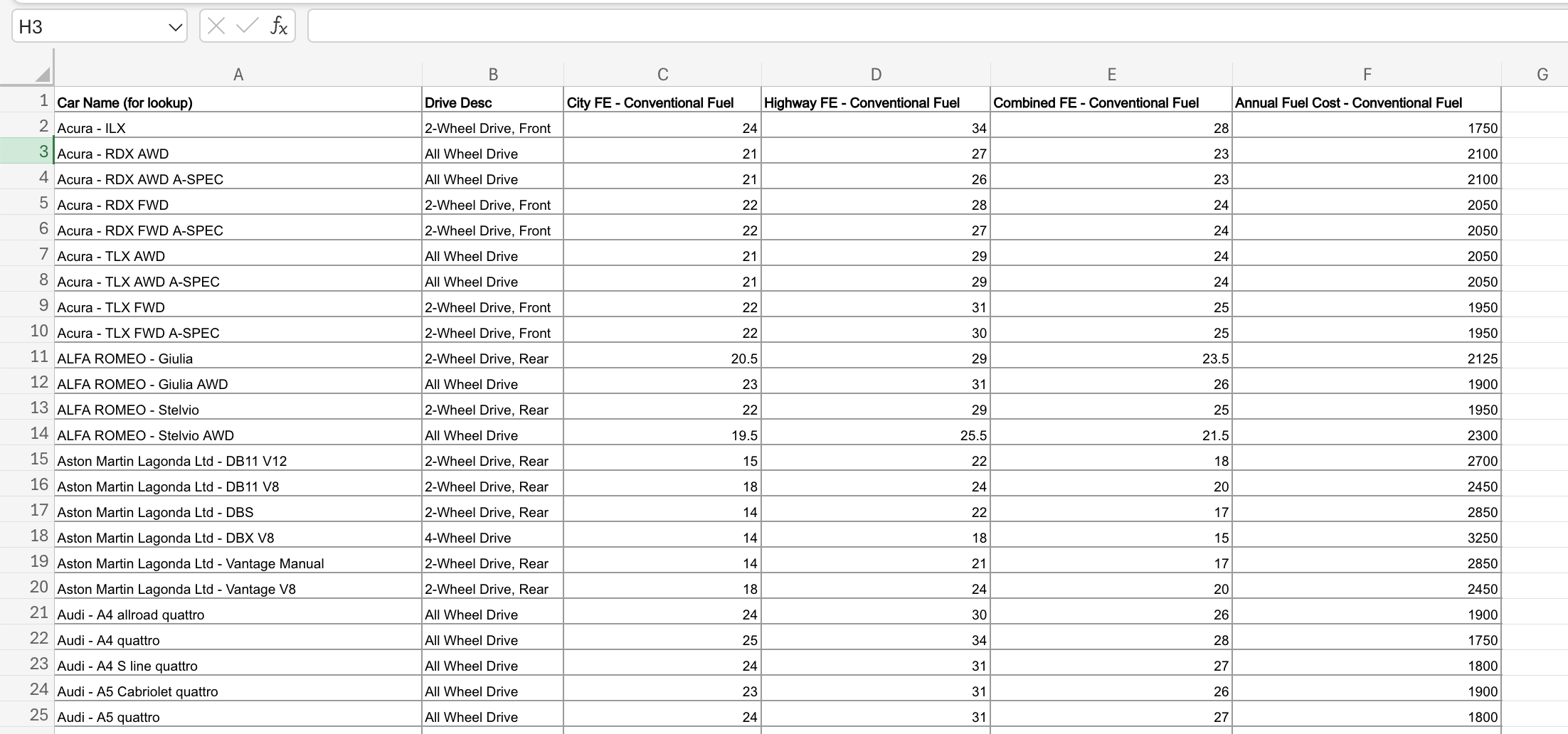
using the column labeled "Car Name for lookup from the CarFuelEfficiency sheet to populate the lists. This should be the landing sheet when users open the workbook.
The summary sheet should display fuel information for each of the selected cars from these four columns using lookup functions:
The ranking of the Annual Fuel Cost Conventional Fuel
City FE Conventional Fuel
Highway FE Conventional Fuel
Combined FE Conventional Fuel
Have the cell with the "Combined FE Conventional Fuel" number shaded green if the car's "Combined FE Conventional Fuel" is above and red if the car's "Combined FE Conventional Fuel" is below
Make sure to
Lines Remove the gridlines on the summary sheet.
Input Output designation Clearly label and format appropriately Input and Output cells ie use appropriate number formatting and use color
Typos and Errors Check spelling.
First Impressions Scroll every sheet to the top left, select cell A
First Impressions Make the Efficiency summary sheet the "landing page" when the workbook is opened and is in the first position of the workbook. H
Car Name for lookup
begintabularccccc
hline Drive Desc & City FE Conventional Fuel & Highway FE Conventional Fuel & Combined FE Conventional Fuel & Annual Fuel Cost Conventional Fuel
hline Wheel Drive, Front & & & &
hline All Wheel Drive & & & &
hline All Wheel Drive & & & &
hline Wheel Drive, Front & & & &
hline Wheel Drive, Front & & & &
hline All Wheel Drive & & & &
hline All Wheel Drive & & & &
hline Wheel Drive, Front & & & &
hline Wheel Drive, Front & & & &
hline Wheel Drive, Rear & & & &
hline All Wheel Drive & & & &
hline Wheel Drive, Rear & & & &
hline All Wheel Drive & & & &
hline Wheel Drive, Rear & & & &
hline Wheel Drive, Rear & & & &
hline Wheel Drive, Rear & & & &
hline Wheel Drive & & & &
hline Wheel Drive, Rear & & & &
hline Wheel Drive, Rear & & & &
hline All Wheel Drive & & & &
hline All Wheel Drive & & & &
hline All Wheel Drive & & & &
hline All Wheel Drive & & & &
hline All Wheel Drive & & & &
hline
endtabular
Step by Step Solution
There are 3 Steps involved in it
1 Expert Approved Answer
Step: 1 Unlock

Question Has Been Solved by an Expert!
Get step-by-step solutions from verified subject matter experts
Step: 2 Unlock
Step: 3 Unlock
 Study Help