







Question: Build an app to make invitations for a party. It starts like this. Create the following: Create the following. Upload code and what files they
Build an app to make invitations for a party. It starts like this.
Create the following:
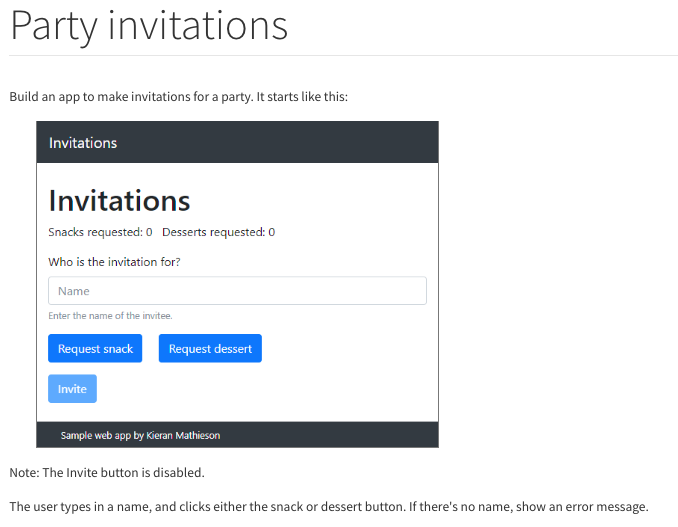
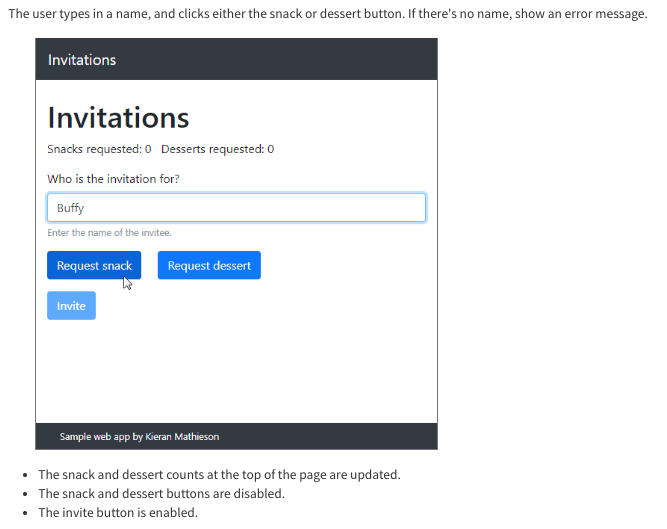
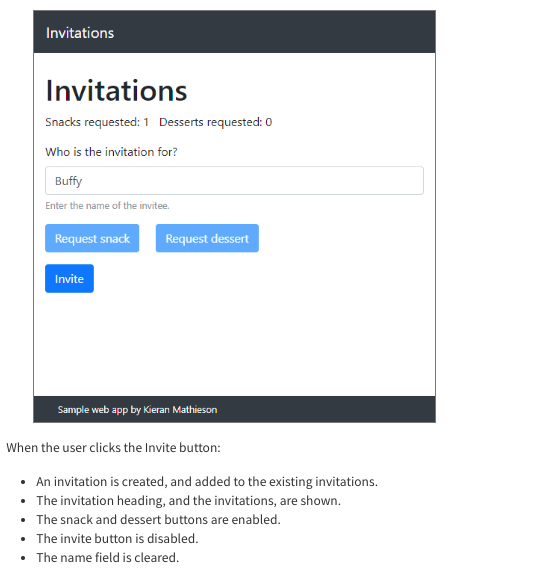
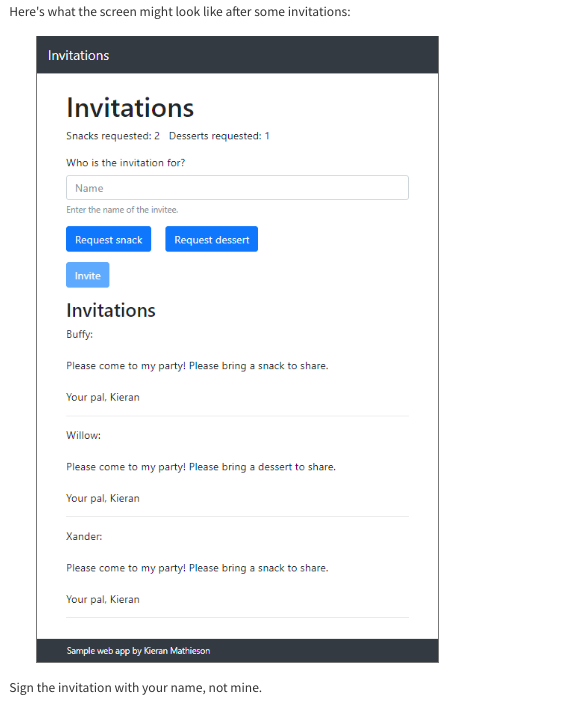
Create the following.
Upload code and what files they would go in.
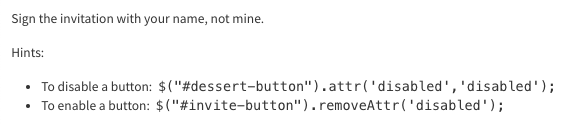
Party invitations Build an app to make invitations for a party. It starts like this: Invitations Invitations Snacks requested: O Desserts requested: 0 Who is the invitation for? Name Enter the name of the invitee. Request snack Request dessert Invite Sample web app by Kieran Mathieson Note: The Invite button is disabled. The user types in a name, and clicks either the snack or dessert button. If there's no name, show an error message. The user types in a name, and clicks either the snack or dessert button. If there's no name, show an error message. Invitations Invitations Snacks requested: 0 Desserts requested: 0 Who is the invitation for? Buffy Enter the name of the invitee. Request snack Request dessert Invite Sample web app by Kieran Mathieson The snack and dessert counts at the top of the page are updated. The snack and dessert buttons are disabled. The invite button is enabled. Invitations Invitations Snacks requested: 1 Desserts requested: 0 Who is the invitation for? Buffy Enter the name of the invitee. Request snack Request dessert Invite Sample web app by Kieran Mathieson When the user clicks the Invite button: An invitation is created, and added to the existing invitations. The invitation heading, and the invitations, are shown. The snack and dessert buttons are enabled. The invite button is disabled. The name field is cleared. Here's what the screen might look like after some invitations: Invitations Invitations Snacks requested:2 Desserts requested: 1 Who is the invitation for? Name Enter the name of the invitee Request snack Request dessert Invite Invitations Buffy: Please come to my party! Please bring a snack to share. Your pal, Kieran Willow: Please come to my party! Please bring a dessert to share. Your pal, Kieran Xander: Please come to my party! Please bring a snack to share Your pal, Kieran Sample web app by Kieran Mathieson Sign the invitation with your name, not mine. Sign the invitation with your name, not mine. Hints: To disable a button: $("#dessert-button").attr('disabled', 'disabled'); To enable a button: $("#invite-button").removeAttr('disabled'); Party invitations Build an app to make invitations for a party. It starts like this: Invitations Invitations Snacks requested: O Desserts requested: 0 Who is the invitation for? Name Enter the name of the invitee. Request snack Request dessert Invite Sample web app by Kieran Mathieson Note: The Invite button is disabled. The user types in a name, and clicks either the snack or dessert button. If there's no name, show an error message. The user types in a name, and clicks either the snack or dessert button. If there's no name, show an error message. Invitations Invitations Snacks requested: 0 Desserts requested: 0 Who is the invitation for? Buffy Enter the name of the invitee. Request snack Request dessert Invite Sample web app by Kieran Mathieson The snack and dessert counts at the top of the page are updated. The snack and dessert buttons are disabled. The invite button is enabled. Invitations Invitations Snacks requested: 1 Desserts requested: 0 Who is the invitation for? Buffy Enter the name of the invitee. Request snack Request dessert Invite Sample web app by Kieran Mathieson When the user clicks the Invite button: An invitation is created, and added to the existing invitations. The invitation heading, and the invitations, are shown. The snack and dessert buttons are enabled. The invite button is disabled. The name field is cleared. Here's what the screen might look like after some invitations: Invitations Invitations Snacks requested:2 Desserts requested: 1 Who is the invitation for? Name Enter the name of the invitee Request snack Request dessert Invite Invitations Buffy: Please come to my party! Please bring a snack to share. Your pal, Kieran Willow: Please come to my party! Please bring a dessert to share. Your pal, Kieran Xander: Please come to my party! Please bring a snack to share Your pal, Kieran Sample web app by Kieran Mathieson Sign the invitation with your name, not mine. Sign the invitation with your name, not mine. Hints: To disable a button: $("#dessert-button").attr('disabled', 'disabled'); To enable a button: $("#invite-button").removeAttr('disabled')
Step by Step Solution
There are 3 Steps involved in it

Get step-by-step solutions from verified subject matter experts
 Study Help