







Question: Build classes to simulate items in a library step by step. Must match sample output and validation. //Sample Output ----jGRASP exec: java Library Library Menu
Build classes to simulate items in a library step by step. Must match sample output and validation.
//Sample Output ----jGRASP exec: java Library
Library Menu 1. Add a book 2. Checkout a book 3. Checkin a book 4. Search for a book by title 5. Print the inventory 6. Exit
Enter a choice: 1 Enter id: B111 Enter title: C Primer Plus Enter author: Prata Enter year: 2015 Enter publisher: Addison
Library Menu 1. Add a book 2. Checkout a book 3. Checkin a book 4. Search for a book by title 5. Print the inventory 6. Exit
Enter a choice: 5
Library Inventory: 1. Id: B100 Title: Building Java Programs In Stock: Yes Author: Reges & Stepp Year: 2020 Publisher: Pearson
2. Id: B101 Title: Introduction to Computing In Stock: Yes Author: Patt & Patel Year: 2020 Publisher: Wiley
3. Id: B111 Title: C Primer Plus In Stock: Yes Author: Prata Year: 2015 Publisher: Addison
Library Menu 1. Add a book 2. Checkout a book 3. Checkin a book 4. Search for a book by title 5. Print the inventory 6. Exit
Enter a choice: 2 Enter title to check out: Building Java Programs
Library Menu 1. Add a book 2. Checkout a book 3. Checkin a book 4. Search for a book by title 5. Print the inventory 6. Exit
Enter a choice: 2 Enter title to check out: Building Java Programs Book not available
Library Menu 1. Add a book 2. Checkout a book 3. Checkin a book 4. Search for a book by title 5. Print the inventory 6. Exit
Enter a choice: 3 Enter title to check in: Building Java Programs
Library Menu 1. Add a book 2. Checkout a book 3. Checkin a book 4. Search for a book by title 5. Print the inventory 6. Exit
Enter a choice: 5
Library Inventory: 1. Id: B100 Title: Building Java Programs In Stock: Yes Author: Reges & Stepp Year: 2020 Publisher: Pearson
2. Id: B101 Title: Introduction to Computing In Stock: Yes Author: Patt & Patel Year: 2020 Publisher: Wiley
3. Id: B111 Title: C Primer Plus In Stock: Yes Author: Prata Year: 2015 Publisher: Addison
Library Menu 1. Add a book 2. Checkout a book 3. Checkin a book 4. Search for a book by title 5. Print the inventory 6. Exit
Enter a choice: 4 Enter a title to search: C Primer Plus Title found: Id: B111 Title: C Primer Plus In Stock: Yes Author: Prata Year: 2015 Publisher: Addison
Library Menu 1. Add a book 2. Checkout a book 3. Checkin a book 4. Search for a book by title 5. Print the inventory 6. Exit
Enter a choice: 4 Enter a title to search: C Programming Title not found
Library Menu 1. Add a book 2. Checkout a book 3. Checkin a book 4. Search for a book by title 5. Print the inventory 6. Exit
Enter a choice: 6
----jGRASP: operation complete.
//Sample Validation ----jGRASP exec: java Library
Library Menu 1. Add a book 2. Checkout a book 3. Checkin a book 4. Search for a book by title 5. Print the inventory 6. Exit
Enter a choice: a Please enter a number between 1 and 6
Library Menu 1. Add a book 2. Checkout a book 3. Checkin a book 4. Search for a book by title 5. Print the inventory 6. Exit
Enter a choice: 0 Please enter a number between 1 and 6
Library Menu 1. Add a book 2. Checkout a book 3. Checkin a book 4. Search for a book by title 5. Print the inventory 6. Exit
Enter a choice: 8 Please enter a number between 1 and 6
Library Menu 1. Add a book 2. Checkout a book 3. Checkin a book 4. Search for a book by title 5. Print the inventory 6. Exit
Enter a choice: 6
----jGRASP: operation complete.
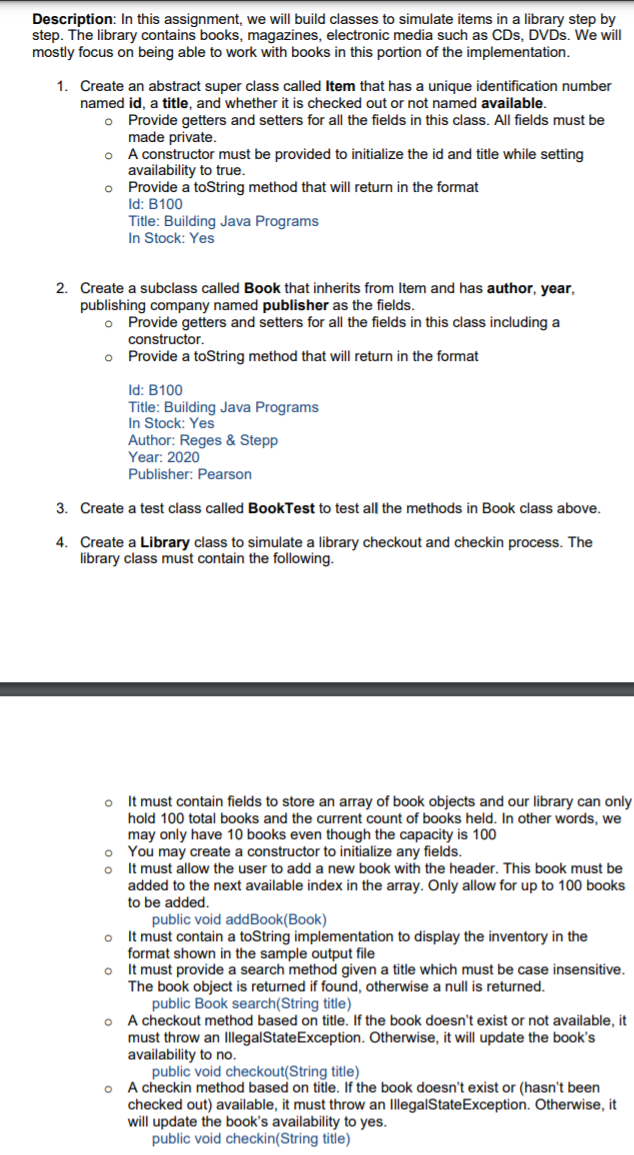
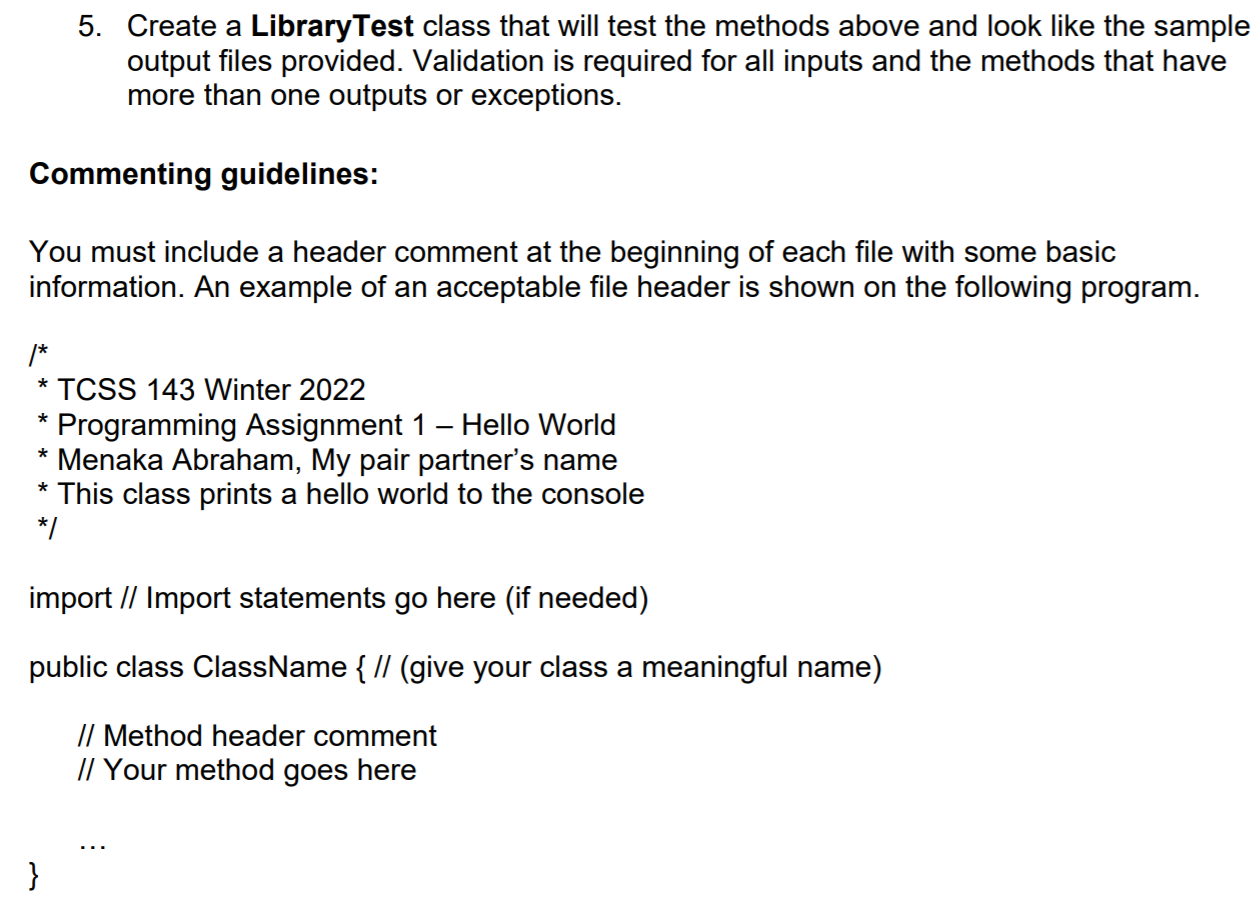
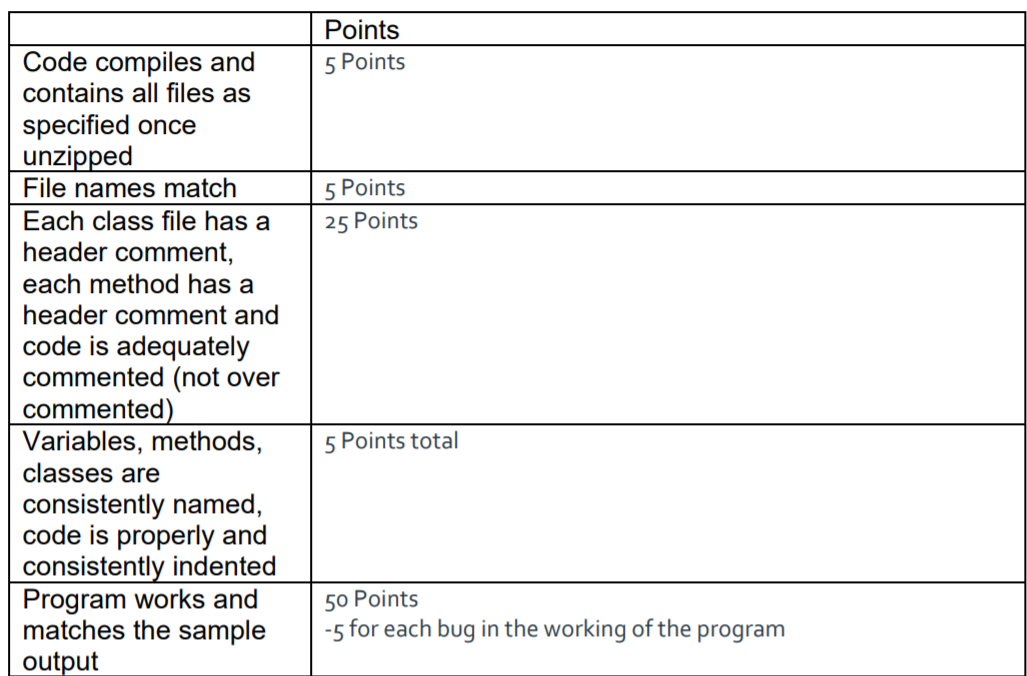
Description: In this assignment, we will build classes to simulate items in a library step by step. The library contains books, magazines, electronic media such as CDs, DVDs. We will mostly focus on being able to work with books in this portion of the implementation. O 1. Create an abstract super class called Item that has a unique identification number named id, a title, and whether it is checked out or not named available. o Provide getters and setters for all the fields in this class. All fields must be made private. A constructor must be provided to initialize the id and title while setting availability to true. Provide a toString method that will return in the format Id: B100 Title: Building Java Programs In Stock: Yes O 2. Create a subclass called Book that inherits from Item and has author, year, publishing company named publisher as the fields. o Provide getters and setters for all the fields in this class including a constructor. Provide a toString method that will return in the format O Id: B100 Title: Building Java Programs In Stock: Yes Author: Reges & Stepp Year: 2020 Publisher: Pearson 3. Create a test class called BookTest to test all the methods in Book class above. 4. Create a Library class to simulate a library checkout and checkin process. The library class must contain the following. o O o It must contain fields to store an array of book objects and our library can only hold 100 total books and the current count of books held. In other words, we may only have 10 books even though the capacity is 100 0 You may create a constructor to initialize any fields. o It must allow the user to add a new book with the header. This book must be added to the next available index in the array. Only allow for up to 100 books to be added. public void addBook(Book) It must contain a toString implementation to display the inventory in the format shown in the sample output file It must provide a search method given a title which must be case insensitive. The book object is returned if found, otherwise a null is returned. public Book search(String title) O A checkout method based on title. If the book doesn't exist or not available, it must throw an IllegalState Exception. Otherwise, it will update the book's availability to no. public void checkout(String title) o A checkin method based on title. If the book doesn't exist or (hasn't been checked out) available, it must throw an IllegalStateException. Otherwise, it will update the book's availability to yes. public void checkin(String title) 5. Create a LibraryTest class that will test the methods above and look like the sample output files provided. Validation is required for all inputs and the methods that have more than one outputs or exceptions. Commenting guidelines: You must include a header comment at the beginning of each file with some basic information. An example of an acceptable file header is shown on the following program. * /* * TCSS 143 Winter 2022 Programming Assignment 1 Hello World Menaka Abraham, My pair partner's name * This class prints a hello world to the console */ * import // Import statements go here (if needed) public class ClassName { // (give your class a meaningful name) // Method header comment // Your method goes here } Points 5 Points 5 Points 25 Points Code compiles and contains all files as specified once unzipped File names match Each class file has a header comment, each method has a header comment and code is adequately commented (not over commented) Variables, methods, classes are consistently named, code is properly and consistently indented Program works and matches the sample output 5 Points total 50 Points -5 for each bug in the working of the program
Step by Step Solution
There are 3 Steps involved in it

Get step-by-step solutions from verified subject matter experts
 Study Help