







Question: Build off of the python code given below. Create a Python program named LAB2_Lastname.py, which does the following: - When button1 is pressed, LED1 turns
Build off of the python code given below.
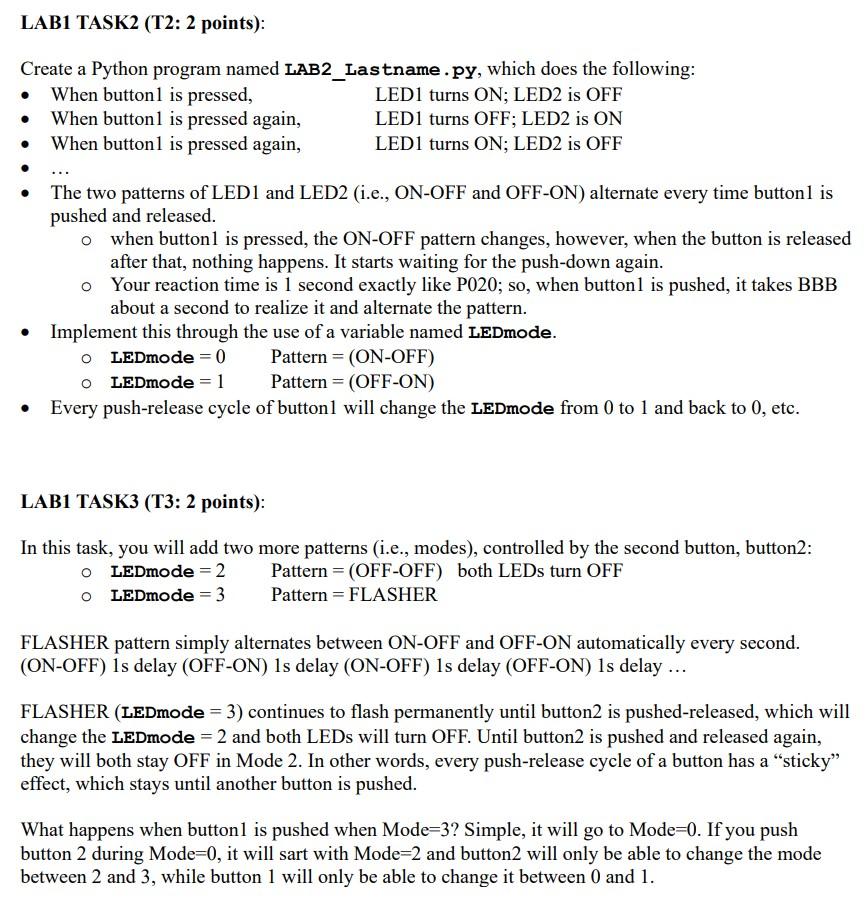
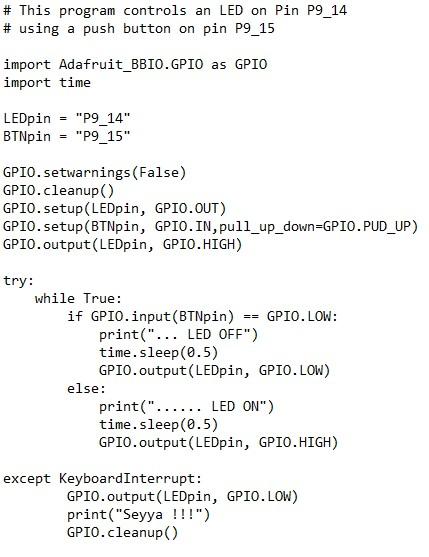
Create a Python program named LAB2_Lastname.py, which does the following: - When button1 is pressed, LED1 turns ON; LED2 is OFF - When button1 is pressed again, LED1 turns OFF; LED2 is ON - When button1 is pressed again, LED1 turns ON; LED2 is OFF - - The two patterns of LED1 and LED2 (i.e., ON-OFF and OFF-ON) alternate every time button1 is pushed and released. - when button1 is pressed, the ON-OFF pattern changes, however, when the button is released after that, nothing happens. It starts waiting for the push-down again. - Your reaction time is 1 second exactly like P020; so, when button1 is pushed, it takes BBB about a second to realize it and alternate the pattern. - Implement this through the use of a variable named LEDmode. - LEDmode =0 Pattern =(ONOFF) - LEDmode =1 Pattern =(OFFON) - Every push-release cycle of button1 will change the LEDmode from 0 to 1 and back to 0 , etc. LAB1 TASK3 (T3: 2 points): In this task, you will add two more patterns (i.e., modes), controlled by the second button, button2: - LEDmode =2 Pattern =( OFF-OFF ) both LEDs turn OFF - LEDmode =3 Pattern = FLASHER FLASHER pattern simply alternates between ON-OFF and OFF-ON automatically every second. (ON-OFF) 1s delay (OFF-ON) 1s delay (ON-OFF) 1s delay (OFF-ON) 1s delay ... FLASHER (LEDmode = 3) continues to flash permanently until button2 is pushed-released, which will change the LEDmode =2 and both LEDs will turn OFF. Until button2 is pushed and released again, they will both stay OFF in Mode 2. In other words, every push-release cycle of a button has a "sticky" effect, which stays until another button is pushed. What happens when button1 is pushed when Mode =3 ? Simple, it will go to Mode =0. If you push button 2 during Mode =0, it will sart with Mode =2 and button 2 will only be able to change the mode between 2 and 3 , while button 1 will only be able to change it between 0 and 1 . \# This program controls an LED on Pin P9_14 \# using a push button on pin P9_15 import Adafruit_BBI0.GPI0 as GPI0 import time LEDpin = "P9_14" BTNpin = "P9_15" GPI0.setwarnings(False) GPI0.cleanup() GPI0.setup(LEDpin, GPI0.0UT) GPI0.setup(BTNpin, GPI0.IN,pul1_up_down=GPIO.PUD_UP) GPI0.output(LEDpin,GPI0.HIGH) try: while True: if GPI0.input(BTNpin)==GPI0.LOW: print("...LED OFF") time.sleep(0.5) GPI0.output(LEDpin, GPI0.LOW) else: print(".....LED ON") time.sleep(0.5) GPI0.output(LEDpin, GPI0.HIGH) except KeyboardInterrupt: GPI0.output(LEDpin, GPI0.LOW) print("Seyya !!!") GPI0.cleanup()
Step by Step Solution
There are 3 Steps involved in it

Get step-by-step solutions from verified subject matter experts
 Study Help