







Question: Build the following Dental Payment System App using WPF( Windows Presentation Foundation/C#, Visual Studio) You can use appropriate layout controls. If patient is Senior, then
Build the following Dental Payment System App using WPF(Windows Presentation Foundation/C#, Visual Studio)
You can use appropriate layout controls. If patient is Senior, then give 10% discount, if he/she is in category - Kids/Youth then 15% discount.
Add one combo box under Address textbox (drop down for Provinces - Alberta - HST 7%, Ontario- HST 13% and Quebec- HST 6%).
As per the selection of the province, Total Charges should be calculated accordingly.
CalculatorApp Dental Payment System
Name of Patient: Dental Services Available Flossing $20.00 Address: Filling $75.00 O Senior O kids and Youth Adult Root Canal $150.00
Calculate Output is displayed here in this textblock. You need to print Patient Name along with Total charges
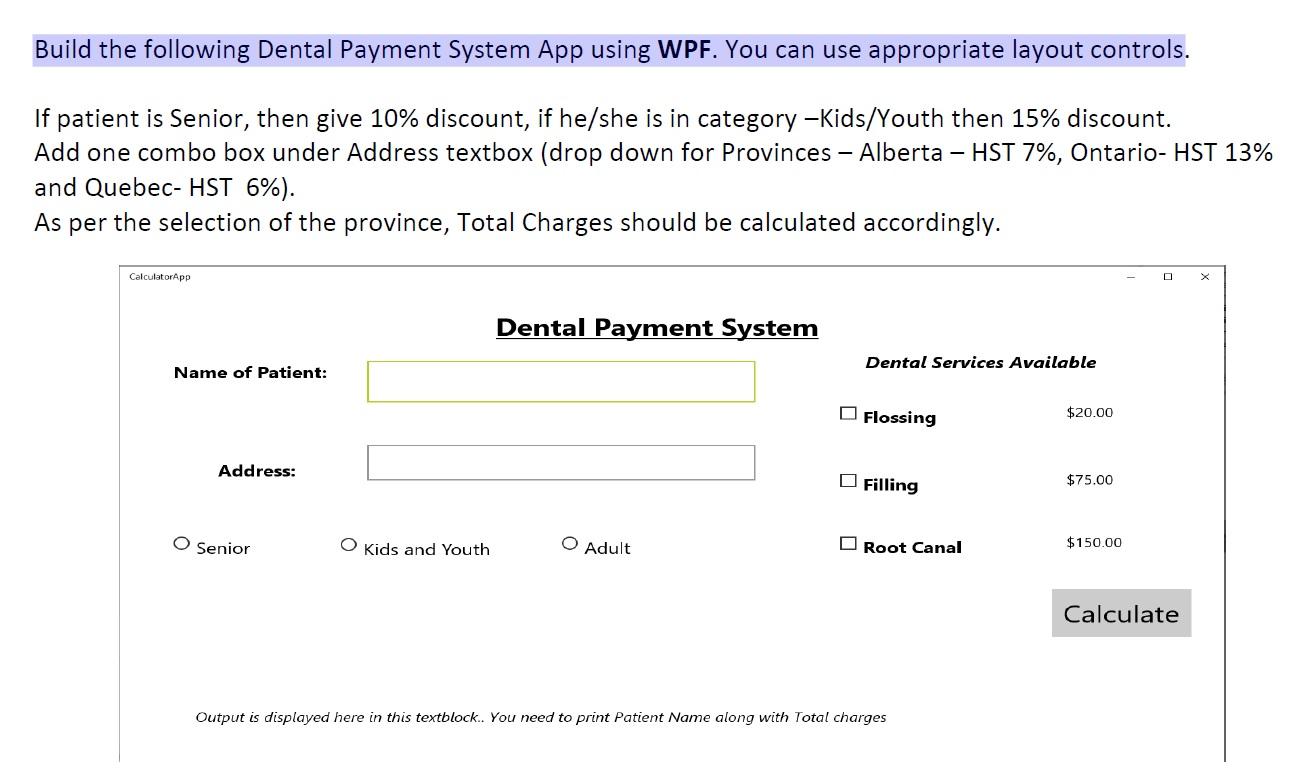
Build the following Dental Payment System App using WPF. You can use appropriate layout controls. If patient is Senior, then give 10% discount, if he/she is in category -kids/Youth then 15% discount. Add one combo box under Address textbox (drop down for Provinces - Alberta - HST 7%, Ontario- HST 13% and Quebec- HST 6%). As per the selection of the province, Total Charges should be calculated accordingly. CalculatorApp - OX Dental Payment System Name of Patient: Dental Services Available Flossing $20.00 Address: Filling $75.00 O Senior O kids and Youth O Adult O Root Canal $150.00 Calculate Output is displayed here in this textblock.. You need to print Patient Name along with Total charges
Step by Step Solution
There are 3 Steps involved in it

Get step-by-step solutions from verified subject matter experts
 Study Help