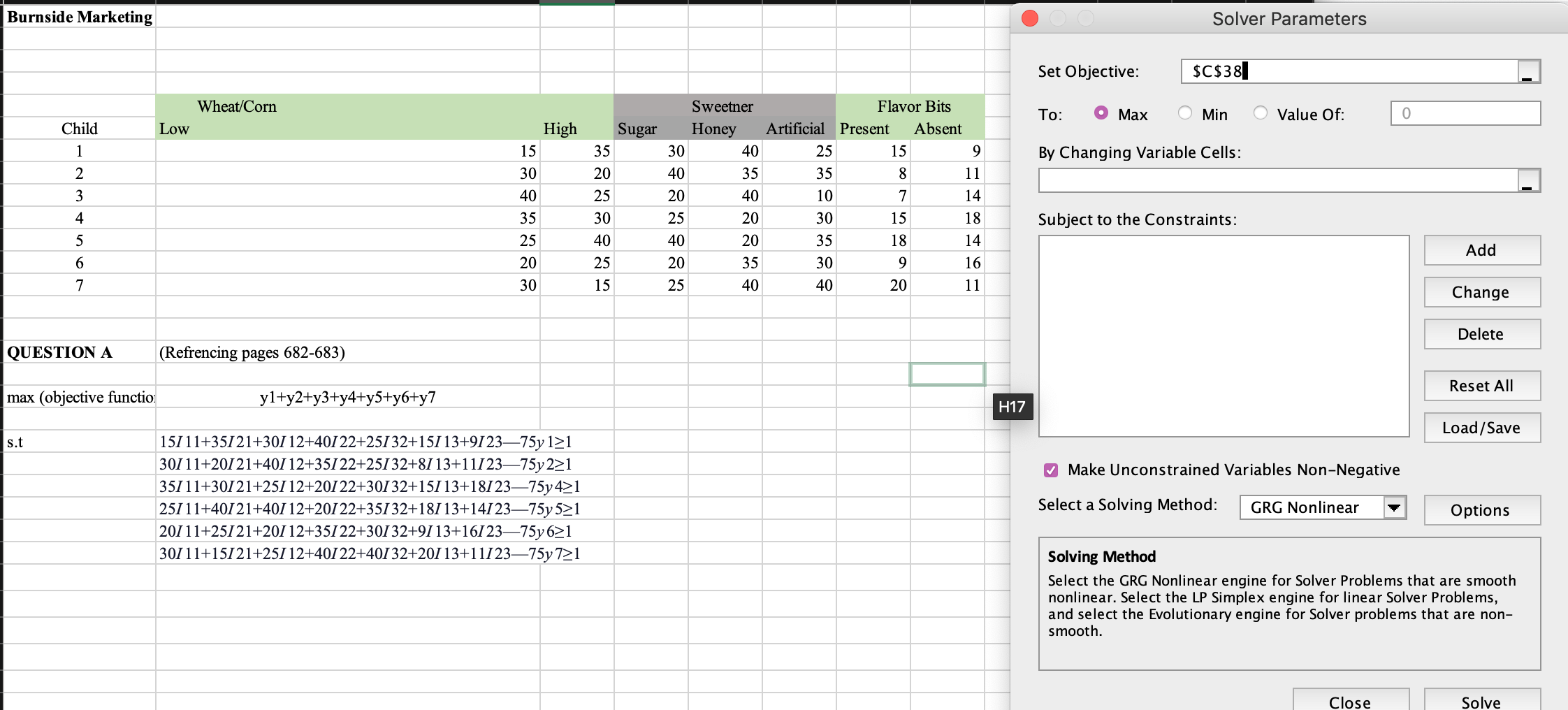
Question: Burnside Marketing By Changing Variable Cells: W Set Objective: scsssl I To: 0 Max 0 Min 0 Value Of: 0 Subject to the Constraints: El
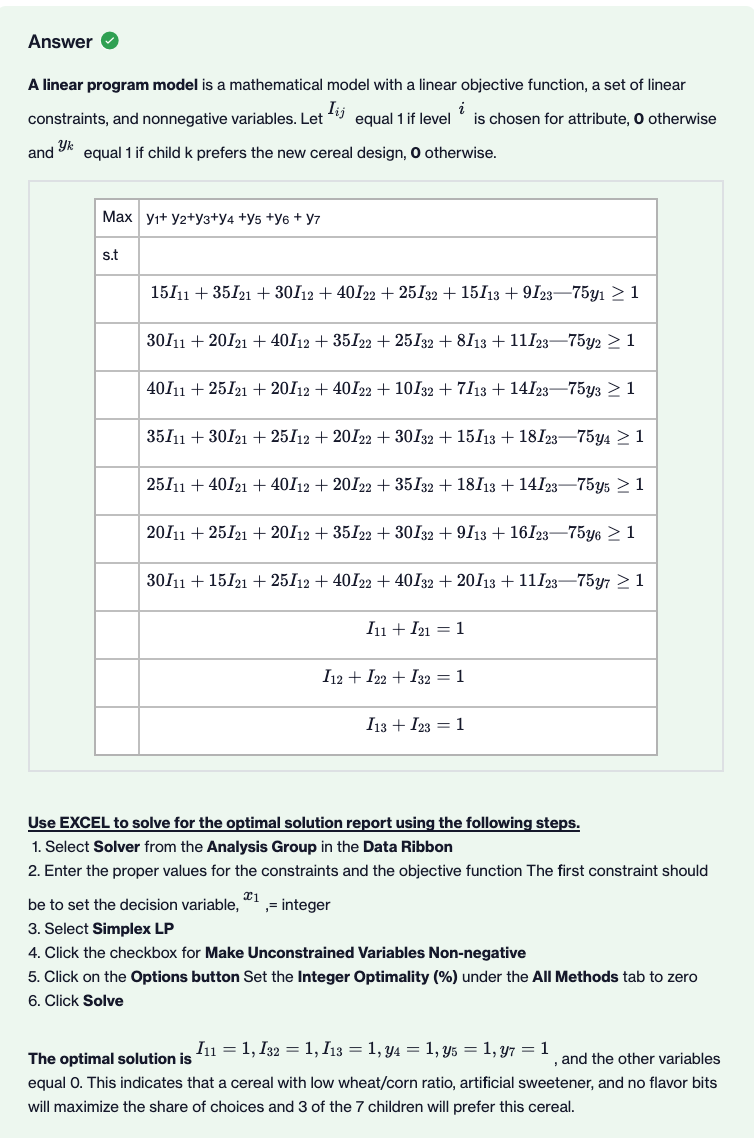
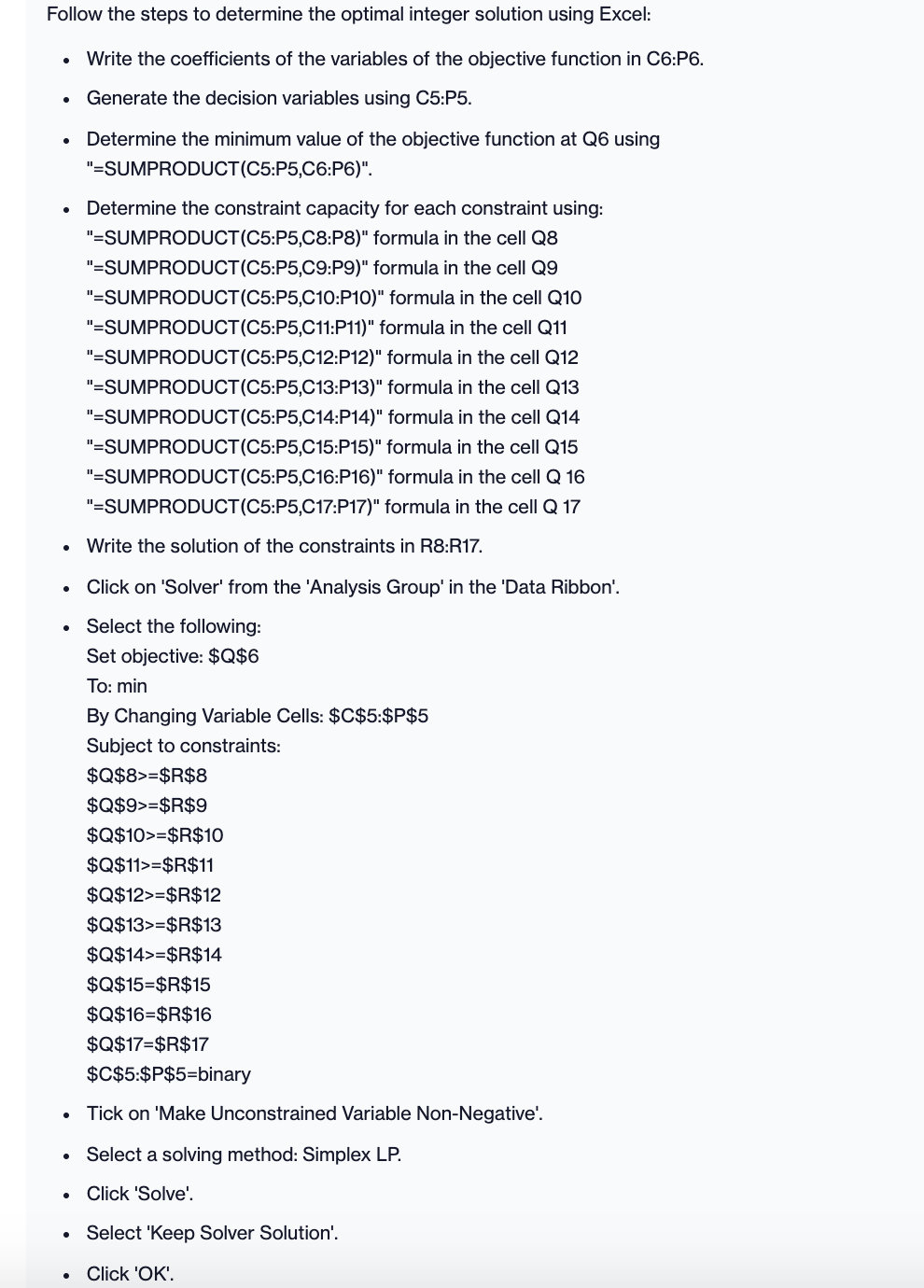
Burnside Marketing By Changing Variable Cells: W Set Objective: scsssl I To: 0 Max 0 Min 0 Value Of: 0 Subject to the Constraints: El 35 35 8 11 40 10 7 14 20 30 15 18 20 35 18 14 35 30 9 16 40 40 20 11 QUESTION A (Re'encing pages 682-683) I:| max (objective functio y1+y2+y3+y4+y5+y6+y7 W s.t 1511 1+35121+30112+40122+25132+15113+912375y 121 Add Change Delete Reset All 30111+20121+40112+35122+25132+8113+1112375y221 35111+30121+25112+20122+30132+15113+1812375y421 25111+40121+40112+20122+35132+18113+1412375y 521 Select a Solving Method: 20111+25121+20112+35122+30132+9113+1612375y621 Make Unconstrained Variables Non-Negative Load/ Save GRG Nonlinear Options 30111+15121+25112+40122+40132+20113+1112375y721 solving Method smooth. Select the GRG Nonlinear engine for Solver Problems that are smooth nonlinear. Select the LP Simplex engine for linear Solver Problems. and select the Evolutionary engine for Solver problems that are non Close Solve Answer A linear program model is a mathematical model with a linear objective function, a set of linear constraints, and nonnegative variables. Let " equal 1 if level * is chosen for attribute, 0 otherwise and equal 1 if child k prefers the new cereal design, 0 otherwise. Max yi+ y2+y3+y4 +y5 +y6 + y7 s.t 15/11 + 35/21 + 30/12 + 40122 + 25132 + 15/13 + 9/23-75y1 2 1 30/11 + 20/21 + 40/12 + 35122 + 25132 + 8/13 + 11/23-7592 2 1 40/11 + 25/21 + 20/12 + 40122 + 10132 + 7/13 + 14123-75y3 2 1 35/11 + 30121 + 25/12 + 20122 + 30132 + 15/13 + 18123-75y4 2 1 25/11 + 40/21 + 40/12 + 20122 + 35132 + 18/13 + 14123-75y5 2 1 20/11 + 25/21 + 20/12 + 35/22 + 30132 + 9/13 + 16123-75y6 2 1 30/11 + 15/21 + 25/12 + 40122 + 40132 + 20/13 + 11/23-7597 2 1 In + 21 = 1 I12 + 122 + 132 = 1 I13 + 123 = 1 Use EXCEL to solve for the optimal solution report using the following steps. 1. Select Solver from the Analysis Group in the Data Ribbon 2. Enter the proper values for the constraints and the objective function The first constraint should be to set the decision variable, ",= integer 3. Select Simplex LP 4. Click the checkbox for Make Unconstrained Variables Non-negative 5. Click on the Options button Set the Integer Optimality (%) under the All Methods tab to zero 6. Click Solve The optimal solution is /11 = 1, 132 = 1, /13 = 1, y4 = 1, ys = 1, 97 = 1 , and the other variables equal O. This indicates that a cereal with low wheat/corn ratio, artificial sweetener, and no flavor bits will maximize the share of choices and 3 of the 7 children will prefer this cereal.Follow the steps to determine the optimal integer solution using Excel: . Write the coefficients of the variables of the objective function in C6:P6. . Generate the decision variables using C5:P5. . Determine the minimum value of the objective function at Q6 using "=SUMPRODUCT (C5:P5,C6:P6)". . Determine the constraint capacity for each constraint using: "=SUMPRODUCT (C5:P5,C8:P8)" formula in the cell Q8 "=SUMPRODUCT(C5:P5,C9:P9)" formula in the cell Q9 "=SUMPRODUCT(C5:P5,C10:P10)" formula in the cell Q10 "=SUMPRODUCT (C5:P5,C11:P11)" formula in the cell Q11 "=SUMPRODUCT(C5:P5,C12:P12)" formula in the cell Q12 "=SUMPRODUCT (C5:P5,C13:P13)" formula in the cell Q13 "=SUMPRODUCT (C5:P5,C14:P14)" formula in the cell Q14 "=SUMPRODUCT (C5:P5,C15:P15)" formula in the cell Q15 "=SUMPRODUCT (C5:P5,C16:P16)" formula in the cell Q 16 "=SUMPRODUCT(C5:P5,C17:P17)" formula in the cell Q 17 . Write the solution of the constraints in R8:R17. . Click on 'Solver' from the 'Analysis Group' in the 'Data Ribbon'. . Select the following: Set objective: $Q$6 To: min By Changing Variable Cells: $C$5:$P$5 Subject to constraints: $Q$8>=$R$8 $Q$9>=$R$9 $Q$10>=$R$10 $Q$11>=$R$11 $Q$12>=$R$12 $Q$13>=$R$13 $Q$14>=$R$14 $Q$15=$R$15 $Q$16=$R$16 $Q$17=$R$17 $C$5:$P$5=binary . Tick on 'Make Unconstrained Variable Non-Negative'. . Select a solving method: Simplex LP. . Click 'Solve'. . Select 'Keep Solver Solution'. . Click 'OK









 Study Help