







Question: Bus Spreadsheet Excel project to make a sick time report for 12 sheets from jan to dec L29 EX fx P Q R S T
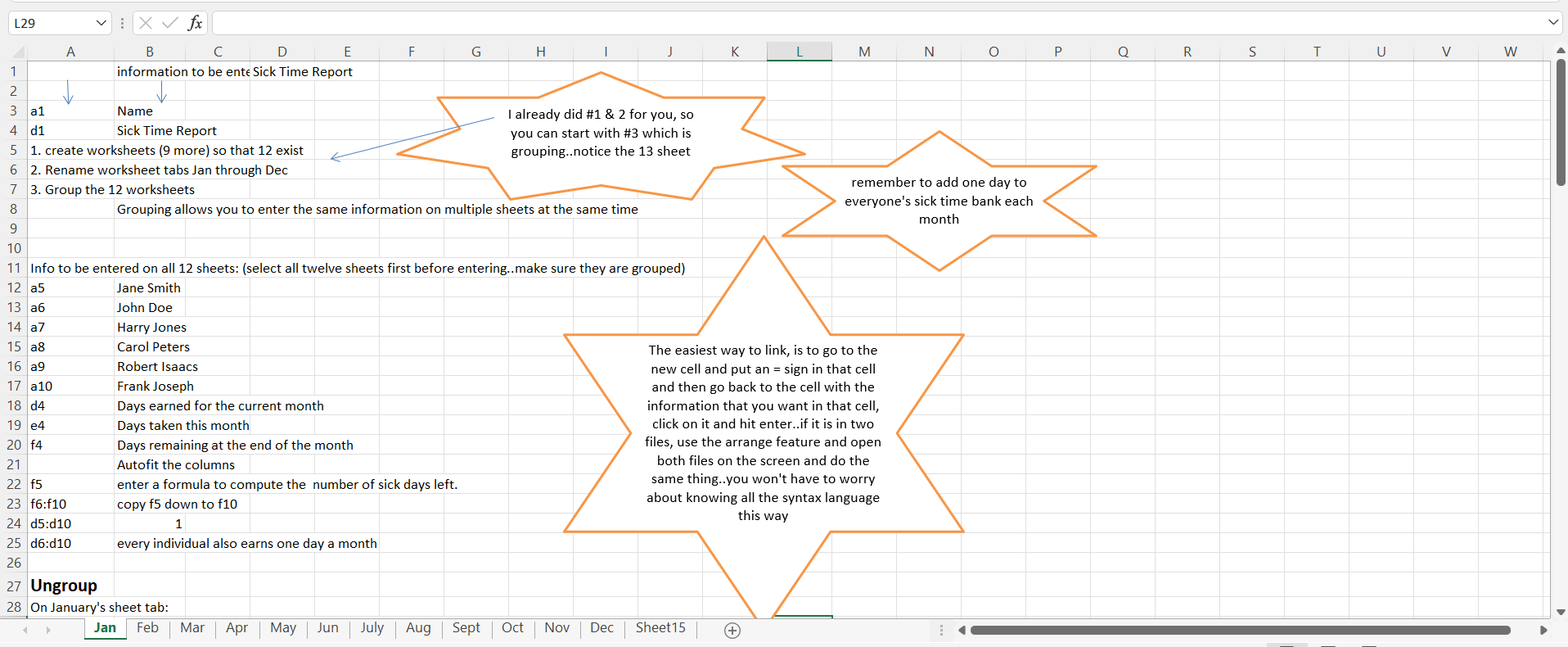
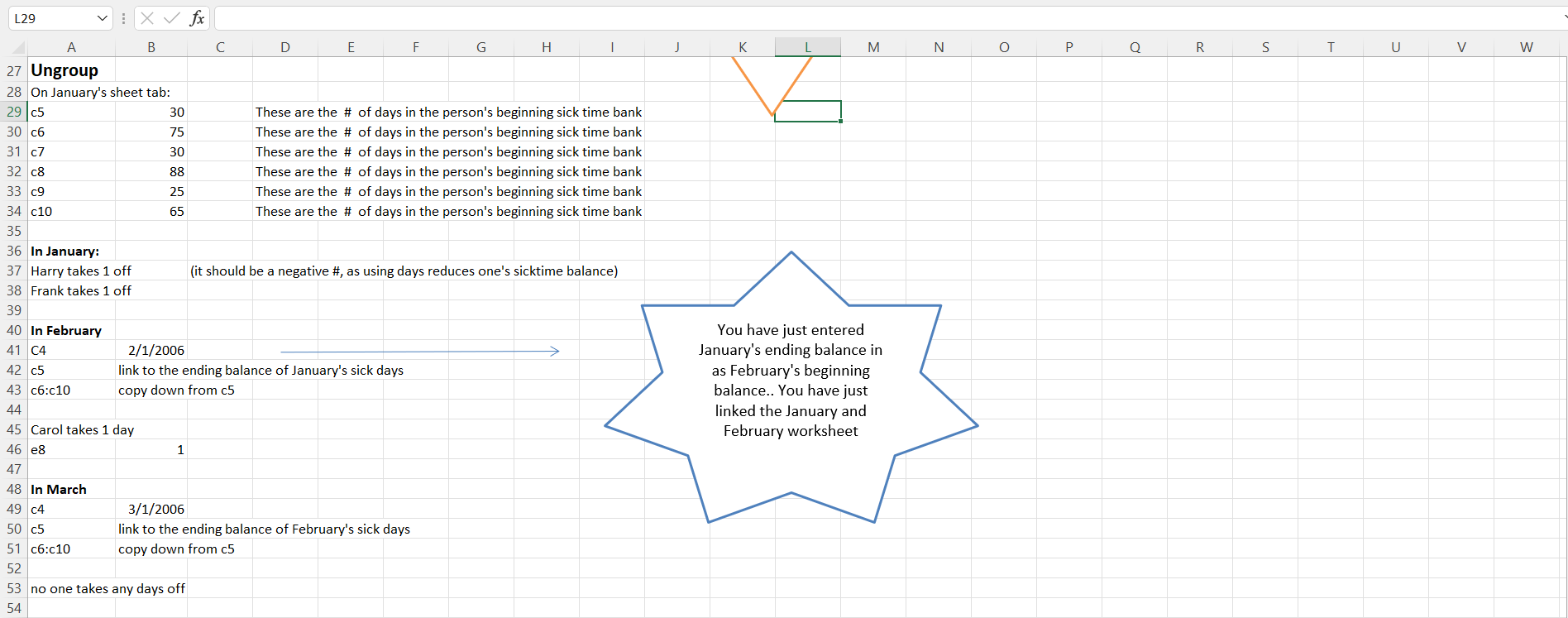
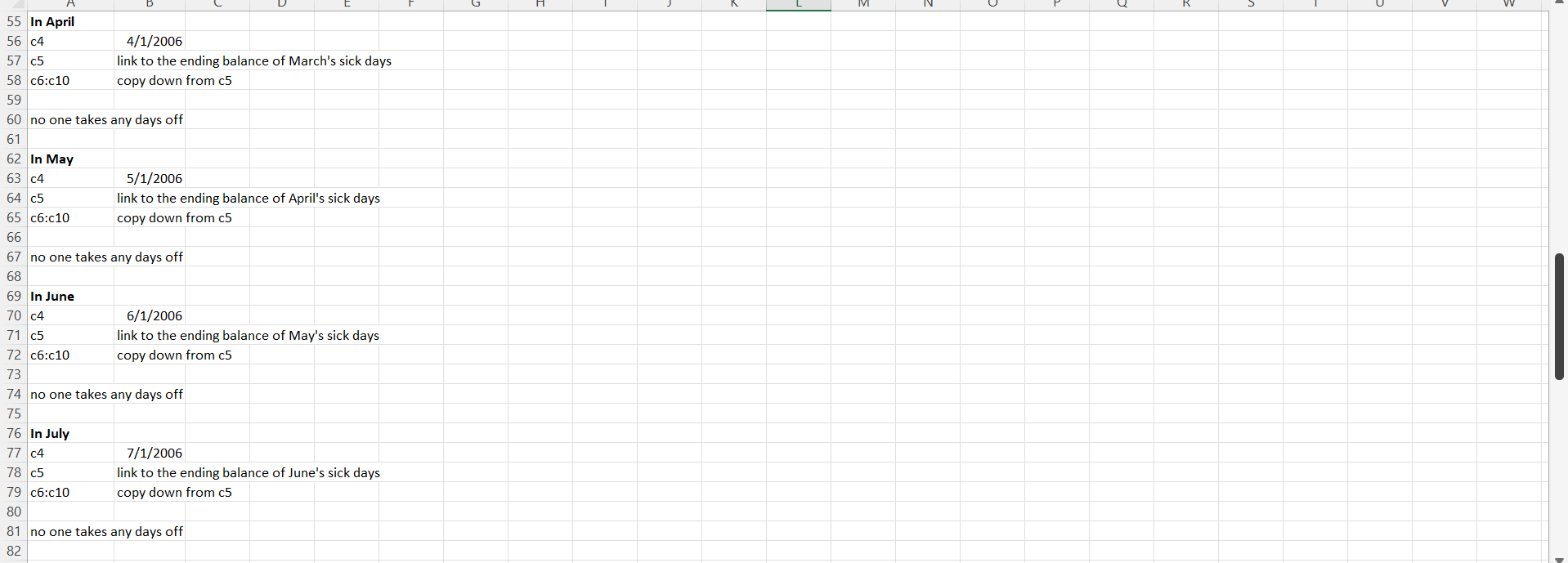 Bus Spreadsheet
Excel project to make a sick time report for 12 sheets from jan to dec
L29 EX fx P Q R S T U V W A B D E F G H K L M N 1 information to be ente Sick Time Report 2 3 a1 Name I already did #1 & 2 for you, so 4 d1 Sick Time Report you can start with #3 which is 5 1. create worksheets (9 more) so that 12 exist grouping..notice the 13 sheet 6 2. Rename worksheet tabs Jan through Dec remember to add one day to 7 3. Group the 12 worksheets everyone's sick time bank each 8 Grouping allows you to enter the same information on multiple sheets at the same time month 9 10 11 Info to be entered on all 12 sheets: (select all twelve sheets first before entering..make sure they are grouped) 12 a5 Jane Smith 13 John Doe 14 a7 Harry Jones 15 a8 Carol Peters The easiest way to link, is to go to the 16 a 9 Robert Isaacs new cell and put an = sign in that cell 17 a 10 Frank Joseph and then go back to the cell with the 18 d4 Days earned for the current month information that you want in that cell, 19 e4 Days taken this month click on it and hit enter..if it is in two 20 f4 Days remaining at the end of the month files, use the arrange feature and open 21 Autofit the columns both files on the screen and do the 22 f5 enter a formula to compute the number of sick days left. same thing..you won't have to worry about knowing all the syntax language 23 f6:10 copy f5 down to f10 24 d5:d10 25 d6:d10 every individual also earns one day a month 26 27 Ungroup 28 On January's sheet tab: Jan Feb Mar Apr May Jun July Aug Nov Dec Sheet15 + this way Sept | Oct L29 EX fx A B C D E F H J M N O R S T U V w 27 Ungroup 28 On January's sheet tab: 29 c5 30 These are the # of days in the person's beginning sick time bank 30 c6 75 These are the # of days in the person's beginning sick time bank 31 c7 30 These are the # of days in the person's beginning sick time bank 32 08 88 These are the # of days in the person's beginning sick time bank 33 c9 25 These are the # of days in the person's beginning sick time bank 34 c10 65 These are the # of days in the person's beginning sick time bank 35 36 In January: 37 Harry takes 1 off (it should be a negative #, as using days reduces one's sicktime balance) 38 Frank takes 1 off 39 40 In February 41 C4 2/1/2006 42 c5 link to the ending balance of January's sick days 43 c6:c10 copy down from c5 44 45 Carol takes 1 day 46 e8 1 47 48 In March 49 c4 3/1/2006 50 c5 link to the ending balance of February's sick days 51 c6:c10 copy down from c5 52 53 no one takes any days off 54 You have just entered January's ending balance in as February's beginning balance.. You have just linked the January and February worksheet 55 In April 56 C4 4/1/2006 57 c5 link to the ending balance of March's sick days 58 c6:c10 copy down from c5 59 60 no one takes any days off 61 62 In May 63 c4 5/1/2006 64 c5 link to the ending balance of April's sick days 65 c6:c10 copy down from c5 66 67 no one takes any days off 68 69 In June 70 c4 6/1/2006 71 c5 link to the ending balance of May's sick days 72 c6:c10 copy down from c5 73 74 no one takes any days off 75 76 In July 77 c4 7/1/2006 78 c5 link to the ending balance of June's sick days 79 c6:c10 copy down from c5 80 81 no one takes any days off 82 L29 EX fx P Q R S T U V W A B D E F G H K L M N 1 information to be ente Sick Time Report 2 3 a1 Name I already did #1 & 2 for you, so 4 d1 Sick Time Report you can start with #3 which is 5 1. create worksheets (9 more) so that 12 exist grouping..notice the 13 sheet 6 2. Rename worksheet tabs Jan through Dec remember to add one day to 7 3. Group the 12 worksheets everyone's sick time bank each 8 Grouping allows you to enter the same information on multiple sheets at the same time month 9 10 11 Info to be entered on all 12 sheets: (select all twelve sheets first before entering..make sure they are grouped) 12 a5 Jane Smith 13 John Doe 14 a7 Harry Jones 15 a8 Carol Peters The easiest way to link, is to go to the 16 a 9 Robert Isaacs new cell and put an = sign in that cell 17 a 10 Frank Joseph and then go back to the cell with the 18 d4 Days earned for the current month information that you want in that cell, 19 e4 Days taken this month click on it and hit enter..if it is in two 20 f4 Days remaining at the end of the month files, use the arrange feature and open 21 Autofit the columns both files on the screen and do the 22 f5 enter a formula to compute the number of sick days left. same thing..you won't have to worry about knowing all the syntax language 23 f6:10 copy f5 down to f10 24 d5:d10 25 d6:d10 every individual also earns one day a month 26 27 Ungroup 28 On January's sheet tab: Jan Feb Mar Apr May Jun July Aug Nov Dec Sheet15 + this way Sept | Oct L29 EX fx A B C D E F H J M N O R S T U V w 27 Ungroup 28 On January's sheet tab: 29 c5 30 These are the # of days in the person's beginning sick time bank 30 c6 75 These are the # of days in the person's beginning sick time bank 31 c7 30 These are the # of days in the person's beginning sick time bank 32 08 88 These are the # of days in the person's beginning sick time bank 33 c9 25 These are the # of days in the person's beginning sick time bank 34 c10 65 These are the # of days in the person's beginning sick time bank 35 36 In January: 37 Harry takes 1 off (it should be a negative #, as using days reduces one's sicktime balance) 38 Frank takes 1 off 39 40 In February 41 C4 2/1/2006 42 c5 link to the ending balance of January's sick days 43 c6:c10 copy down from c5 44 45 Carol takes 1 day 46 e8 1 47 48 In March 49 c4 3/1/2006 50 c5 link to the ending balance of February's sick days 51 c6:c10 copy down from c5 52 53 no one takes any days off 54 You have just entered January's ending balance in as February's beginning balance.. You have just linked the January and February worksheet 55 In April 56 C4 4/1/2006 57 c5 link to the ending balance of March's sick days 58 c6:c10 copy down from c5 59 60 no one takes any days off 61 62 In May 63 c4 5/1/2006 64 c5 link to the ending balance of April's sick days 65 c6:c10 copy down from c5 66 67 no one takes any days off 68 69 In June 70 c4 6/1/2006 71 c5 link to the ending balance of May's sick days 72 c6:c10 copy down from c5 73 74 no one takes any days off 75 76 In July 77 c4 7/1/2006 78 c5 link to the ending balance of June's sick days 79 c6:c10 copy down from c5 80 81 no one takes any days off 82
Step by Step Solution
There are 3 Steps involved in it

Get step-by-step solutions from verified subject matter experts
 Study Help