







Question: business administration Section 2: Using Sums 110 marks INSTRUCTIONS: Your company has just received all of its sales volumes for 2019 and 2020. Using the
business administration 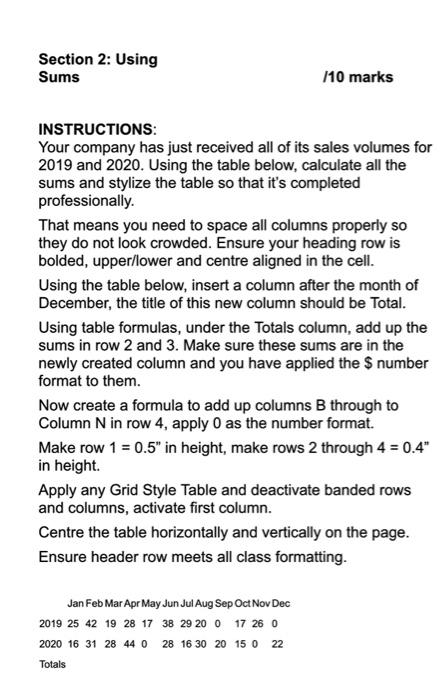
Section 2: Using Sums 110 marks INSTRUCTIONS: Your company has just received all of its sales volumes for 2019 and 2020. Using the table below, calculate all the sums and stylize the table so that it's completed professionally. That means you need to space all columns properly so they do not look crowded. Ensure your heading row is bolded, upper/lower and centre aligned in the cell. Using the table below, insert a column after the month of December, the title of this new column should be Total. Using table formulas, under the Totals column, add up the sums in row 2 and 3. Make sure these sums are in the newly created column and you have applied the $ number format to them. Now create a formula to add up columns B through to Column N in row 4, apply 0 as the number format. Make row 1 = 0.5" in height, make rows 2 through 4 = 0.4" in height. Apply any Grid Style Table and deactivate banded rows and columns, activate first column. Centre the table horizontally and vertically on the page. Ensure header row meets all class formatting. Jan Feb Mar Apr May Jun Jul Aug Sep Oct Nov Dec 2019 25 42 19 28 17 38 29 20 0 17 26 0 2020 16 31 28 44 0 28 16 30 20 15 0 22 Totals
Step by Step Solution
There are 3 Steps involved in it
1 Expert Approved Answer
Step: 1 Unlock

Question Has Been Solved by an Expert!
Get step-by-step solutions from verified subject matter experts
Step: 2 Unlock
Step: 3 Unlock
 Study Help