







Question: Business Modeling With Excel. Balance Sheet Assignment A balance sheet is a typical business document intended to detail a company's assets and liabilities, balancing each
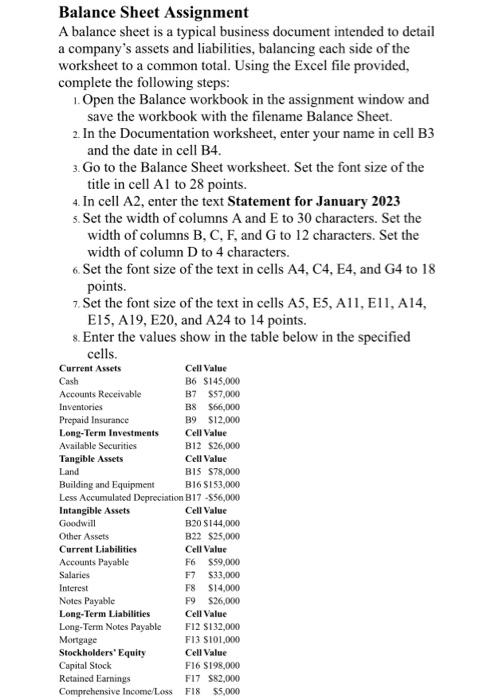
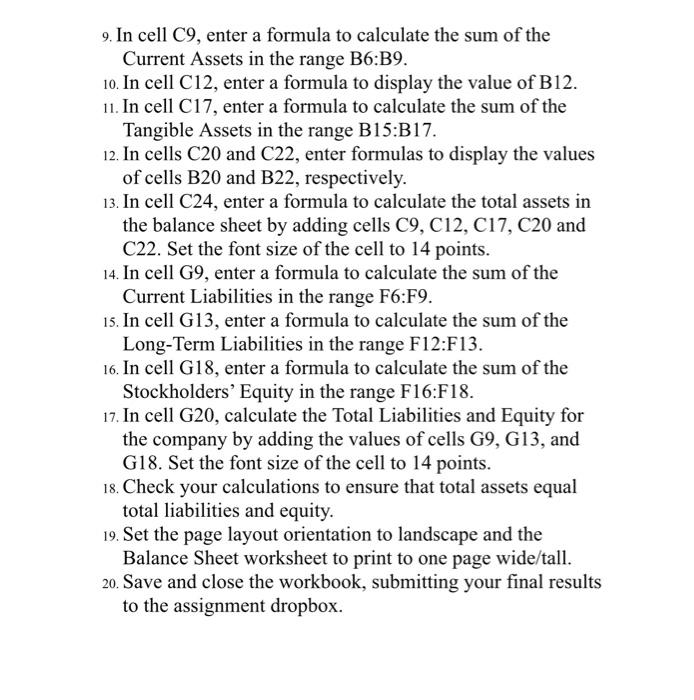
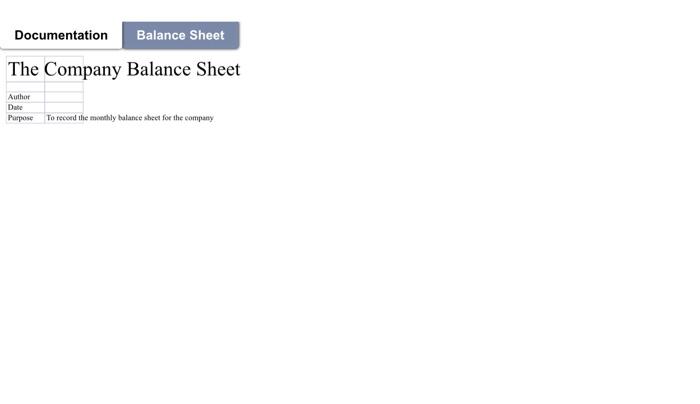
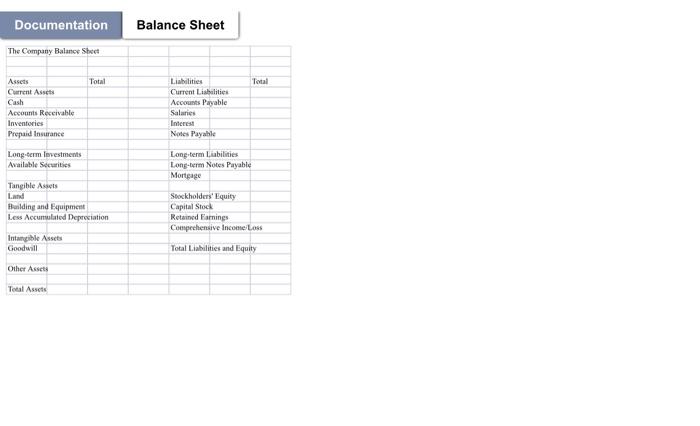
Balance Sheet Assignment A balance sheet is a typical business document intended to detail a company's assets and liabilities, balancing each side of the worksheet to a common total. Using the Excel file provided, complete the following steps: 1. Open the Balance workbook in the assignment window and save the workbook with the filename Balance Sheet. 2. In the Documentation worksheet, enter your name in cell B3 and the date in cell B4. 3. Go to the Balance Sheet worksheet. Set the font size of the title in cell A1 to 28 points. 4. In cell A2, enter the text Statement for January 2023 5. Set the width of columns A and E to 30 characters. Set the width of columns B, C, F, and G to 12 characters. Set the width of column D to 4 characters. 6. Set the font size of the text in cells A4, C4, E4, and G4 to 18 points. 7. Set the font size of the text in cells A5, E5, A11, E11, A14, E15,A19,E20, and A24 to 14 points. 8. Enter the values show in the table below in the specified cells 9. In cell C9, enter a formula to calculate the sum of the Current Assets in the range B6:B9. 10. In cell C12, enter a formula to display the value of B12. 11. In cell C17, enter a formula to calculate the sum of the Tangible Assets in the range B15:B17. 12. In cells C20 and C22, enter formulas to display the values of cells B20 and B22, respectively. 13. In cell C24, enter a formula to calculate the total assets in the balance sheet by adding cells C9, C12, C17, C20 and C22. Set the font size of the cell to 14 points. 14. In cell G9, enter a formula to calculate the sum of the Current Liabilities in the range F6:F9. 15. In cell G13, enter a formula to calculate the sum of the Long-Term Liabilities in the range F12:F13. 16. In cell G18, enter a formula to calculate the sum of the Stockholders' Equity in the range F16:F18. 17. In cell G20, calculate the Total Liabilities and Equity for the company by adding the values of cells G9, G13, and G18. Set the font size of the cell to 14 points. 18. Check your calculations to ensure that total assets equal total liabilities and equity. 19. Set the page layout orientation to landscape and the Balance Sheet worksheet to print to one page wide/tall. 20. Save and close the workbook, submitting your final results to the assignment dropbox. The Company Balance Sheet Documentation Balance Sheet The Company Balanee Shect
Step by Step Solution
There are 3 Steps involved in it

Get step-by-step solutions from verified subject matter experts
 Study Help