







Question: by a queue named Q1 with infinite capacity and machine 2 (M2) is preceded by a queue named Q2 with capacity 2. More information about
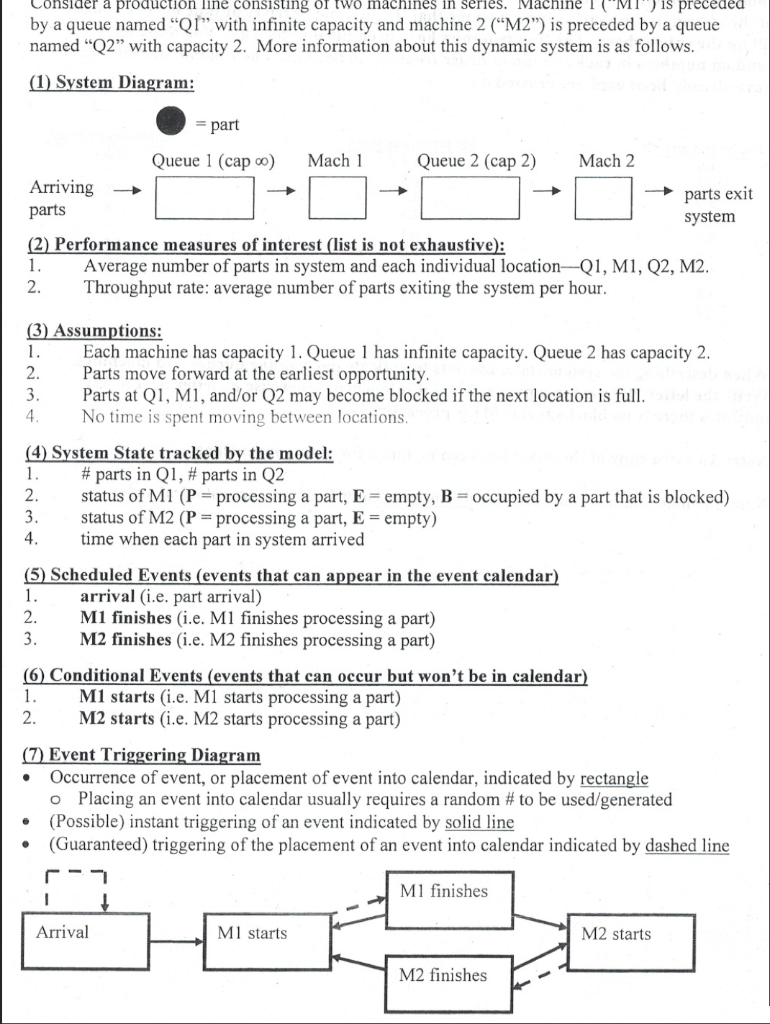
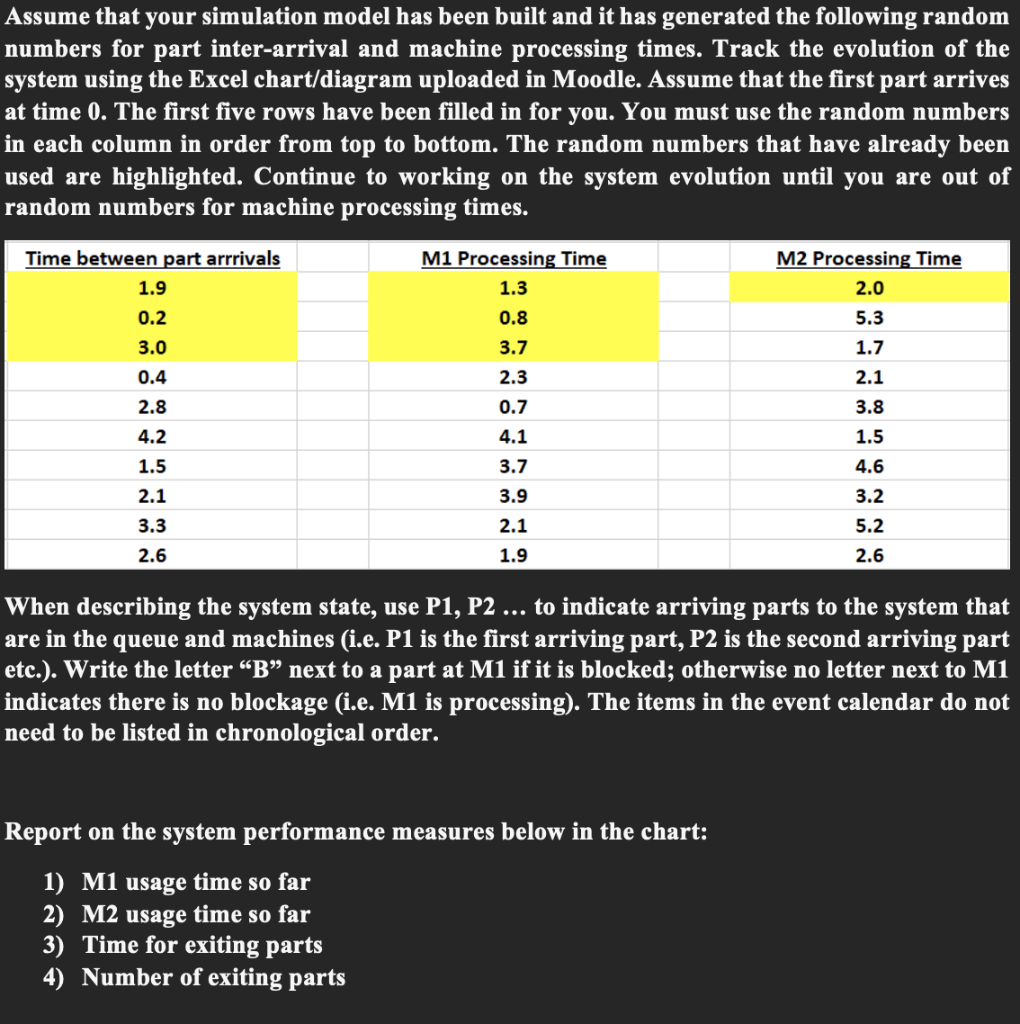
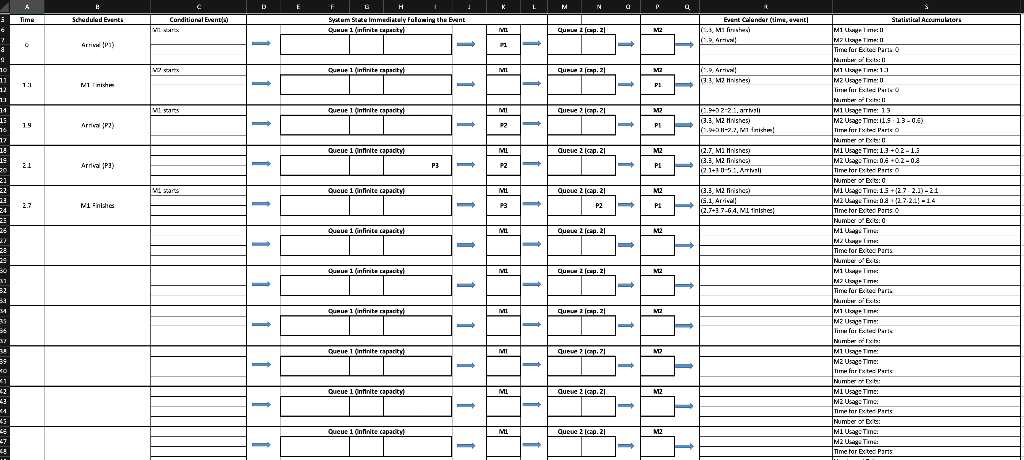
by a queue named "Q1" with infinite capacity and machine 2 ("M2") is preceded by a queue named "Q2" with capacity 2. More information about this dynamic system is as follows. (2) Performance measures of interest (list is not exhaustive): 1. Average number of parts in system and each individual location-Q1, M1, Q2, M2. 2. Throughput rate: average number of parts exiting the system per hour. (3) Assumptions: 1. Each machine has capacity 1. Queue 1 has infinite capacity. Queue 2 has capacity 2. 2. Parts move forward at the earliest opportunity. 3. Parts at Q1, M1, and/or Q2 may become blocked if the next location is full. 4. No time is spent moving between locations. (4) System State tracked by the model: 1. \# parts in Q1, \# parts in Q2 2. status of M1(P= processing a part, E= empty, B= occupied by a part that is blocked) 3. status of M2(P= processing a part, E= empty ) 4. time when each part in system arrived (5) Scheduled Events (events that can appear in the event calendar) 1. arrival (i.e. part arrival) 2. M1 finishes (i.e. M1 finishes processing a part) 3. M2 finishes (i.e. M2 finishes processing a part) (6) Conditional Events (events that can occur but won't be in calendar) 1. M1 starts (i.e. M1 starts processing a part) 2. M2 starts (i.e. M2 starts processing a part) (7) Event Triggering Diagram - Occurrence of event, or placement of event into calendar, indicated by rectangle - Placing an event into calendar usually requires a random \# to be used/generated - (Possible) instant triggering of an event indicated by solid line - (Guaranteed) triggering of the placement of an event into calendar indicated by dashed line Assume that your simulation model has been built and it has generated the following random numbers for part inter-arrival and machine processing times. Track the evolution of the system using the Excel chart/diagram uploaded in Moodle. Assume that the first part arrives at time 0 . The first five rows have been filled in for you. You must use the random numbers in each column in order from top to bottom. The random numbers that have already been used are highlighted. Continue to working on the system evolution until you are out of random numbers for machine processing times. When describing the system state, use P1,P2 to indicate arriving parts to the system that are in the queue and machines (i.e. P1 is the first arriving part, P2 is the second arriving part etc.). Write the letter "B" next to a part at M1 if it is blocked; otherwise no letter next to M1 indicates there is no blockage (i.e. M1 is processing). The items in the event calendar do not need to be listed in chronological order. Report on the system performance measures below in the chart: 1) M1 usage time so far 2) M2 usage time so far 3) Time for exiting parts 4) Number of exiting parts by a queue named "Q1" with infinite capacity and machine 2 ("M2") is preceded by a queue named "Q2" with capacity 2. More information about this dynamic system is as follows. (2) Performance measures of interest (list is not exhaustive): 1. Average number of parts in system and each individual location-Q1, M1, Q2, M2. 2. Throughput rate: average number of parts exiting the system per hour. (3) Assumptions: 1. Each machine has capacity 1. Queue 1 has infinite capacity. Queue 2 has capacity 2. 2. Parts move forward at the earliest opportunity. 3. Parts at Q1, M1, and/or Q2 may become blocked if the next location is full. 4. No time is spent moving between locations. (4) System State tracked by the model: 1. \# parts in Q1, \# parts in Q2 2. status of M1(P= processing a part, E= empty, B= occupied by a part that is blocked) 3. status of M2(P= processing a part, E= empty ) 4. time when each part in system arrived (5) Scheduled Events (events that can appear in the event calendar) 1. arrival (i.e. part arrival) 2. M1 finishes (i.e. M1 finishes processing a part) 3. M2 finishes (i.e. M2 finishes processing a part) (6) Conditional Events (events that can occur but won't be in calendar) 1. M1 starts (i.e. M1 starts processing a part) 2. M2 starts (i.e. M2 starts processing a part) (7) Event Triggering Diagram - Occurrence of event, or placement of event into calendar, indicated by rectangle - Placing an event into calendar usually requires a random \# to be used/generated - (Possible) instant triggering of an event indicated by solid line - (Guaranteed) triggering of the placement of an event into calendar indicated by dashed line Assume that your simulation model has been built and it has generated the following random numbers for part inter-arrival and machine processing times. Track the evolution of the system using the Excel chart/diagram uploaded in Moodle. Assume that the first part arrives at time 0 . The first five rows have been filled in for you. You must use the random numbers in each column in order from top to bottom. The random numbers that have already been used are highlighted. Continue to working on the system evolution until you are out of random numbers for machine processing times. When describing the system state, use P1,P2 to indicate arriving parts to the system that are in the queue and machines (i.e. P1 is the first arriving part, P2 is the second arriving part etc.). Write the letter "B" next to a part at M1 if it is blocked; otherwise no letter next to M1 indicates there is no blockage (i.e. M1 is processing). The items in the event calendar do not need to be listed in chronological order. Report on the system performance measures below in the chart: 1) M1 usage time so far 2) M2 usage time so far 3) Time for exiting parts 4) Number of exiting parts
Step by Step Solution
There are 3 Steps involved in it

Get step-by-step solutions from verified subject matter experts
 Study Help