Question: By given the following models and database context classes, answer the following questions or complete the missing codes: using System; using System. Collections . Generic;
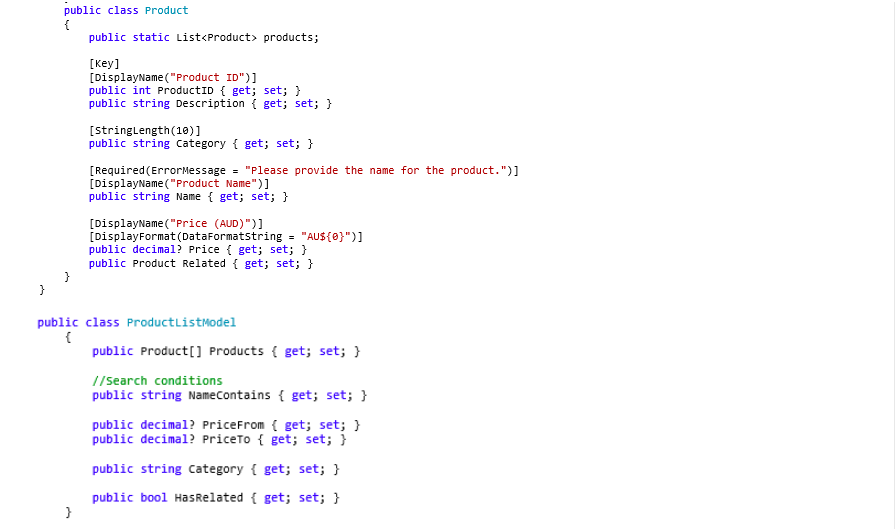
 By given the following models and database context classes, answer thefollowing questions or complete the missing codes: using System; using System. Collections. Generic; using System. Linq; using System. Threading . Tasks; using System.ComponentModel . DataAnnotations; using System. ComponentModel; using Microsoft. EntityFrameworkCore; namespace LanguageFeatures2. Models{ public class Productcontext : DbContext public DbSet Products { get; set;} public ProductContext (DbContextOptions options) : base (options) wr public ProductContext() protectedoverride void OnConfiguring (DbContextOptionsBuilder options) options . Usesqlserver (Startup. ConnectionString); public Product

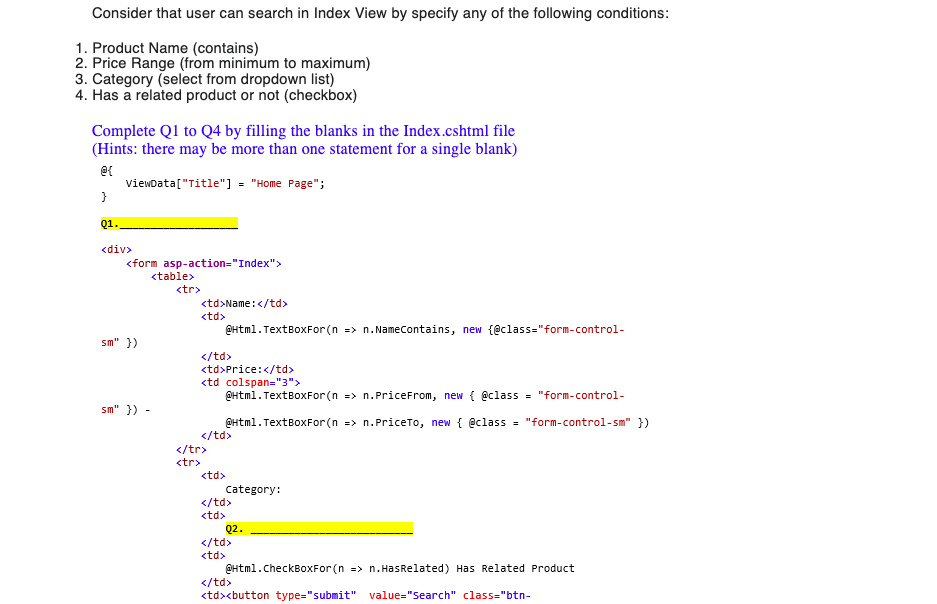
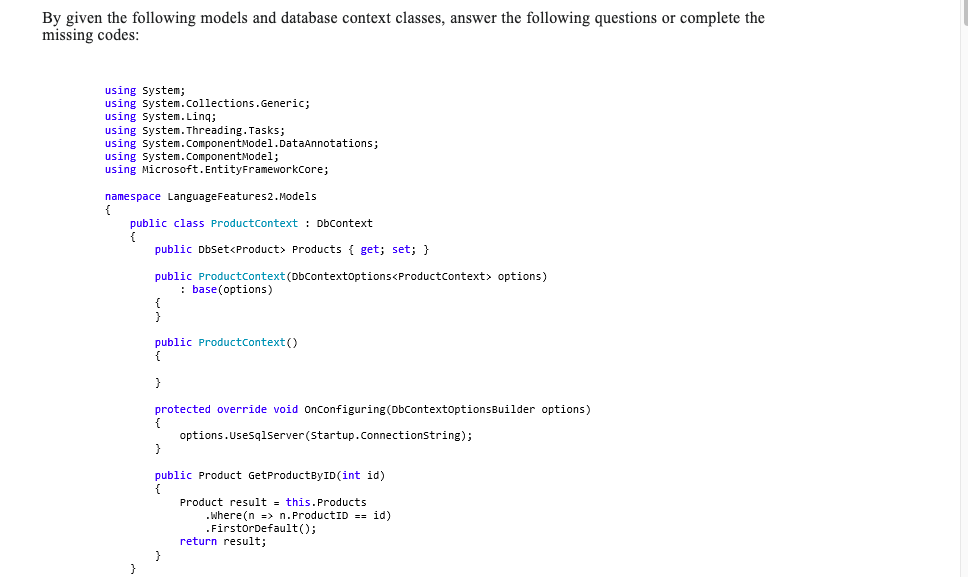
By given the following models and database context classes, answer the following questions or complete the missing codes: using System; using System. Collections . Generic; using System. Linq; using System. Threading . Tasks; using System. ComponentModel . DataAnnotations; using System. ComponentModel; using Microsoft. EntityFrameworkCore; namespace LanguageFeatures2. Models { public class Productcontext : DbContext public DbSet Products { get; set; } public ProductContext (DbContextOptions options) : base (options) wr public ProductContext() protected override void OnConfiguring (DbContextOptionsBuilder options) options . Usesqlserver (Startup. ConnectionString); public Product GetProductByID(int id) Product result = this. Products Where (n => n. ProductID == id) FirstorDefault( ); return result;public class Product public static List products; [Key ] [DisplayName ( "Product ID") ] public int ProductID { get; set; } public string Description { get; set; } [StringLength (10) ] public string Category { get; set; } [ Required (ErrorMessage = "Please provide the name for the product.") ] [DisplayName ("Product Name") ] public string Name { get; set; } [DisplayName ("Price (AUD)") ] [DisplayFormat (DataFormatString = "AUS{}")] public decimal? price { get; set; } public Product Related { get; set; } public class ProductListModel public Product Products { get; set; } //search conditions public string NameContains { get; set; } public decimal? PriceFrom { get; set; } public decimal? PriceTo { get; set; } public string Category { get; set; } public bool HasRelated { get; set; }Assume the Index view for Home controller lists all products with details as following: X Home Page - LanguageFeatures2 X + - C a localhost:44368 I W LanguageFeatures2 Home Privacy Register Login Name: Price: O Has Category: Related Search Product ID Name Price Related 1 Life Jacket 123.00 Levis 123 Details | Edit | Delete Nike Shoes 89.00 Life Jacket Details | Edit | Delete 3 Levis 123 50.00 Nike Shoes Details | Edit | Delete | 4 Test No.1 96.00 Life Jacket Details | Edit | Delete 5 Test No. 2 247.00 Life Jacket Details | Edit | Delete | 1004 Test No.3 56.00 Nike Shoes Details | Edit | Delete 1006 Test No. 4 123.00 Details | Edit | Delete | 1007 Test No. 5 222.00 Details | Edit | Delete | There are 8 products in the list Create NewConsider that user can search in Index View by specify any of the following conditions: 1. Product Name (contains) 2. Price Range (from minimum to maximum) 3. Category (select from dropdown list) 4. Has a related product or not (checkbox) Complete Q1 to Q4 by filling the blanks in the Index.cshtml file (Hints: there may be more than one statement for a single blank) et ViewData [ "Title"] = "Home Page"; Q1.
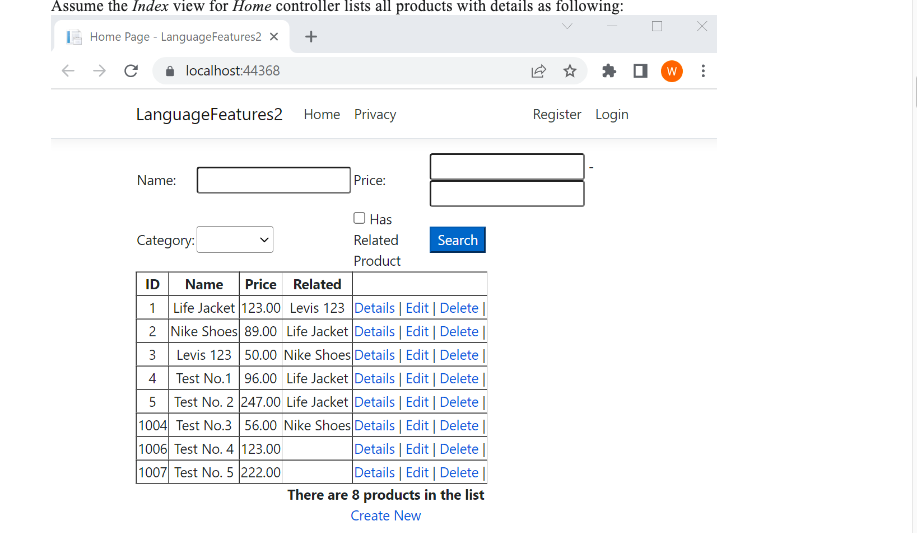
Name : @Html . TextBoxFor (n => n. NameContains, new {@class="form-control- sm" }) Price: @Html . TextBoxFor (n => n. PriceFrom, new { @class = "form-control- sm" }) - @Html . TextBoxFor (n => n. PriceTo, new { @class = "form-control-sm" })
Category : Q2. @Html . CheckBoxFor (n => n. HasRelated) Has Related Product
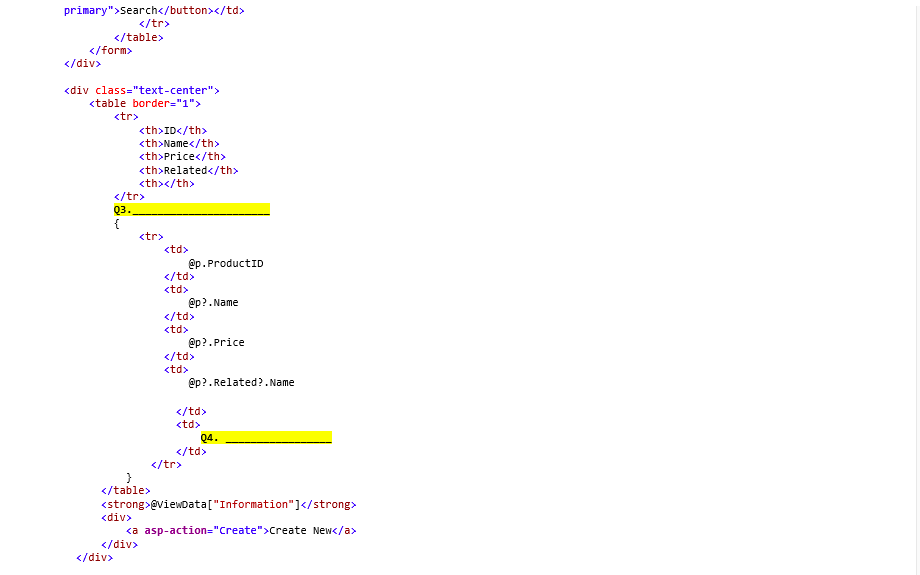
Q3
ID Name Price Related
ap . ProductID op? . Name op? . Price ap? . Related? . Name 04.
@viewData ["Information"]
ca asp-action="create">Create New
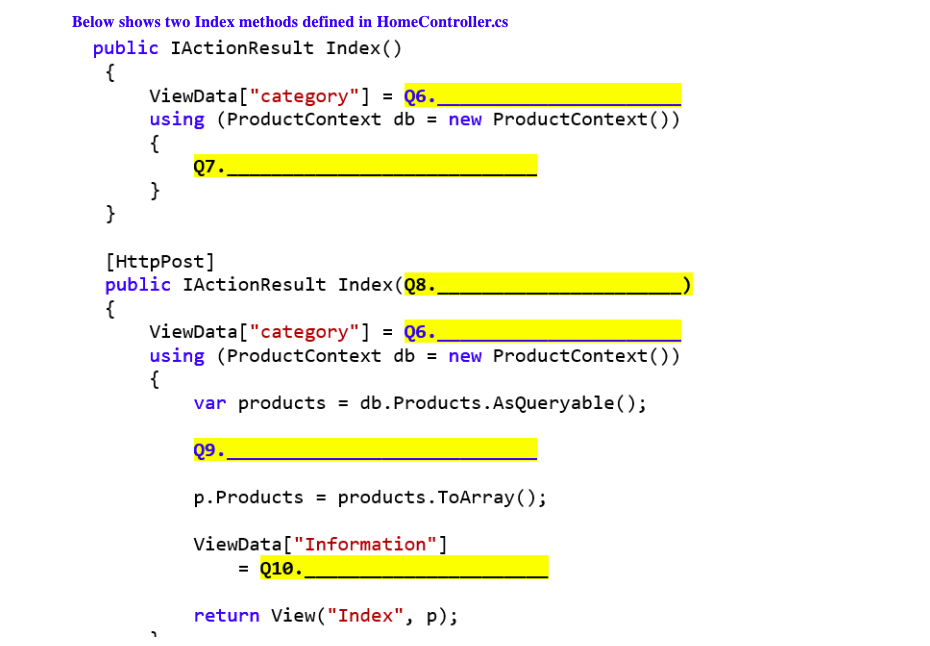
Below shows two Index methods defined in HomeController.cs public IActionResult Index() ViewData ["category" ] = Q6._ using (ProductContext db = new ProductContext( ) ) 07 . [HttpPost ] public IActionResult Index(Q8. ViewData ["category" ] = Q6._ using (ProductContext db = new ProductContext( )) var products = db . Products . AsQueryable ( ) ; Q9. p. Products = products . ToArray ( ); ViewData ["Information" ] = 010. return View("Index", p);\f

Step by Step Solution

There are 3 Steps involved in it

1 Expert Approved Answer
Step: 1 Unlock blur-text-image
Question Has Been Solved by an Expert!

Get step-by-step solutions from verified subject matter experts

Step: 2 Unlock
Step: 3 Unlock

Students Have Also Explored These Related Programming Questions!