Question: By the way ,the Node List and the Ordered list are shown :( Please just extend with def slice(self,start,stop) function ) class Node: def __init__(self,
 By the way ,the Node List and the Ordered list are shown :(Please just extend with def slice(self,start,stop) function )
class Node:
def __init__(self, init_data):
self.data = init_data self.next = None
def get_data(self):
return self.data
def get_next(self):
return self.next
def set_data(self, new_data):
self.data = new_data
def set_next(self, new_next):
self.next = new_next
def __str__(self):
return self.data
The Ordered List is :
class OrderedList:
def __init__(self): self.head = None def add(self,item): current = self.head previous = None stop = False while current != None and not stop: if current.get_data() > item: stop = True else: previous = current current = current.get_next()
temp = Node(item) if previous == None: temp.set_next(self.head) self.head = temp else: temp.set_next(current) previous.set_next(temp) def remove(self,item): current = self.head previous = None found = False while not found: if current.get_data() == item: found = True else: previous = current current = current.get_next()
if previous == None: self.head = current.get_next() else: previous.set_next(current.get_next()) def search(self, item): current = self.head found = False stop = False while current != None and not found and not stop: if current.get_data() == item: found = True else: if current.get_data() > item: stop = True else: current = current.get_next() return found def is_empty(self): return self.head == None def size(self): current = self.head count = 0 while current != None: count = count + 1 current = current.get_next() return count def __str__(self): result = "[" node = self.head if node != None: result += str(node.data) node = node.next while node: result += ", " + str(node.data) node = node.next result += "]" return result def get(self,index): if index>=0 and index else: return None
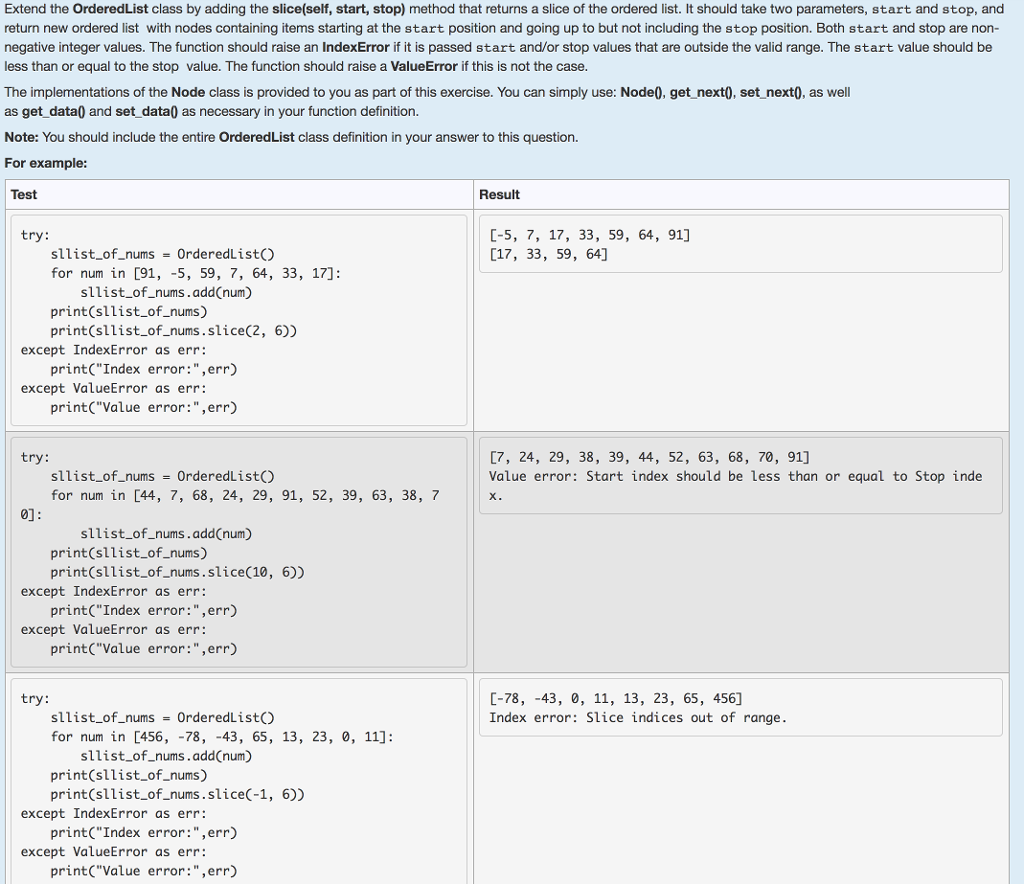
Extend the OrderedList class by adding the slice(self, start, stop) method that returns a slice of the ordered list. It should take two parameters, start and stop, and return new ordered list with nodes containing items starting at the start position and going up to but not including the stop position. Both start and stop are non- negative integer values. The function should raise an IndexError if it is passed start and/or stop values that are outside the valid range. The start value should be less than or equal to the stop value. The function should raise a ValueError if this is not the case. The implementations of the Node class is provided to you as part of this exercise. You can simply use: Node0, get next0, set next0, as well as get_data0 and set_data) as necessary in your function definition Note: You should include the entire OrderedList class definition in your answer to this question. For example: Test Result C-5, 7, 17, 33, 59, 64, 91] [17, 33, 59, 64] try: sllist of.nums-OrderedListo for num in [91, -5, 59, 7, 64, 33, 17]: sllist_of_nums.add(num) print(sllist_of_nums) print(sllist_of_nums.slice(2, 6)) print("Index error:",err print( Value error:",err except IndexError as err: except ValueError as err: [7, 24, 29, 38, 39, 44, 52, 63, 68, 70, 91] Value error: Start index should be less than or equal to Stop inde try: sllist-of-nums = OrderedList() for num in [44, 7, 68, 24, 29, 91, 52, 39, 63, 38, 7 0] sllist of nums.add(num) print(sllist_of_nums) print(sllist_of_nums.slice(10, 6)) print("Index error:",err print("Value error:",err) except IndexError as err: except ValueError as err: C-78, -43, 0, 11, 13, 23, 65, 456] Index error: Slice indices out of range try: sllist.of numsOrderedListO for num in [456,-78, -43, 65, 13, 23, 0, 11]: sllist_of_nums.addCnum) print(sllist_of nums) print(sllist_of_nums.slice(-1, 6)) print("Index error:",err) print("Value error:",err) except IndexError as err: except ValueError as err Extend the OrderedList class by adding the slice(self, start, stop) method that returns a slice of the ordered list. It should take two parameters, start and stop, and return new ordered list with nodes containing items starting at the start position and going up to but not including the stop position. Both start and stop are non- negative integer values. The function should raise an IndexError if it is passed start and/or stop values that are outside the valid range. The start value should be less than or equal to the stop value. The function should raise a ValueError if this is not the case. The implementations of the Node class is provided to you as part of this exercise. You can simply use: Node0, get next0, set next0, as well as get_data0 and set_data) as necessary in your function definition Note: You should include the entire OrderedList class definition in your answer to this question. For example: Test Result C-5, 7, 17, 33, 59, 64, 91] [17, 33, 59, 64] try: sllist of.nums-OrderedListo for num in [91, -5, 59, 7, 64, 33, 17]: sllist_of_nums.add(num) print(sllist_of_nums) print(sllist_of_nums.slice(2, 6)) print("Index error:",err print( Value error:",err except IndexError as err: except ValueError as err: [7, 24, 29, 38, 39, 44, 52, 63, 68, 70, 91] Value error: Start index should be less than or equal to Stop inde try: sllist-of-nums = OrderedList() for num in [44, 7, 68, 24, 29, 91, 52, 39, 63, 38, 7 0] sllist of nums.add(num) print(sllist_of_nums) print(sllist_of_nums.slice(10, 6)) print("Index error:",err print("Value error:",err) except IndexError as err: except ValueError as err: C-78, -43, 0, 11, 13, 23, 65, 456] Index error: Slice indices out of range try: sllist.of numsOrderedListO for num in [456,-78, -43, 65, 13, 23, 0, 11]: sllist_of_nums.addCnum) print(sllist_of nums) print(sllist_of_nums.slice(-1, 6)) print("Index error:",err) print("Value error:",err) except IndexError as err: except ValueError as err









 Study Help