







Question: By using Matlab coding please omework 2 ired Homework 2 here WVU Summer 2018 7. Consider the array of grades given below: Grades [98 72
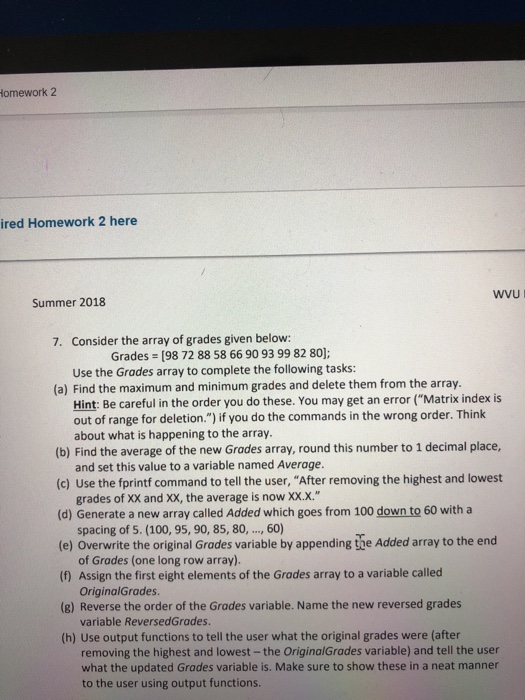
omework 2 ired Homework 2 here WVU Summer 2018 7. Consider the array of grades given below: Grades [98 72 88 58 66 90 93 99 82 80 Use the Grades array to complete the following tasks: (a) Find the maximum and minimum grades and delete them from the array Hint: Be careful in the order you do these. You may get an error ("Matrix index is out of range for deletion.") if you do the commands in the wrong order. Think about what is happening to the array. (b) Find the average of the new Grades array, round this number to 1 decimal place, (c) Use the fprintf command to tell the user, "After removing the highest and lowest (d) Generate a new array called Added which goes from 100 down to 60 with a (e) Overwrite the original Grades variable by appending the Added array to the end (1) Assign the first eight elements of the Grades array to a variable called and set this value to a variable named Average. grades of XX and XX, the average is now xxx." spacing of 5. (100,95,90, 85, 80,, 60) of Grades (one long row array). OriginalGrades (8) Reverse the order of the Grades variable. Name the new reversed grades variable ReversedGrades (h) Use output functions to tell the user what the original grades were (after removing the highest and lowest -the OriginalGrades variable) and tell the user what the updated Grades variable is. Make sure to show these in a neat manner to the user using output functions
Step by Step Solution
There are 3 Steps involved in it

Get step-by-step solutions from verified subject matter experts
 Study Help