







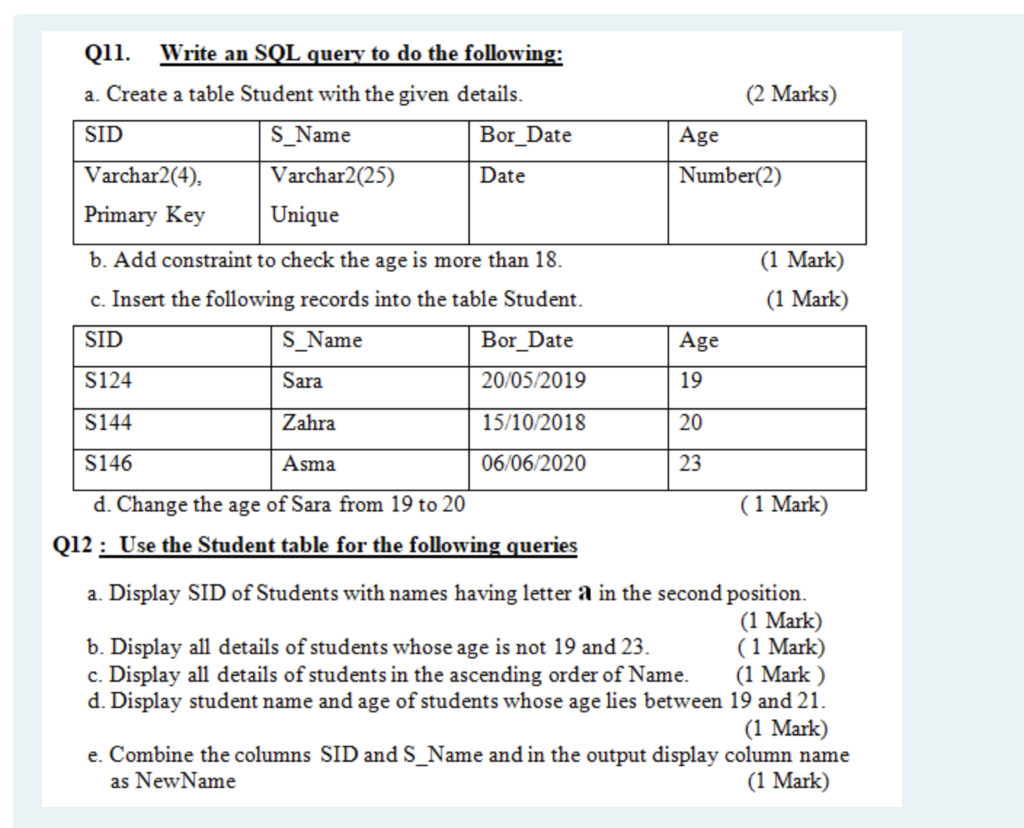
Question: by using SQL (2 Marks) Age Number(2) Qll. Write an SQL query to do the following: a. Create a table Student with the given details.
 by using SQL
(2 Marks) Age Number(2) Qll. Write an SQL query to do the following: a. Create a table Student with the given details. SID S_Name Bor_Date Varchar2(4) Varchar2(25) Date Primary Key Unique b. Add constraint to check the age is more than 18. c. Insert the following records into the table Student. SID S_Name Bor Date (1 Mark) (1 Mark) Age S124 Sara 20/05/2019 19 S144 Zahra 15/10/2018 20 S146 Asma 06/06/2020 d. Change the age of Sara from 19 to 20 (1 Mark) Q12 : Use the Student table for the following queries a. Display SID of Students with names having letter a in the second position. (1 Mark) b. Display all details of students whose age is not 19 and 23. (1 Mark) c. Display all details of students in the ascending order of Name. (1 Mark) d. Display student name and age of students whose age lies between 19 and 21. (1 Mark) e. Combine the columns SID and S_Name and in the output display column name as New Name (1 Mark)
Step by Step Solution
There are 3 Steps involved in it

Get step-by-step solutions from verified subject matter experts
 Study Help