







Question: c# C# Console and Windows s Programmina usina Visual C#.Net indu 4.4 Body Mass Index 1. 2. Create a new project with a class called
c#
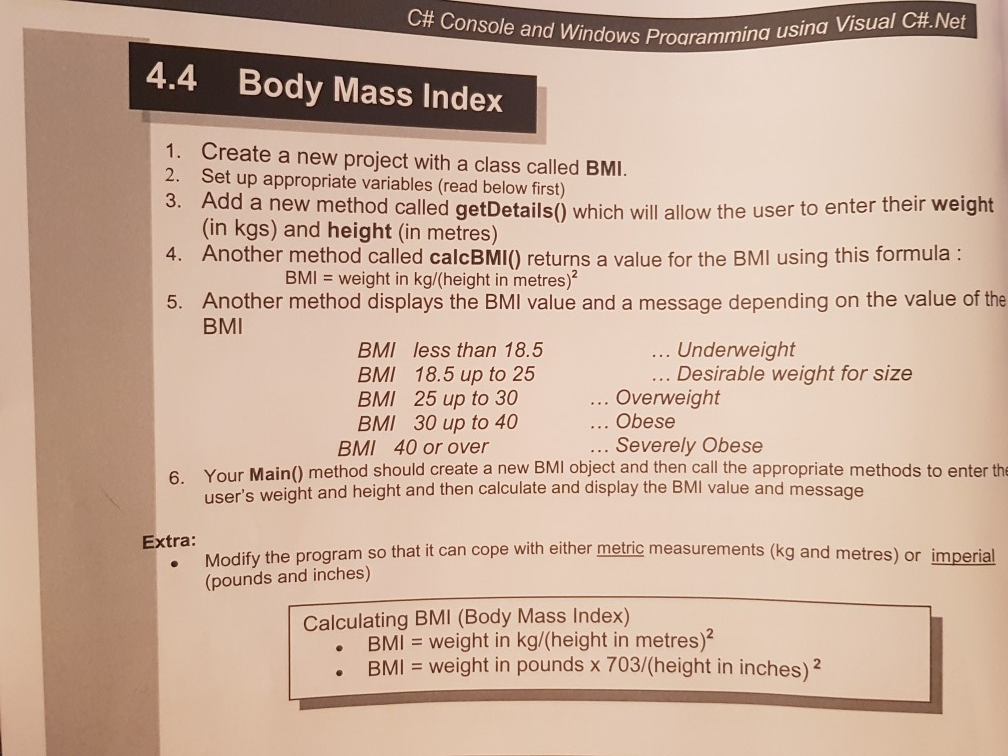
C# Console and Windows s Programmina usina Visual C#.Net indu 4.4 Body Mass Index 1. 2. Create a new project with a class called BMI. Set up appropriate variables (read below first) Add a new method called getDetails) which will allow the user to enter their weight (in kgs) and height (in metres) Another method called calcBMI() returns a value for the BMI using this formula: 8. 4. BMI = weight in kg/(height in metresf Another method displays the BMI value and a message depending on the value of the BMI 5. BMI less than 18.5 BMI 18.5 up to 25 BMI 25 up to 30 BMI 30 up to 40 40 or over . Underweight . Desirable weight for size Overweight Obese BMI .. Severely Obese 6. Your Main() method should create a new BMI object and then call the appropriate methods to enter the user's weight and height and then calculate and display the BMI value and message xtra: . Modify the program so that it can cope with either metric measurements (kg and metres) or imperial (pounds and inches) Calculating BMI (Body Mass Index) BMI = weight in kg/(height in metres . BMI weight in pounds x 703/(height in inches)2
Step by Step Solution
There are 3 Steps involved in it

Get step-by-step solutions from verified subject matter experts
 Study Help