







Question: C CODE LANGUAGE. MSP430. #include #define redLED BIT0 // Red LED at P1.0 #define greenLED BIT7 // Green LED at P9.7 #define BUT1 BIT1 //
C CODE LANGUAGE. MSP430.
#include
#define redLED BIT0 // Red LED at P1.0
#define greenLED BIT7 // Green LED at P9.7
#define BUT1 BIT1 // Button S1 at P1.1
#define BUT2 BIT2 // Button S2 at P1.2
void main(void) {
WDTCTL = WDTPW | WDTHOLD; // Stop the Watchdog timer
PM5CTL0 &= ~LOCKLPM5; // Enable the GPIO pins
// Configure and initialize LEDs
P1DIR |= redLED; // Direct pin as output
P9DIR |= greenLED; // Direct pin as output
P1OUT &= ~redLED; // Turn LED Off
P9OUT &= ~greenLED; // Turn LED Off
// Configure buttons1
P1DIR &= ~(BUT1 | BUT2); // Direct pin as input
P1REN |= (BUT1 | BUT2); // Enable built-in resistor
P1OUT |= (BUT1 | BUT2); // Set resistor as pull-up
// Polling the button in an infinite loop
for(;;) {
// Fill the if-statement below...
if((P1IN & BUT1)==0)
P1OUT |= redLED; // Turn red LED on
else P1OUT &= ~redLED; // Turn red LED off
if((P1IN & BUT2)==0)
P9OUT |= greenLED; // Turn green LED on
else P9OUT &= ~greenLED; //Turn green LED off
}
}
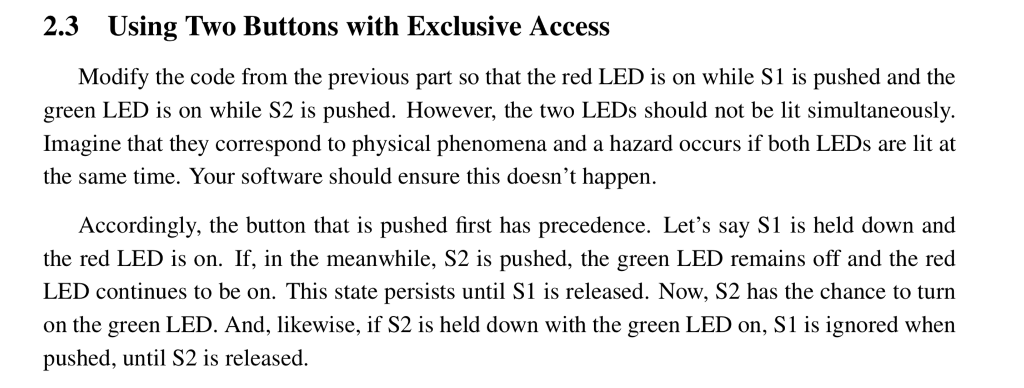
2.3 Using Two Buttons with Exclusive Access Modify the code from the previous part so that the red LED is on while S1 is pushed and the green LED is on while S2 is pushed. However, the two LEDs should not be lit simultaneously. Imagine that they correspond to physical phenomena and a hazard occurs if both LEDs are lit at the same time. Your software should ensure this doesn't happen. Accordingly, the button that is pushed first has precedence. Let's say S1 is held down and the red LED is on. If, in the meanwhile, S2 is pushed, the green LED remains off and the red LED continues to be on. This state persists until S1 is released. Now, S2 has the chance to turn on the green LED. And, likewise, if S2 is held down with the green LED on, S1 is ignored when pushed, until S2 is released
Step by Step Solution
There are 3 Steps involved in it

Get step-by-step solutions from verified subject matter experts
 Study Help