







Question: C++ coding Sample Output Enter the length of the number sequence: 3 Enter 3 number of elements to store in the array: 123 345 99
C++ coding
Sample Output
Enter the length of the number sequence:3 Enter 3 number of elements to store in the array: 123 345 99 123 345 99
This is my code:
#include using namespace std;
/* A function that reads a sequence of integers from input to fill a dynamically allocated array. For example, if the length is 3, and the numbers are 123 345 99 then the array returned will be of size 3, and stores values 123, 345 and 99. @param size: upon return, stores the size of the array @return the pointer pointing to the array */ int * ReadNumberSequence(int & size) { int * array = NULL; // initialize the pointer to NULL do { cout > size; } while (size
// Note: we know the value of size only at run time, so we need to DYNAMICALLY // Todo: write a loop to read size # of int from input, and store in the array array=new int[size];
cout
for(int i=0;i
cin>>array[i];
}
return array; } int main() {
// Todo: delcare necesssary variables
// Todo: call the ReadNumberSequence function to read a sequence of numbers
// Todo: write a loop to display the elements in the array returned ...
// Todo: free the array returned by ReadNumberSequence.
int size;
ReadNumberSequence(size); return 0; }

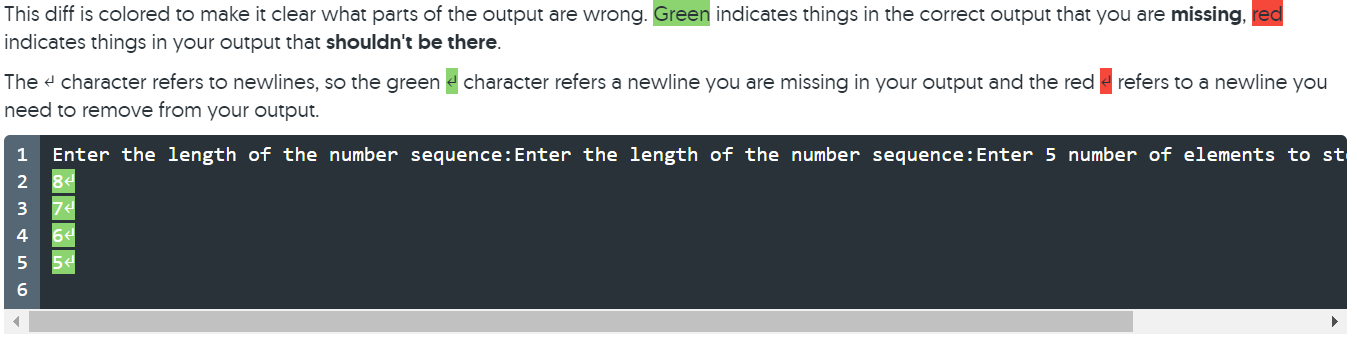 I get these error message! Please debug!
This diff is colored to make it clear what parts of the output are wrong. Green indicates things in the correct output that you are missing, red indicates things in your output that shouldn't be there. The + character refers to newlines, so the green & character refers a newline you are missing in your output and the red 2 refers to a newline you need to remove from your output. 1 2 Enter the length of the number sequence:Enter 3 number of elements to store in the array: 1234 3454 994 3 4 This diff is colored to make it clear what parts of the output are wrong. Green indicates things in the correct output that you are missing, red indicates things in your output that shouldn't be there. The character refers to newlines, so the green & character refers a newline you are missing in your output and the red refers to a newline you need to remove from your output. 1 Enter the length of the number sequence: Enter the length of the number sequence: Enter 5 number of elements to st 8 2 3 4 64 5 54 6
Step by Step Solution
There are 3 Steps involved in it

Get step-by-step solutions from verified subject matter experts
 Study Help