







Question: C++: Create a class Rectangle that represents a rectangle on a Cartesian plane. To simplify things, we will assume that the rectangle is always aligned
C++: Create a class Rectangle that represents a rectangle on a Cartesian plane. To simplify things, we will assume that the rectangle is always aligned with the x and y axis (one pair of sides is always perfectly vertical, the other pair is always horizontal). Note, you are not solving any particular problem your job is to build a tool (Rectangle class) that we could use to solve problems with. The way you will demonstrate your code works is by providing a Unit Test of the class in the RectangleTester.cpp. You should build Rectangle using composition. Here is a UML diagram of what you are building. Appropriate places for const and & are NOT specified in the UML. You should use them anywhere that is appropriate.
Point.h:
#ifndef POINT_H
#define POINT_H
/**
* @brief The Point class represents a point in the Cartesian plane
*/
class Point
{public:
/**
* @brief Point Constructs at 0, 0
*/
Point();
/**
* @brief Point Constructs a point at the given coordinates
* @param startX initial x location
* @param startY initial y location
*/
Point(double startX, double startY);
/**
* @brief getX Accesses x loction
* @return x coordinate
*/
double getX() const;
/**
* @brief getY Accesses y loction
* @return y coordinate
*/
double getY() const;
/**
* @brief setX Change the x location
* @param newX New x location
*/
void setX(double newX);
/**
* @brief setX Change the y location
* @param newX New y location
*/
void setY(double newY);
/**
* @brief translate Moves the point by the specified offset in x and y
* @param xShift Amount to move in x
* @param yShift AMount to move in y
*/
void translate(double xShift, double yShift);
/**
* @brief isSameAs Tests if two points represent approximately the same location
* @param other Point to compare with this one
* @return True if both x and y are within 0.0000001 of each other. Else false.
*/
bool isSameAs(const Point& other) const;
/**
* @brief distanceTo Calculates distance to another Point
* @param other Point to measure distance to
* @return Distance
*/
double distanceTo(const Point& other) const;
/**
* @brief print Prints formated information about Point to console
*/
void print() const;
private:
double x;
double y;
};
#endif // POINT_H
Point.cpp
#include
#include
using namespace std;
#include "Point.h"
Point::Point() {x = 0;
y = 0;
}
Point::Point(double startX, double startY) {x = startX;
y = startY;
}
double Point::getX() const {return x;
}
double Point::getY() const {return y;
}
void Point::setX(double newX) {x = newX;
}
void Point::setY(double newY) {y = newY;
}
void Point::translate(double xShift, double yShift) {x += xShift;
y += yShift;
}
double Point::distanceTo(const Point& other) const {double xDiff = x - other.x;
double yDiff = y - other.y;
return sqrt( pow(xDiff, 2) + pow(yDiff, 2) );
}
bool Point::isSameAs(const Point& other) const {const double EPSILON = 0.0000001;
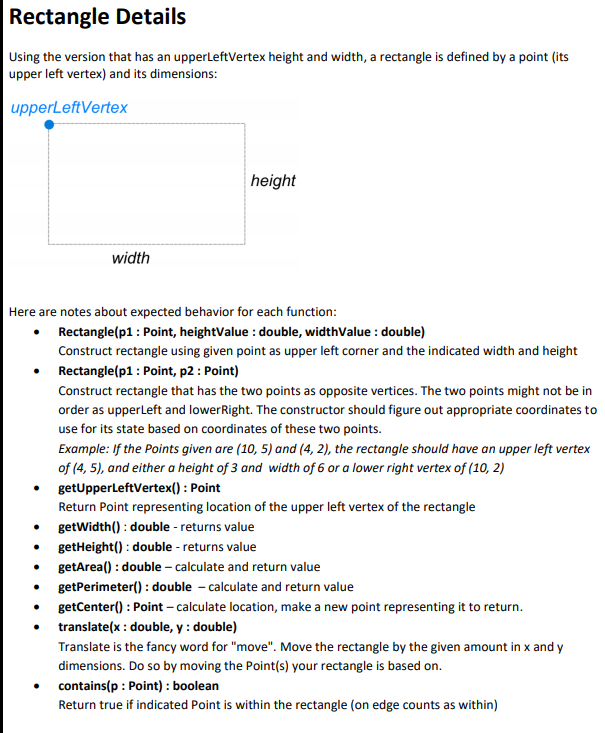
if( (abs(x - other.x)(abs(y - other.y)return true;elsereturn false;}void Point::print() const {cout}Rectangle Details Using the version that has an upperLeftVertex height and width, a rectangle is defined by a point (its upper left vertex) and its dimensions: upperLeftVertex height width Here are notes about expected behavior for each function: Rectangle(p1 : Point, heightValue: double, widthValue: double) Construct rectangle using given point as upper left corner and the indicated width and height Rectangle(p1 : Point, p2 : Point) Construct rectangle that has the two points as opposite vertices. The two points might not be in order as upperLeft and lower Right. The constructor should figure out appropriate coordinates to use for its state based on coordinates of these two points. Example: If the Points given are (10, 5) and (4,2), the rectangle should have an upper left vertex of (4,5), and either a height of 3 and width of 6 or a lower right vertex of (10, 2) getUpperLeftVertex(): Point Return Point representing location of the upper left vertex of the rectangle getWidth(): double-returns value getHeight(): double - returns value getArea(): double - calculate and return value getPerimeter() : double - calculate and return value getCenter() : Point - calculate location, make a new point representing it to return. translateix : double, y: double) Translate is the fancy word for "move". Move the rectangle by the given amount in x and y dimensions. Do so by moving the Point(s) your rectangle is based on. contains(p: Point): boolean Return true if indicated Point is within the rectangle (on edge counts as within)
Step by Step Solution
There are 3 Steps involved in it

Get step-by-step solutions from verified subject matter experts
 Study Help