Question: C D E F G H K L M N O P Q R S T U V W X Please see the Panopto Tutorial
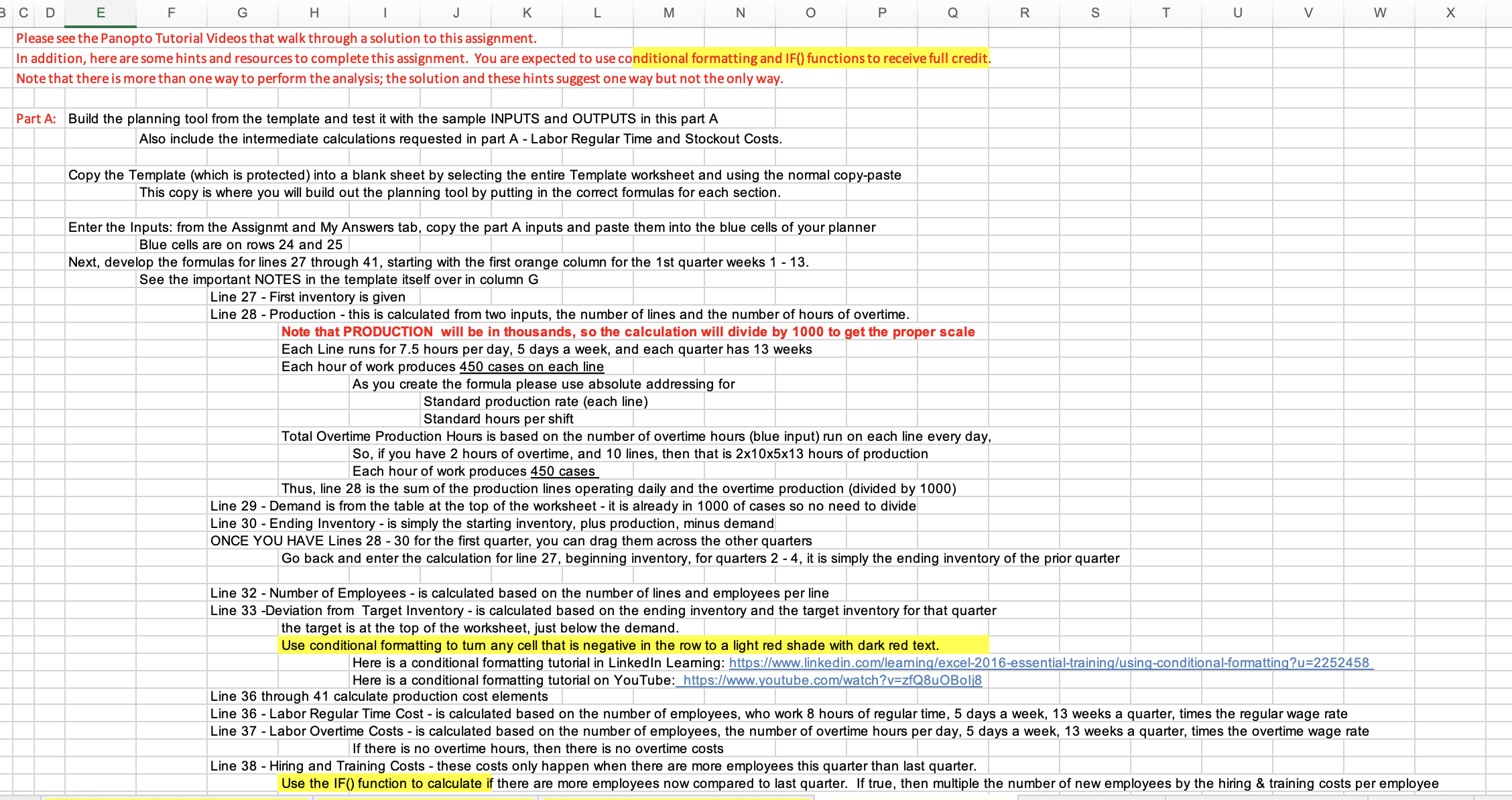
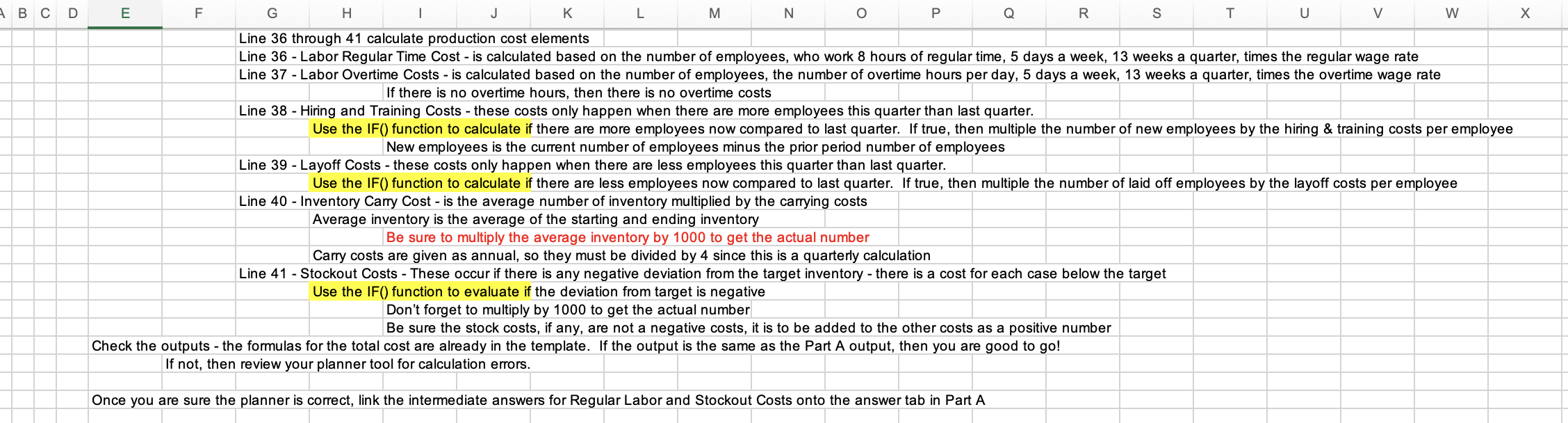
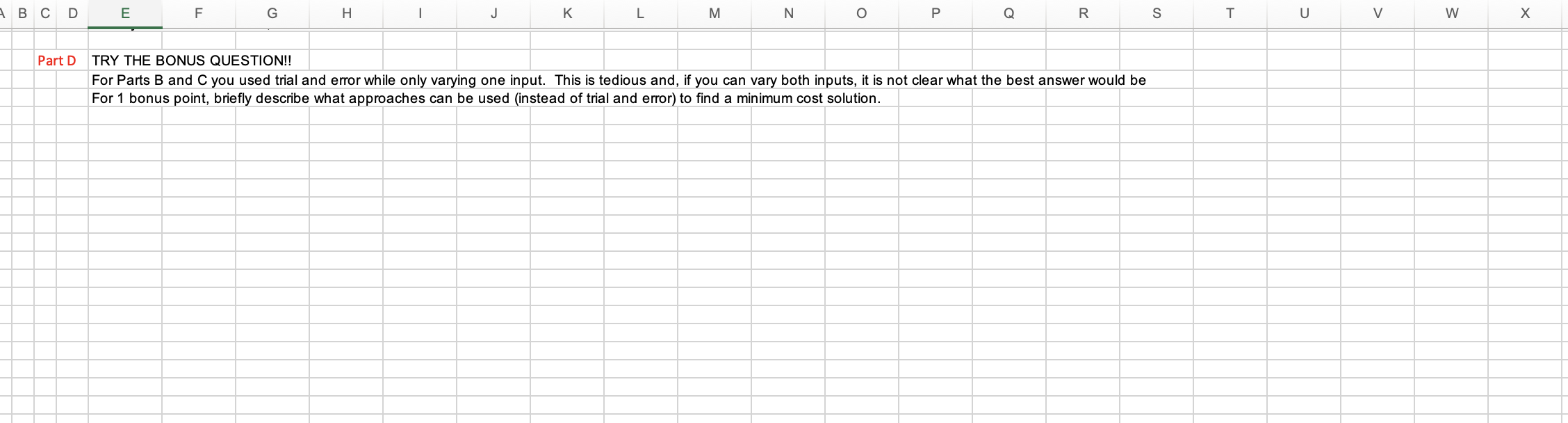
C D E F G H K L M N O P Q R S T U V W X Please see the Panopto Tutorial Videos that walk through a solution to this assignment. In addition, here are some hints and resources to complete this assignment. You are expected to use conditional formatting and IF() functions to receive full credit. Note that there is more than one way to perform the analysis; the solution and these hints suggest one way but not the only way. Part A: Build the planning tool from the template and test it with the sample INPUTS and OUTPUTS in this part A Also include the intermediate calculations requested in part A - Labor Regular Time and Stockout Costs. Copy the Template (which is protected) into a blank sheet by selecting the entire Template worksheet and using the normal copy-paste This copy is where you will build out the planning tool by putting in the correct formulas for each section. Enter the Inputs: from the Assignmt and My Answers tab, copy the part A inputs and paste them into the blue cells of your planner Blue cells are on rows 24 and 25 Next, develop the formulas for lines 27 through 41, starting with the first orange column for the 1st quarter weeks 1 - 13. See the important NOTES in the template itself over in column G Line 27 - First inventory is given Line 28 - Production - this is calculated from two inputs, the number of lines and the number of hours of overtime. Note that PRODUCTION will be in thousands, so the calculation will divide by 1000 to get the proper scale Each Line runs for 7.5 hours per day, 5 days a week, and each quarter has 13 weeks Each hour of work produces 450 cases on each line As you create the formula please use absolute addressing for Standard production rate (each line) Standard hours per shift Total Overtime Production Hours is based on the number of overtime hours (blue input) run on each line every day, So, if you have 2 hours of overtime, and 10 lines, then that is 2x10x5x13 hours of production Each hour of work produces 450 cases Thus, line 28 is the sum of the production lines operating daily and the overtime production (divided by 1000) Line 29 - Demand is from the table at the top of the worksheet - it is already in 1000 of cases so no need to divide Line 30 - Ending Inventory - is simply the starting inventory, plus production, minus demand ONCE YOU HAVE Lines 28 - 30 for the first quarter, you can drag them across the other quarters Go back and enter the calculation for line 27, beginning inventory, for quarters 2 - 4, it is simply the ending inventory of the prior quarter Line 32 - Number of Employees - is calculated based on the number of lines and employees per line Line 33 -Deviation from Target Inventory - is calculated based on the ending inventory and the target inventory for that quarter the target is at the top of the worksheet, just below the demand. Use conditional formatting to turn any cell that is negative in the row to a light red shade with dark red text. Here is a conditional formatting tutorial in Linkedin Learning: https://www.linkedin.com/leaming/excel-2016-essential-training/using-conditional-formatting?u=2252458 Here is a conditional formatting tutorial on YouTube: https://www.youtube.com/watch?v=zfQ8uOBolj8 Line 36 through 41 calculate production cost elements Line 36 - Labor Regular Time Cost - is calculated based on the number of employees, who work 8 hours of regular time, 5 days a week, 13 weeks a quarter, times the regular wage rate Line 37 - Labor Overtime Costs - is calculated based on the number of employees, the number of overtime hours per day, 5 days a week, 13 weeks a quarter, times the overtime wage rate If there is no overtime hours, then there is no overtime costs Line 38 - Hiring and Training Costs - these costs only happen when there are more employees this quarter than last quarter. Use the IF() function to calculate if there are more employees now compared to last quarter. If true, then multiple the number of new employees by the hiring & training costs per employeeBCD E F G H K L M N O P Q R S T U V W X Line 36 through 41 calculate production cost elements Line 36 - Labor Regular Time Cost - is calculated based on the number of employees, who work 8 hours of regular time, 5 days a week, 13 weeks a quarter, times the regular wage rate Line 37 - Labor Overtime Costs - is calculated based on the number of employees, the number of overtime hours per day, 5 days a week, 13 weeks a quarter, times the overtime wage rate If there is no overtime hours, then there is no overtime costs Line 38 - Hiring and Training Costs - these costs only happen when there are more employees this quarter than last quarter. Use the IF() function to calculate if there are more employees now compared to last quarter. If true, then multiple the number of new employees by the hiring & training costs per employee New employees is the current number of employees minus the prior period number of employees Line 39 - Layoff Costs - these costs only happen when there are less employees this quarter than last quarter. Use the IF() function to calculate if there are less employees now compared to last quarter. If true, then multiple the number of laid off employees by the layoff costs per employee Line 40 - Inventory Carry Cost - is the average number of inventory multiplied by the carrying costs Average inventory is the average of the starting and ending inventory Be sure to multiply the average inventory by 1000 to get the actual number Carry costs are given as annual, so they must be divided by 4 since this is a quarterly calculation Line 41 - Stockout Costs - These occur if there is any negative deviation from the target inventory - there is a cost for each case below the target Use the IF() function to evaluate if the deviation from target is negative Don't forget to multiply by 1000 to get the actual number Be sure the stock costs, if any, are not a negative costs, it is to be added to the other costs as a positive number Check the outputs - the formulas for the total cost are already in the template. If the output is the same as the Part A output, then you are good to go! If not, then review your planner tool for calculation errors. Once you are sure the planner is correct, link the intermediate answers for Regular Labor and Stockout Costs onto the answer tab in Part ABCD E F G H K L M N O P Q Part D TRY THE BONUS QUESTION! R S T U V W X For Parts B and C you used trial and error while only varying one input. This is tedious and, if you can vary both inputs, it is not clear what the best answer would be For 1 bonus point, briefly describe what approaches can be used (instead of trial and error) to find a minimum cost solution
Step by Step Solution
There are 3 Steps involved in it
1 Expert Approved Answer
Step: 1 Unlock
Question Has Been Solved by an Expert!
Get step-by-step solutions from verified subject matter experts
Step: 2 Unlock
Step: 3 Unlock
Students Have Also Explored These Related Finance Questions!