







Question: c++ end (at the ) end. please show display This program is to implement a number of functions on a linked list. 1. Insertion of
 end (at the ) end. please show display
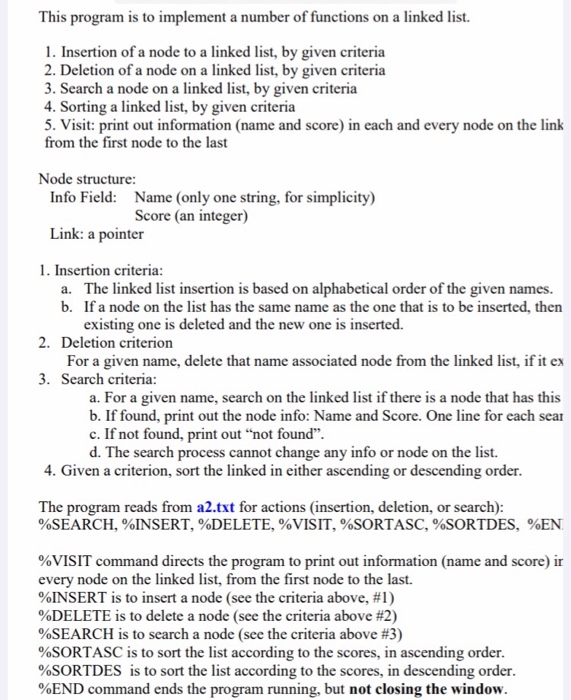
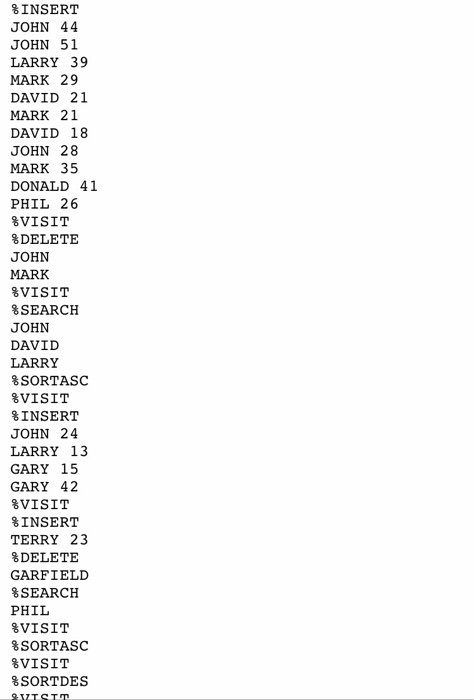
 This program is to implement a number of functions on a linked list. 1. Insertion of a node to a linked list, by given criteria 2. Deletion of a node on a linked list, by given criteria 3. Search a node on a linked list, by given criteria 4. Sorting a linked list, by given criteria 5. Visit: print out information (name and score) in each and every node on the link from the first node to the last Node structure: Info Field: Name (only one string, for simplicity) Score (an integer) Link: a pointer 1. Insertion criteria: a. The linked list insertion is based on alphabetical order of the given names. b. If a node on the list has the same name as the one that is to be inserted, then existing one is deleted and the new one is inserted. 2. Deletion criterion For a given name, delete that name associated node from the linked list, if it ex 3. Search criteria: a. For a given name, search on the linked list if there is a node that has this b. If found, print out the node info: Name and Score. One line for each sear c. If not found, print out "not found". d. The search process cannot change any info or node on the list. 4. Given a criterion, sort the linked in either ascending or descending order. The program reads from a2.txt for actions (insertion, deletion, or search): %SEARCH, %INSERT, DELETE, %VISIT, %SORTASC, %SORTDES, %EN %VISIT command directs the program to print out information (name and score) ir every node on the linked list, from the first node to the last. %INSERT is to insert a node (see the criteria above, #1) %DELETE is to delete a node (see the criteria above #2) %SEARCH is to search a node (see the criteria above #3) %SORTASC is to sort the list according to the scores, in ascending order. %SORTDES is to sort the list according to the scores, in descending order. %END command ends the program running, but not closing the window. INSERT JOHN 44 JOHN 51 LARRY 39 MARK 29 DAVID 21 MARK 21 DAVID 18 JOHN 28 MARK 35 DONALD 41 PHIL 26 %VISIT % DELETE JOHN MARK %VISIT %SEARCH JOHN DAVID LARRY % SORTASC VISIT INSERT JOHN 24 LARRY 13 GARY 15 GARY 42 VISIT INSERT TERRY 23 DELETE GARFIELD %SEARCH PHIL VISIT % SORTASC VISIT SORTDES UTSTT
Step by Step Solution
There are 3 Steps involved in it

Get step-by-step solutions from verified subject matter experts
 Study Help