







Question: C++ exercise: Follow the instructions of this code: INSTRUCTIONS: There are 4 regular steps (40 points) and 3 extra credit steps (4 points). Some algorithms
C++ exercise:
Follow the instructions of this code:
INSTRUCTIONS: There are 4 regular steps (40 points) and 3 extra credit steps (4 points). Some algorithms and IPOs (Input, Processing, Output) are provided. The term: "input" may refer to keyboard input from the user; OR "input" may refer to input to a function as a function parameter. Step 1. (10 points) A common programming task is to get numerical input from the user. Write a single function that will: 1) Display a prompt 2) Get user's input (from keyboard) 3) Verify that the input is valid (within a range, inclusive) 4) If the input is valid, accept it and return 5) If the input is invalid, display an error message and try again
Create a new function that performs the steps above. Use the following: 1) Function name: get_input 2) Parameter: prompt (pass by constant reference) 3) Parameter: error_msg (pass by constant reference) 4) Parameter: min_value (pass by value) 5) Parameter: max_value; (pass by value) 6) Parameter: range_check (true or false) (pass by value) 7) return: value
Function get_input() should provide error checking that detects non-numeric input. If parameter range_check is true, display the valid range as part of the prompt so the user knows what range of values is acceptable and provide range checking; otherwise, don't provide range checking. Usually range checking is desired; provide a default. Hints: 1) if (cin>>value) { } else { }; 2) cin.clear(); 3) cin.ignore();
Step 2. (10 points) Test the function get_input() by asking the user for their birthday. Call it 3 times to get: month, day, year. Provide a valid range for each. Assume a valid day is 1 to 31, month is 1 to 12, year is from 1900 to 2020. For now, don't worry about the number of days each month has; that comes later.
Step 3. (10 points) Despite input validation, it is possible the user entered the wrong information. Give the user an opportunity to verify and correct invalid input. Create a loop that displays the person's birthday as entered in MM/DD/YYYY format. Example: 7/4/1776 On ONE line, display the entered date, followed by a menu of options: birthday is 7/4/1776 Options: CHANGE: m)onth, d)ay, y)ear; OR a)ccept, r)efuse? The options should do this: m)onth : reenter the month; d)ay : reenter the day; y)ear : reenter the year; a)ccept : user claims data is correct, accept date as entered and exit loop r)efuse : user does NOT want to enter a birthday. Set date to 0/0/0000, exit loop In main, get the user's birthday. Loop as described above to accept changes. Accept upper and lower case. Use an enum and a switch statement for the options.
Step 4. (10 points) With get_input, each part of a date may be in range, but the complete birthday may be invalid. Perhaps it has an invalid number of days for the month.
Enhance your birthday validation process to verify that the number of days is valid for the number of the month. Do NOT modify the get_input function, keep that generic. Create a new function, isvalid_day_month(). Here is the IPO: Inputs: number of day, number of month Processing: compute whether the day, month combination is valid. Use a switch statement. Output: boolean: return true if valid, false if invalid Use these limits: (you can use the line below or some variation to save time): const int Jan=31, Feb=28, Mar=31, Apr=30, May=31, Jun=30, Jul=31, Aug=31, Sep=30, Oct=31, Nov=30, Dec=31;
Call isvalid_day_month() in Step 3 code as appropriate. If user a)ccepts, but date is invalid, don't accept; display error and retry. If user refuses to enter date, don't validate, exit loop. Step 5. (1 point) EXTRA CREDIT, OPTIONAL In leap years, such as 2020, Feb has 29 days. That is a problem! For extra credit, provide and use function isvalid_day_month_year(): accept parameter year, and then make it work for leap years. Do this only if you have time.
Step 6. (2 points) EXTRA CREDIT, OPTIONAL To provide an incentive for your user to enter a valid date, give the user a chance to win a prize. After a valid date is entered, see if the user won a prize. If user refused, no prize is offered.
Create a new function, won_prize() Here is the IPO: Input: odds: 1 in n odds of winning the prize. Example: won_prize(100); // 1 in 100 chance of winning Example: won_prize(10); // 1 in 10 chance of winning Example: won_prize(2); // 1 in 2 chance of winning Processing: Calculate whether the person won the prize Output: true if they won the prize, false if not In main, after the user entered a valid date, call won_prize() with a 1 in 100 chance of winning. Notify the user whether they won or not. Hint: use time(), srand(), rand(), %. Important: ONLY call srand() ONCE!
Step 7. (1 point) EXTRA CREDIT, OPTIONAL Your boss is worried that the program may award too many prizes. To verify the prize award process, test it. Simulate running the prize award function 10,000 times. In 10,000 times, how many times was a prize won? Print the output to convince your boss that it works. The output should be: "Of 10,000 attempts, 125 won: 1.25 percent." */
// step 1 (10 points) function get_input() goes here --- get_input() {}; // modify as appropriate: add parameters, function body, return value
// step 4 (10 points) function isvalid_day_month() goes here --- isvalid_day_month() {}; // edit as appropriate: add parameters, function body, return value // step 5 (1 point, optional extra credit) isvalid_day_month_year() handles leap year
int main() { cout
// step 2 (10 points) 3 calls to get_input() goes here --- get_input(); get_input(); get_input(); // edit as appropriate; capture return into month, day, year // step 3 (10 points) loop to enter and reenter birthday until valid // step 4's call to isvalid_day_month (enhancement to step 3)
// step 6 (2 points, extra credit) call won_prize() if user entered valid birthday // step 7 (1 points, extra credit) test if won_prize() in loop of 10,000
cout
/* Paste your test output below. 2 point DEDUCTION if no test output. */
Run it three times. The outputs should look like this:
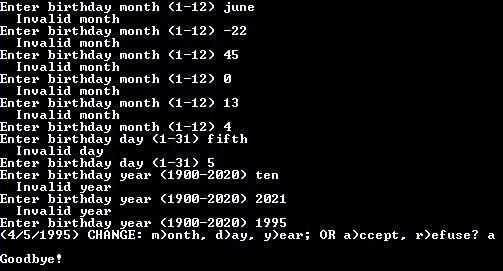
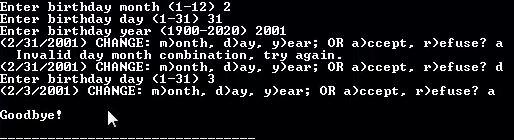

Enter birthday month (1-12) june Invalid month Enter birthday month (1-12) -22 Invalid month Enter birthday month (1-12) 45 Invalid month Enter birthday month (1-12) 0 Invalid month Enter birthday month (1-12) 13 Invalid month Enter birthday month (1-12) 4 Enter birthday day (1-31) fifth Invalid day Enter birthday day (1-31) 5 Enter birthday year (1900-2020) ten Invalid year Enter birthday year (1900-2020 2021 Invalid year Enter birthday year (1900-2020) 1995 (4/5/1995) CHANGE: month, day, year; OR accept, refuse? a Goodbye! Enter birthday month (1-12) 2 Enter birthday day (1-31) 31 Enter birthday year (1900-2020) 2001 (2/31/2001) CHANGE: m/onth, d)ay, year; OR accept, refuse? a Invalid day month combination, try again. (2/31/2001) CHANGE: month, day, year; OR accept, refuse? d Enter birthday day (1-31) 3 (2/3/2001) CHANGE: month, day, year; OR accept, refuse? a Goodbye! Enter birthday month (1-12) 1 Enter birthday day (1-31) 1 Enter birthday year (1900-2020) 1900 (1/1/1900) CHANGE: month, day, year; OR accept, refuse? r Goodbye
Step by Step Solution
There are 3 Steps involved in it

Get step-by-step solutions from verified subject matter experts
 Study Help