







Question: C++ For this lab, please write a program that uses a structure to store the following inventory data in a file: 1. Item Description (Must
C++
For this lab, please write a program that uses a structure to store the following inventory data in a file:
1. Item Description (Must be a char array)
2. Quantity on Hand (int)
3. Wholesale Cost (double)
You must use the starter program below (page 2) and you should not add anything to main.
Just write the code for:
1. addRecord
2. viewRecord
3. changeRecord
Input validation for Item Quantity and Cost: (4 X 3 = 12 points)
1. Must be numeric
2. Must not be negative
3. Must be greater than zero
There is no validation for the Item Description.
File specifications:
You must submit the test file (with reasonable inventory names) that you created while testing your program. The test file should have at least 5 entries and have an extension of .dat The file path to the test file should be C:\temp *** The file format MUST be binary***.
On Exit: (NOTE: this requirement is not represented on the sample output below)
Print to the screen: Thank you for visiting the
Starter Code:
/* *** Your Name Here ***
Lab #
*/
#include
#include
#include
struct Inventory
{
char desc[30];
int qty;
double wholeSaleCost;
};
// Function prototypes
void addRecord(fstream &);
void viewRecord(fstream &);
void changeRecord(fstream &);
int main()
{
using namespace std;
fstream inventoryFile;
int choice;
cout
do
{
// Display the menu.
cout
cout
cout
cout
do
{
cout
cin >> choice;
} while (choice 4);
// Process the selection.
switch (choice)
{
// Choice 1 is to add a record.
case 1:
addRecord(inventoryFile);
break;
// Choice 2 is to view a record.
case 2:
viewRecord(inventoryFile);
break;
// Choice 3 is to change a record.
case 3:
changeRecord(inventoryFile);
}
} while (choice != 4);
system ("pause");
return 0;
}
Sample Output:
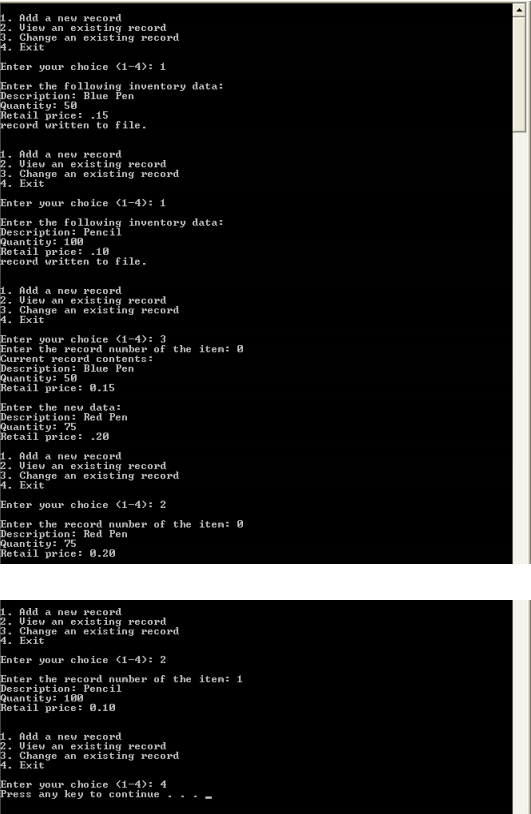
. Add a new record 2. Uiew an exist 3. Cha A. Exit record nge an existing record Enter your choice
Step by Step Solution
There are 3 Steps involved in it

Get step-by-step solutions from verified subject matter experts
 Study Help