







Question: C++ :I have a program that shows memory information of files. The program compiles but does not execute due to a cannot execute binary file:
C++ :I have a program that shows memory information of files. The program compiles but does not execute due to a "cannot execute binary file: Exec format error". .How can I go about fixing this? Im willing to paste the code.
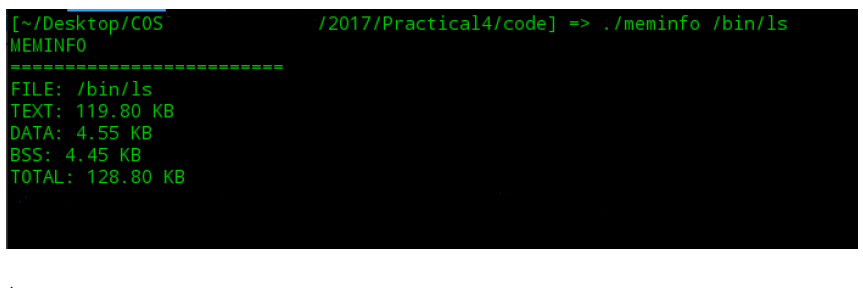
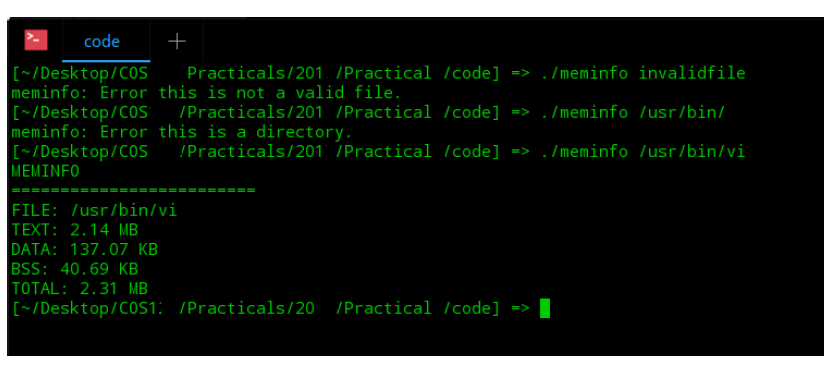
Using C++ , no IDE, compiling and running has to be on the linux terminal. This is how the code is supposed to be run
 Code
Code
#include
// char* convert_to_human_readable(long double size); char* convert_to_human_readable(long double size, char *final_size) { int count = 0; while (size > 1024) { size /= 1024; count = count + 1; } const char* sizes[] = {"B", "KB", "MB", "GB", "TB", "PB", "EB", "ZB", "YB"}; sprintf(final_size, "%.*Lf %s", count, size, sizes[count]); return final_size; }
int main(int argc, char const *argv[]) { //if second argument is not given the return by printing message if (argc "; }
//variables to get file stats struct stat buf; stat(argv[1], &buf); //check wheather file with given name is dir if yes then return //by printing error message if(S_ISDIR(buf.st_mode)) { std::cout
//file to get the piped data from size command FILE* in; //get the file name from command line arguments std::string filename = argv[1]; //concatenate the file name with size command std::string command = "size " + filename;
//execute the "size" command and get its output using popen if(!(in = popen(command.c_str(), "r"))) return 1; //store data to output string char buff[512]; std::string output; while(fgets(buff, sizeof(buff), in)!=NULL){ output += buff; } //extract data from output stream using strigstream long double text, data, bss, total;
std::istringstream o_stream(output); std::string dummy; // text data bss dec hex filename // 120822 2040 3432 126294 1ed56 /bin/ls // skip text data bss dec hex and filename by putting it to dummy string // read text data bss and toatal in decimal o_stream >> dummy >> dummy >> dummy >> dummy >> dummy >> dummy >> text >> data >> bss >> total; char readable_size[100]; //conversion to human readable format and output the data std::cout
//close the FILE in pclose(in);
return 0; }
2017/Practical4/code]-/meminfo /bin/ls /Desktop/COS MEMINFO FILE: /bin/ls TEXT: 119.80 KB DATA: 4.55 KB BSS: 4.45 KB TOTAL: 128.80 KB
Step by Step Solution
There are 3 Steps involved in it

Get step-by-step solutions from verified subject matter experts
 Study Help