







Question: c++ IMPORTANT: Use pointers in your user-defined functions Project 1 Simulation: Tke Tortoise and the Hare In this project, you will re-create the classic race
c++
IMPORTANT: Use pointers in your user-defined functions
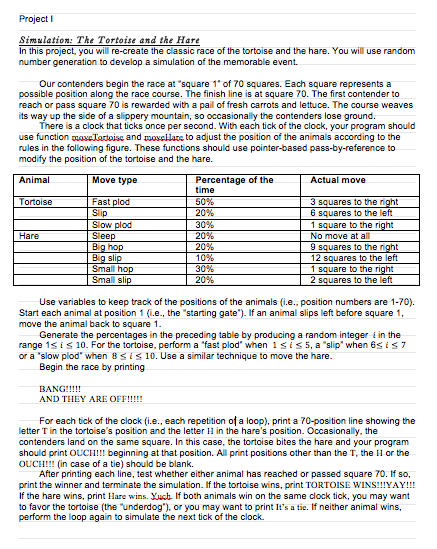
Project 1 Simulation: Tke Tortoise and the Hare In this project, you will re-create the classic race of the tortoise and the hare. You will use random number generation to develop a simulation of the memorable event. Our contenders begin the race at square 14 of 70 squares. Each square represents a possible position along the race course. The finish line is at square 70. The first contender to reach or pass square 70 is rewarded with a pail of fresh carrots and lettuce. The course weaves its way up the side of a slippery mountain, so occasionally the contenders lose ground. There is a clock that ticks once per second. With each tick of the clock, your program should use function BoxeTattoise and morellate to adjust the position of the animals according to the rules in the following figure. These functions should use pointer-based pass-by-reference to modify the position of the tortoise and the hare. Animal Move type Percentage of the Actual move time Tortoise Fast plod 50% 3 squares to the right Slip 20% 6 squares to the left Slow plod 1 square to the right Hare Sleep 20% No move at all Big hop 20% 9 squares to the right Big slip 10% 12 squares to the left Small hop 30% 1 square to the right Small slip 20% 2 squares to the left 30% Use variables to keep track of the positions of the animals (i.e., position numbers are 1-70). Start each animal at position 1 (i.e., the "starting gate"). If an animal slips left before square 1, move the animal back to square 1. Generate the percentages in the preceding table by producing a random integer i in the range 15 is 10. For the tortoise, perform a "fast plod" when isis 5, a "slip when 6sisz or a 'slow plod' when 8 si 10. Use a similar technique to move the hare. Begin the race by printing BANG!!!!! AND THEY ARE OFF!!!!! For each tick of the clock (i.e., each repetition of a loop), print a 70-position line showing the letter T in the tortoise's position and the letter II in the hare's position. Occasionally, the contenders land on the same square. In this case, the tortoise bites the hare and your program should print OUCH!!! beginning at that position. All print positions other than the T, the Il or the OUCH!!! (in case of a tie) should be blank. After printing each line, test whether either animal has reached or passed square 70. If so, print the winner and terminate the simulation. If the tortoise wins, print TORTOISE WINS!!!YAY!!! If the hare wins, print Hare wins. Yuch If both animals win on the same clock tick, you may want to favor the tortoise (the underdog"), or you may want to print It's a tie. If neither animal wins, perform the loop again to simulate the next tick of the clock. Project 1 Simulation: Tke Tortoise and the Hare In this project, you will re-create the classic race of the tortoise and the hare. You will use random number generation to develop a simulation of the memorable event. Our contenders begin the race at square 14 of 70 squares. Each square represents a possible position along the race course. The finish line is at square 70. The first contender to reach or pass square 70 is rewarded with a pail of fresh carrots and lettuce. The course weaves its way up the side of a slippery mountain, so occasionally the contenders lose ground. There is a clock that ticks once per second. With each tick of the clock, your program should use function BoxeTattoise and morellate to adjust the position of the animals according to the rules in the following figure. These functions should use pointer-based pass-by-reference to modify the position of the tortoise and the hare. Animal Move type Percentage of the Actual move time Tortoise Fast plod 50% 3 squares to the right Slip 20% 6 squares to the left Slow plod 1 square to the right Hare Sleep 20% No move at all Big hop 20% 9 squares to the right Big slip 10% 12 squares to the left Small hop 30% 1 square to the right Small slip 20% 2 squares to the left 30% Use variables to keep track of the positions of the animals (i.e., position numbers are 1-70). Start each animal at position 1 (i.e., the "starting gate"). If an animal slips left before square 1, move the animal back to square 1. Generate the percentages in the preceding table by producing a random integer i in the range 15 is 10. For the tortoise, perform a "fast plod" when isis 5, a "slip when 6sisz or a 'slow plod' when 8 si 10. Use a similar technique to move the hare. Begin the race by printing BANG!!!!! AND THEY ARE OFF!!!!! For each tick of the clock (i.e., each repetition of a loop), print a 70-position line showing the letter T in the tortoise's position and the letter II in the hare's position. Occasionally, the contenders land on the same square. In this case, the tortoise bites the hare and your program should print OUCH!!! beginning at that position. All print positions other than the T, the Il or the OUCH!!! (in case of a tie) should be blank. After printing each line, test whether either animal has reached or passed square 70. If so, print the winner and terminate the simulation. If the tortoise wins, print TORTOISE WINS!!!YAY!!! If the hare wins, print Hare wins. Yuch If both animals win on the same clock tick, you may want to favor the tortoise (the underdog"), or you may want to print It's a tie. If neither animal wins, perform the loop again to simulate the next tick of the clock
Step by Step Solution
There are 3 Steps involved in it

Get step-by-step solutions from verified subject matter experts
 Study Help