







Question: c . In SAS, get descriptive statistics and plots on Haemo and Lympho by using the PROC MEANS and PROC UNIVARIATE commands. Print code and
c In SAS, get descriptive statistics and plots on Haemo and Lympho by using the PROC MEANS and PROC
UNIVARIATE commands. Print code and supply output and plots for all the results you find interesting...please
comment.
d Get Pcv descriptive statistics for females and males separately by doing the following:
i Use the subset of data command in SAS.
ii Use the BY statement in SAS and the SPLIT command in SPSS
iii. Use the CLASS statement in SAS.
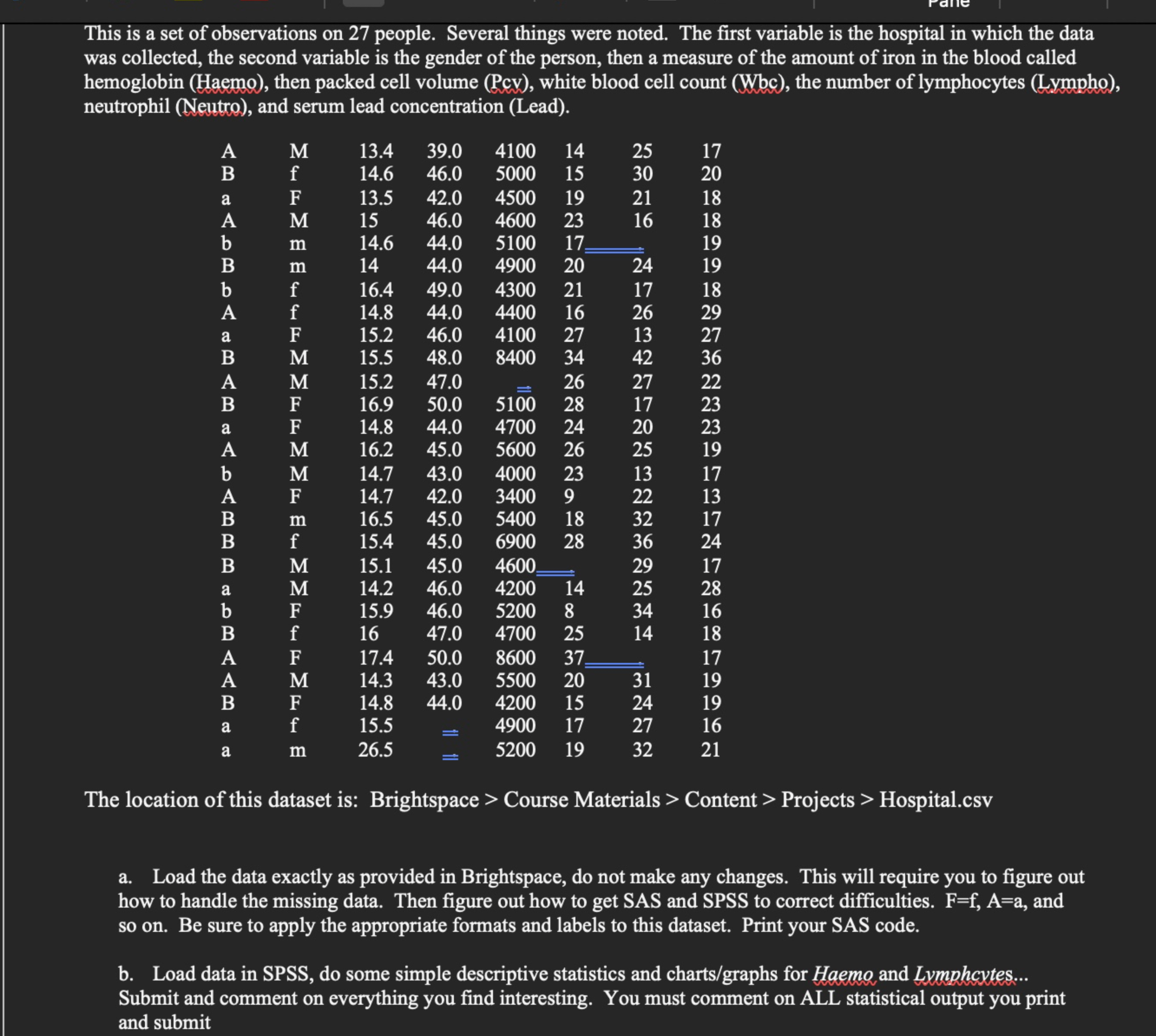
Print all necessary output and discuss. Print your SAS code. Be sure to use the appropriate formats and labels.This is a set of observations on people. Several things were noted. The first variable is the hospital in which the data
was collected, the second variable is the gender of the person, then a measure of the amount of iron in the blood called
hemoglobin Haemo then packed cell volume Pcv white blood cell count Wbbc the number of lymphocytes Lympho
neutrophil Neutro and serum lead concentration Lead
The location of this dataset is: Brightspace Course Materials Content Projects Hospital.csv
a Load the data exactly as provided in Brightspace, do not make any changes. This will require you to figure out
how to handle the missing data. Then figure out how to get SAS and SPSS to correct difficulties. and
so on Be sure to apply the appropriate formats and labels to this dataset. Print your SAS code.
b Load data in SPSS do some simple descriptive statistics and chartsgraphs for Haemo and Lymphcytes...
Submit and comment on everything you find interesting. You must comment on ALL statistical output you print
and submit
Step by Step Solution
There are 3 Steps involved in it
1 Expert Approved Answer
Step: 1 Unlock

Question Has Been Solved by an Expert!
Get step-by-step solutions from verified subject matter experts
Step: 2 Unlock
Step: 3 Unlock
 Study Help