







Question: C# in Visual Basic Form I cant figure out how to generate the information for the popLabel. Can someone please help! I can get the
C# in Visual Basic Form
I cant figure out how to generate the information for the popLabel. Can someone please help!
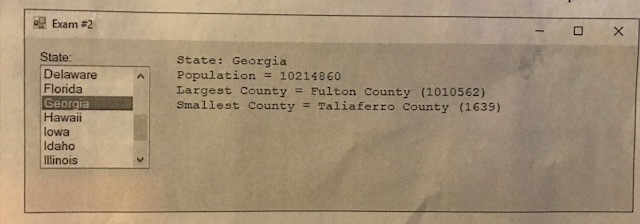
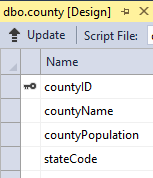
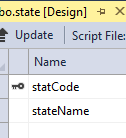
I can get the state list to populate from the state table but I cannot figure out how to query the information from the county tabel to pull the information below and generate the popLabel as seen below.
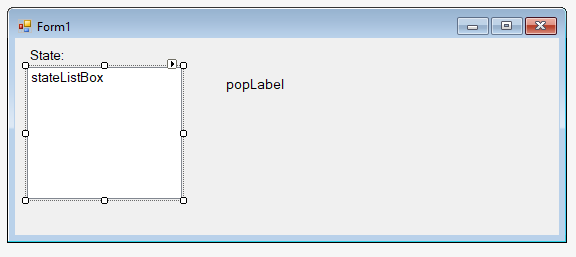
CODE I CURRENTLY HAVE:
using System; using System.Collections.Generic; using System.Linq; using System.Threading.Tasks; using System.Windows.Forms;
namespace Exam2 { static class Program { ///
using System; using System.Collections.Generic; using System.ComponentModel; using System.Data; using System.Drawing; using System.Linq; using System.Text; using System.Threading.Tasks; using System.Windows.Forms; using System.Data.SqlClient;
namespace Exam2 { public partial class Form1 : Form { string connectionString; SqlConnection connection; SqlDataAdapter adapter;
public Form1() { InitializeComponent(); InitialDatabaseObjects(); LoadStateListBox(); CloseDatabaseoObjects(); } public void InitialDatabaseObjects() { connectionString = "Data Source=(LocalDB)\\MSSQLLocalDB;AttachDbFilename= C:\\Users\\Lesley Cadden\\OneDrive\\ANDERSON UNIVERSITY\\Spring 2018\\Exam2\\census.mdf; Integrated Security = True; Connect Timeout = 30"; connection = new SqlConnection(connectionString); connection.Open(); } public void CloseDatabaseoObjects() { connection.Close(); } public void LoadStateListBox() { string query = "SELECT * FROM state"; DataTable stateTable;
stateTable = new DataTable(); adapter = new SqlDataAdapter(query, connection); adapter.Fill(stateTable);
stateListBox.Items.Clear(); foreach (DataRow row in stateTable.Rows) { stateListBox.Items.Add(row[1]); } } } }
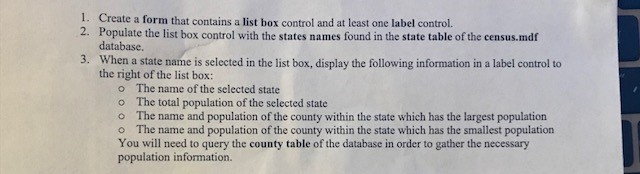
1. 2. Create a form that contains a list box control and at least one label control. Populate the list box control with the states names found in the state table of the census.mdf database. 3. When a state name is selected in the list box, display the following information in a label control to the right of the list box: o The name of the selected state o The total population of the selected state o The name and population of the county within the state which has the largest population o The name and population of the county within the state which has the smallest population You will need to query the county table of the database in order to gather the necessary population information
Step by Step Solution
There are 3 Steps involved in it

Get step-by-step solutions from verified subject matter experts
 Study Help