



Question: C) Match Fields D) Reviewing Pane 2:14 PM 5.) In the Envelopes and Labels dialog, click the A) Print button in order to select an
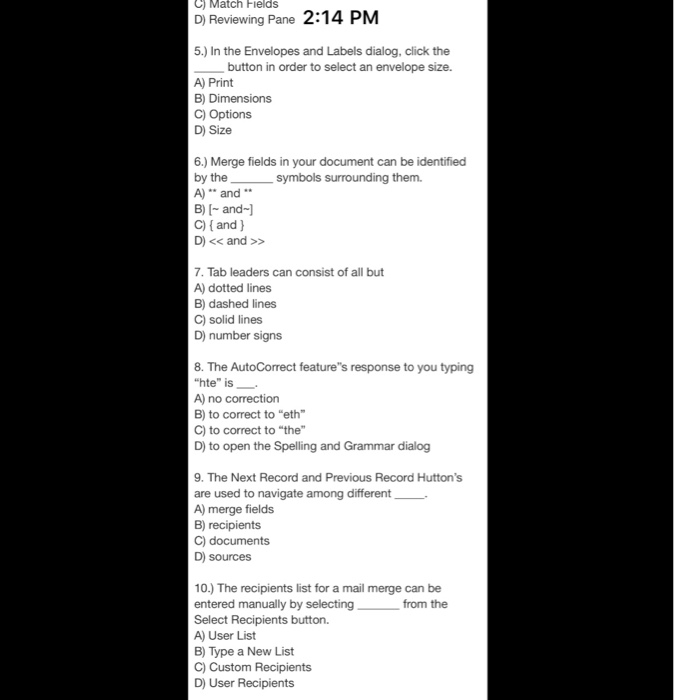
C) Match Fields D) Reviewing Pane 2:14 PM 5.) In the Envelopes and Labels dialog, click the A) Print button in order to select an envelope size. C) Options D) Size 6.) Merge fields in your document can be identified by thesymbols surrounding them. A)and" B) I andl C) and D) > 7. Tab leaders can consist of all but A) dotted lines B) dashed lines C) solid lines D) number signs 8. The AutoCorrect feature"s response to you typing "hte" is .. A) no correction B) to correct to "eth C) to correct to "the" D) to open the Spelling and Grammar dialog 9. The Next Record and Previous Record Hutton's are used to navigate among different_. A) merge fields B) recipients C) documents D) sources 10.) The recipients list for a mail merge can be entered manually by selecting Select Recipients button. A) User List B) Type a New List C) Custom Recipients D) User Recipients from the
Step by Step Solution
There are 3 Steps involved in it

Get step-by-step solutions from verified subject matter experts