







Question: C++ **NEED EXERCISE 1 and 2 COMPLETED!!** =======================================show9.cpp============================================== //-------------------------------------------------------------------- // // Laboratory 9 show9.cpp // // Linked implementation of the showStructure operation for the //
C++
**NEED EXERCISE 1 and 2 COMPLETED!!**
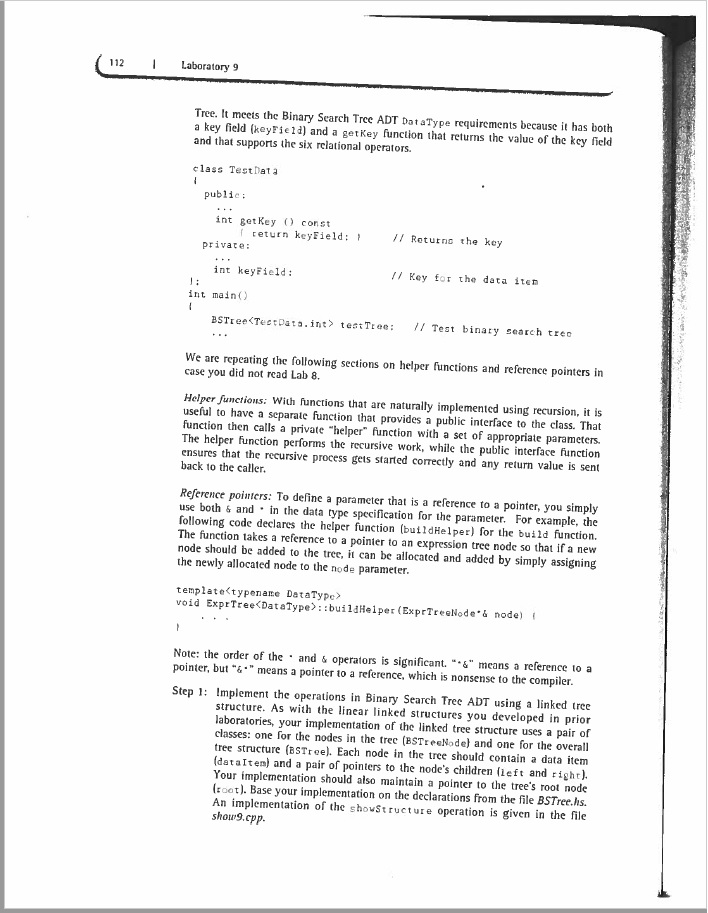
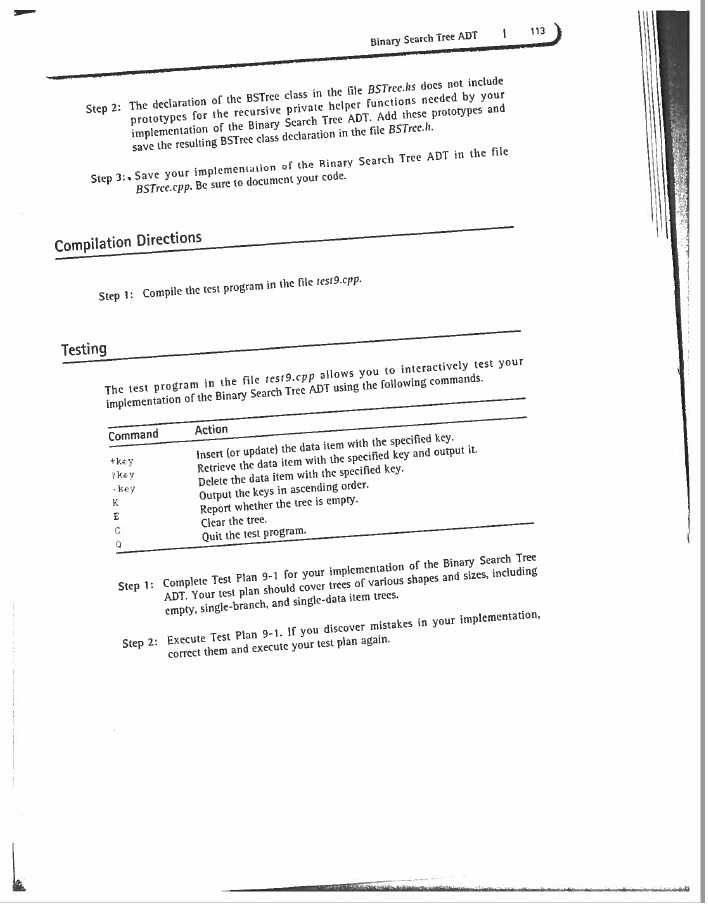
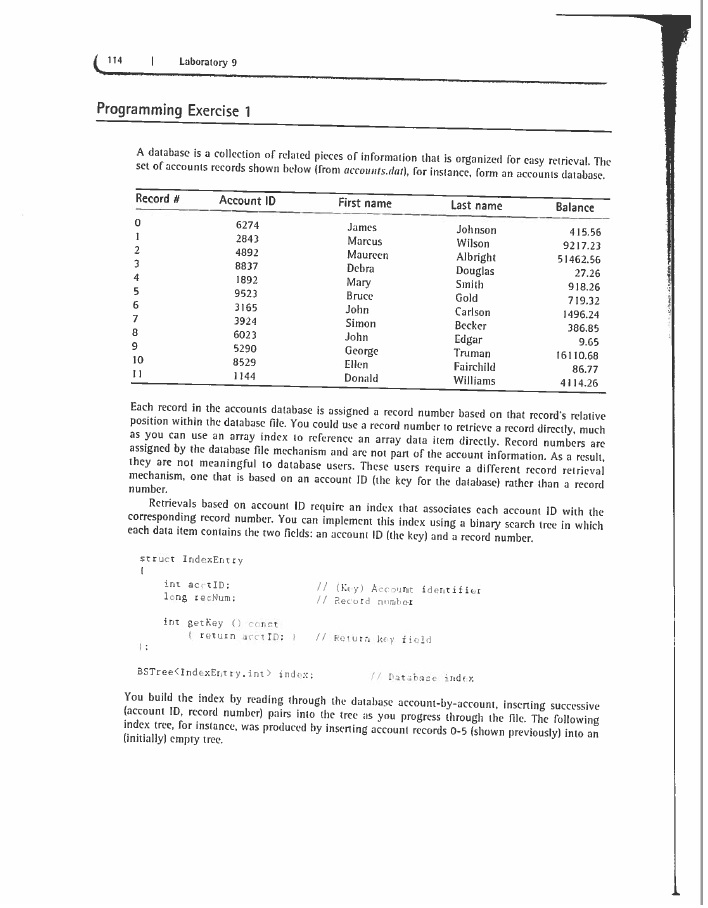
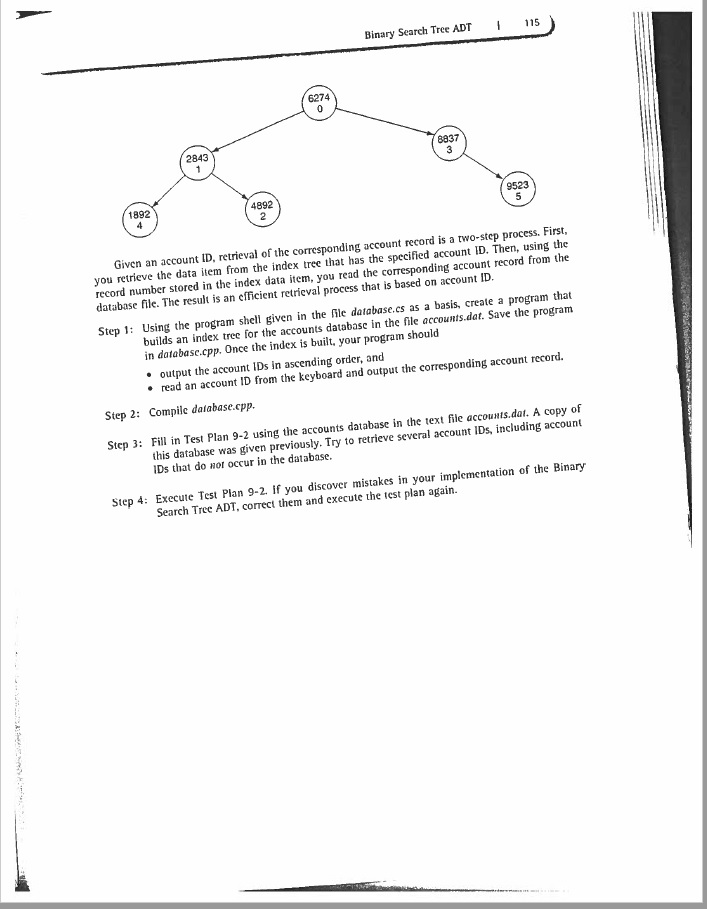
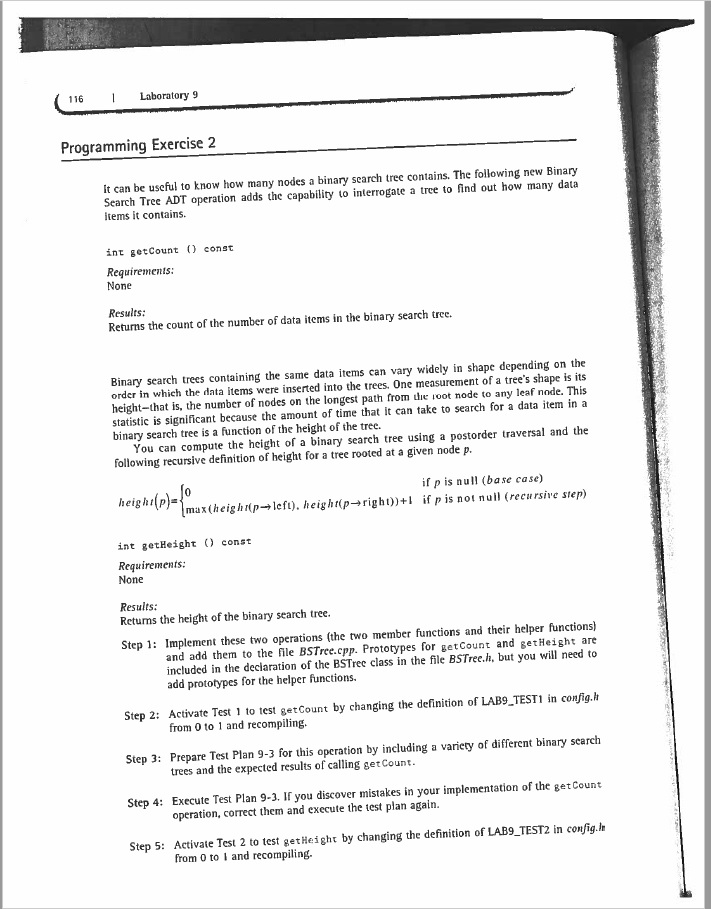

=======================================show9.cpp==============================================
//-------------------------------------------------------------------- // // Laboratory 9 show9.cpp // // Linked implementation of the showStructure operation for the // Binary Search Tree ADT // //--------------------------------------------------------------------
//--------------------------------------------------------------------
template void BSTree
// Outputs the keys in a binary search tree. The tree is output // rotated counterclockwise 90 degrees from its conventional // orientation using a "reverse" inorder traversal. This operation is // intended for testing and debugging purposes only.
{ if ( root == 0 ) cout
// - - - - - - - - - - - - - - - - - - - - - - - - - - - - - - - - - -
template void BSTree
// Recursive helper for showStructure. // Outputs the subtree whose root node is pointed to by p. // Parameter level is the level of this node within the tree.
{ int j; // Loop counter
if ( p != 0 ) { showHelper(p->right,level+1); // Output right subtree for ( j = 0 ; j dataItem.getKey(); // Output key if ( ( p->left != 0 ) && // Output "connector" ( p->right != 0 ) ) cout right != 0 ) cout left != 0 ) cout left,level+1); // Output left subtree } }
=======================================test9.cpp==============================================
//-------------------------------------------------------------------- // // Laboratory 9 test9.cpp // // Test program for the operations in the Binary Search Tree ADT // //--------------------------------------------------------------------
using namespace std;
#include
void print_help();
//-------------------------------------------------------------------- // Declaration for the binary search tree data item class //--------------------------------------------------------------------
class TestData { public:
void setKey ( int newKey ) { keyField = newKey; } // Set the key
int getKey () const { return keyField; } // Returns the key
private:
int keyField; // Key for the data item };
int main() { BSTree
print_help();
do { testTree.showStructure(); // Output tree
cout > cmd; if ( cmd == '+' || cmd == '?' || cmd == '-' || cmd == '> inputKey;
switch ( cmd ) { case 'P' : case 'p' : print_help(); break;
case '+' : // insert testData.setKey(inputKey); cout
case '?' : // retrieve if ( testTree.retrieve(inputKey,testData) ) cout
case '-' : // remove if ( testTree.remove(inputKey) ) cout
case 'K' : case 'k' : // writeKeys cout
case 'C' : case 'c' : // clear cout
case 'E' : case 'e' : // empty if ( testTree.isEmpty() ) cout
#if LAB9_TEST1 case 'G' : case 'g' : // Programming Exercise 2 cout
#if LAB9_TEST2 case 'H' : case 'h' : // Programming Exercise 2 cout
#if LAB9_TEST3 case '
case 'Q' : case 'q' : // Quit test program break;
default : // Invalid command cout
return 0; }
//--------------------------------------------------------------------
void print_help() { cout
cout
cout
===============================database.cs====================================
//-------------------------------------------------------------------- // // Laboratory 11, In-lab Exercise 1 database.cs // // (Shell) Indexed accounts database program // //--------------------------------------------------------------------
// Builds a binary search tree index for the account records in the // text file accounts.dat.
#include
using namespace std;
//-------------------------------------------------------------------- // // Declarations specifying the accounts database //
const int nameLength = 11; // Maximum number of characters in // a name const long bytesPerRecord = 38; // Number of bytes used to store // each record in the accounts // database file
struct AccountRecord { int acctID; // Account identifier char firstName[nameLength], // Name of account holder lastName[nameLength]; double balance; // Account balance };
//-------------------------------------------------------------------- // // Declaration specifying the database index //
struct IndexEntry { int acctID; // (Key) Account identifier long recNum; // Record number
int key () const { return acctID; } // Return key field };
//--------------------------------------------------------------------
void main () { ifstream acctFile ("accounts.dat"); // Accounts database file AccountRecord acctRec; // Account record BSTree
// Iterate through the database records. For each record, read the // account ID and add the (account ID, record number) pair to the // index.
// Output the account IDs in ascending order.
// Clear the status flags for the database file.
acctFile.clear();
// Read an account ID from the keyboard and output the // corresponding record.
}
========================config.h====================================
/** * BSTree class (Lab 9) configuration file. * Activate test 'N' by defining the corresponding LAB9_TESTN to have the value 1. * Deactive test 'N' by setting the value to 0. */
#define LAB9_TEST1 0 // Programming Exercise 2: getCount #define LAB9_TEST2 0 // Programming Exercise 2: getHeight
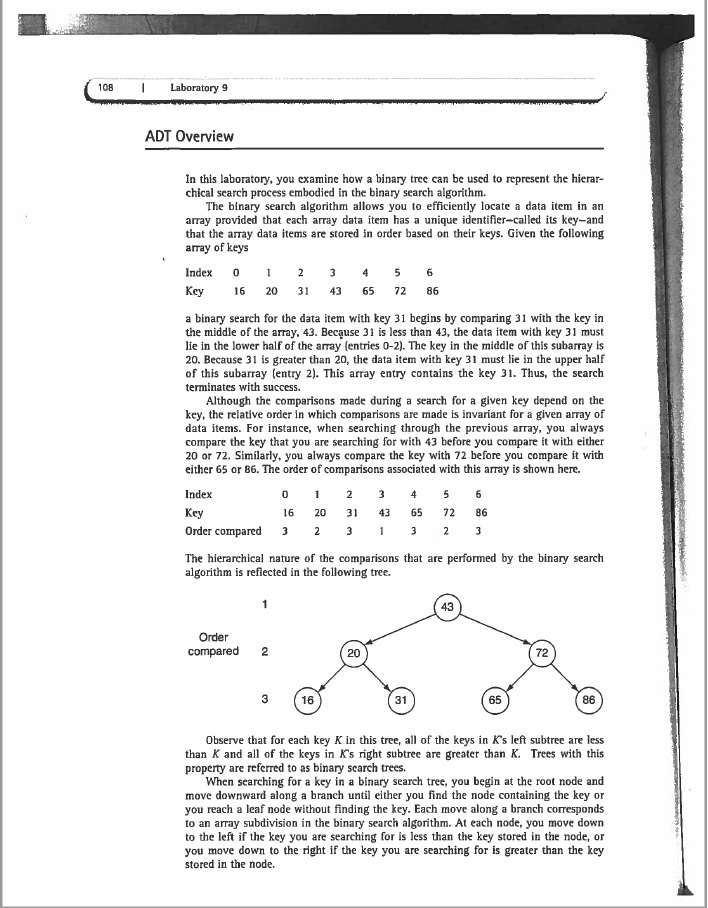
108 Laboratory 9 ADT Overview In this laboratory, you examine how a binary tree can be used to represent the hierar- chical search process embodied in the binary search algorithm. The binary search algorithm allows you to efficiently locate a data item in an array provided that each array data item has a unique identifier-called its key-and that the array data items are stored in order based on their keys. Given the following array of keys Index0 Key 16 20 3 43 65 72 86 1 2345 6 a binary search for the data item with key 31 begins by comparing 31 with the key in the middle of the array. 43. Because 3 is less than 43, the data item with key 31 must lie in the lower half of the array (entries 0-2). The key in the middle of this subarray is 20. Because 31 is greater than 20, the data item with key 31 must lie in the upper half of this subarray (entry 2). This array entry contains the key 31. Thus, the search terminates with success. Although the comparisons made during a search for a given key depend on the key, the relative order in which comparisons are made is invariant for a given array of data items. For instance, when searching through the previous array, you always compare the key that you are searching for with 43 before you compare it with either 20 or 72. Similarly, you always compare the key with 72 before you compare it with either 65 or 86. The order of comparisons associated with this array is shown here. 0 16 20 3 43 65 72 86 Ke Order compared 2 33 3 The hierarchical nature of the comparisons that are performed by the binary search algorithm is reflected in the following tree. 43 Order compared 2 20 72 16 31 65 86 Observe that for each key K in this tree, all of the keys in K's left subtree are less than K and al of the keys in K's right subtree are greater than K. Trees with this property are referred to as binary search trees. When searching for a key in a binary search tree, you begin at the root node and move downward along a branch until either you find the node containing the key or you reach a leaf node without finding the key. Each move along a branch corresponds to an array subdivision in the binary search algorithm. At each node, you move down to the left if the key you are searching for is less than the key stored in the node, or you move down to the right if the key you are searching for is greater than the key stored in the node. 108 Laboratory 9 ADT Overview In this laboratory, you examine how a binary tree can be used to represent the hierar- chical search process embodied in the binary search algorithm. The binary search algorithm allows you to efficiently locate a data item in an array provided that each array data item has a unique identifier-called its key-and that the array data items are stored in order based on their keys. Given the following array of keys Index0 Key 16 20 3 43 65 72 86 1 2345 6 a binary search for the data item with key 31 begins by comparing 31 with the key in the middle of the array. 43. Because 3 is less than 43, the data item with key 31 must lie in the lower half of the array (entries 0-2). The key in the middle of this subarray is 20. Because 31 is greater than 20, the data item with key 31 must lie in the upper half of this subarray (entry 2). This array entry contains the key 31. Thus, the search terminates with success. Although the comparisons made during a search for a given key depend on the key, the relative order in which comparisons are made is invariant for a given array of data items. For instance, when searching through the previous array, you always compare the key that you are searching for with 43 before you compare it with either 20 or 72. Similarly, you always compare the key with 72 before you compare it with either 65 or 86. The order of comparisons associated with this array is shown here. 0 16 20 3 43 65 72 86 Ke Order compared 2 33 3 The hierarchical nature of the comparisons that are performed by the binary search algorithm is reflected in the following tree. 43 Order compared 2 20 72 16 31 65 86 Observe that for each key K in this tree, all of the keys in K's left subtree are less than K and al of the keys in K's right subtree are greater than K. Trees with this property are referred to as binary search trees. When searching for a key in a binary search tree, you begin at the root node and move downward along a branch until either you find the node containing the key or you reach a leaf node without finding the key. Each move along a branch corresponds to an array subdivision in the binary search algorithm. At each node, you move down to the left if the key you are searching for is less than the key stored in the node, or you move down to the right if the key you are searching for is greater than the key stored in the node
Step by Step Solution
There are 3 Steps involved in it

Get step-by-step solutions from verified subject matter experts
 Study Help