







Question: (C++ )Need major help with this assignment. This project will introduce the details of using pointers. Write a program that (1) declares and initializes two
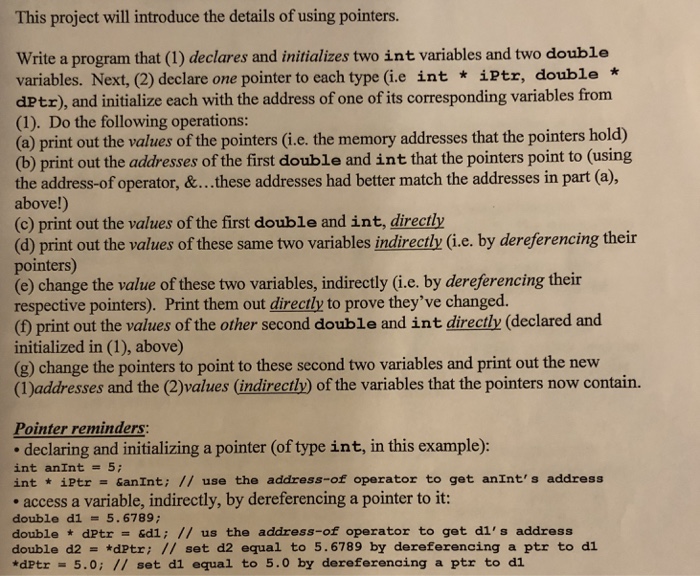
This project will introduce the details of using pointers. Write a program that (1) declares and initializes two int variables and two double variables. Next, (2) declare one pointer to each type (i.e int * iPtr, double * dPtz), and initialize each with the address of one of its corresponding variables from (1). Do the following operations: (a) print out the values of the pointers (i.e. the memory addresses that the pointers hold) (b) print out the addresses of the first double and int that the pointers point to (using the address-of operator, &..these addresses had better match the addresses in part (a), above!) (c) print out the values of the first double and int, directly (d) print out the values of these same two variables indirectly (i.e. by dereferencing their pointers) (e) change the value of these two variables, indirectly (i.e. by dereferencing their respective pointers). Print them out directly to prove they've changed. (D print out the values of the other second double and int directly (declared and initialized in (1), above) (g) change the pointers to point to these second two variables and print out the new (IDaddresses and the (2)values (indirectly) of the variables that the pointers now contain. Pointer reminders: declaring and initializing a pointer (of type int, in this example): int anint = 5; int iPtr GanInt; // use the address-of operator to get anInt's address access a variable, indirectly, by dereferencing a pointer to it: double d1 5.6789 double * dPtr = &dI; // us the address-of operator to get di's address double d2-. *dPtr; // set d2 equal to 5.6789 by dereferencing a ptr to dl *dPtr 5.0; // set d1 equal to 5.0 by dereferencing a ptr to di
Step by Step Solution
There are 3 Steps involved in it

Get step-by-step solutions from verified subject matter experts
 Study Help