







Question: C++ NX + @ ET : > C++ Pro X O How to x Clux Project X > CS11ASX Tutor jo X C Got Ho
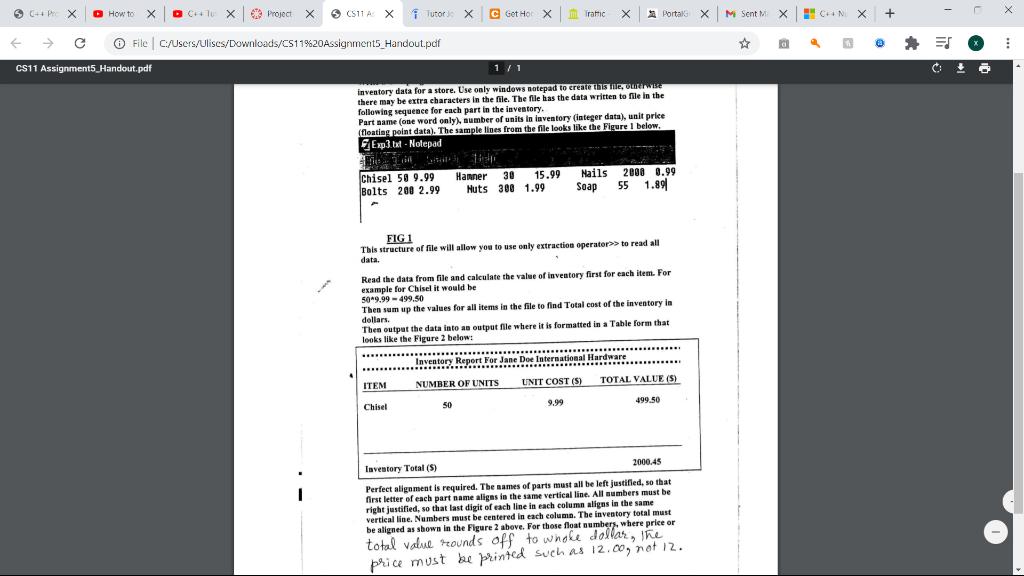
C++ NX + @ ET : > C++ Pro X O How to x Clux Project X > CS11ASX Tutor jo X C Got Ho C Get Hor x Traffic Portais x M Sent M: X File C:/Users/Ulises/Downloads/CS11%20Assignments_Handout.pdf d CS11 Assignments_Handout.pdf 11 inventory data for a store. Use only windows notepad to create this he, OR WISE there may be extra characters in the file. The file has the data written to file in the following sequence for each part in the inventory. Part name (one word only), number of units in inventory (integer data), unit price (floating point data). The sample lines from the file looks like the Figure 1 below Exp3.txt - Notepad Chisel 50 9.99 Bolts 200 2.99 Hanner 30 15.99 Nuts 308 1.99 Nails Soap 2008 0.99 55 1.891 FIG 1 This structure of file will allow you to use only extraction operator>> to read all data. Read the data from file and calculate the value of inventory first for each item. For example for Chisel it would be 50-9.99 - 499.50 Then sum up the values for all items in the file to find Total cost of the inventory in dollars. Then output the data into an output file where it is formatted in a Table form that looks like the Figure 2 below: ... Inventory Report For Jane Doe International Hardware .. NUMBER OF UNITS UNIT COST (5) TOTAL VALUE (5) ITEM Chisel 50 9.99 499.50 Inventory Total (5) 2000.45 Perfect alignment is required. The names of parts must all be left justified, so that first letter of each part name aligns in the same vertical line. All numbers must be right justified, so that last digit of each line in each column aligns in the same vertical line. Numbers must be centered in each column. The inventory total must be aligned as shown in the Figure 2 above. For those float numbers, where price or total value rounds off to whole dollar, the price must be printed such as 12.00, not 12. C++ NX + @ ET : > C++ Pro X O How to x Clux Project X > CS11ASX Tutor jo X C Got Ho C Get Hor x Traffic Portais x M Sent M: X File C:/Users/Ulises/Downloads/CS11%20Assignments_Handout.pdf d CS11 Assignments_Handout.pdf 11 inventory data for a store. Use only windows notepad to create this he, OR WISE there may be extra characters in the file. The file has the data written to file in the following sequence for each part in the inventory. Part name (one word only), number of units in inventory (integer data), unit price (floating point data). The sample lines from the file looks like the Figure 1 below Exp3.txt - Notepad Chisel 50 9.99 Bolts 200 2.99 Hanner 30 15.99 Nuts 308 1.99 Nails Soap 2008 0.99 55 1.891 FIG 1 This structure of file will allow you to use only extraction operator>> to read all data. Read the data from file and calculate the value of inventory first for each item. For example for Chisel it would be 50-9.99 - 499.50 Then sum up the values for all items in the file to find Total cost of the inventory in dollars. Then output the data into an output file where it is formatted in a Table form that looks like the Figure 2 below: ... Inventory Report For Jane Doe International Hardware .. NUMBER OF UNITS UNIT COST (5) TOTAL VALUE (5) ITEM Chisel 50 9.99 499.50 Inventory Total (5) 2000.45 Perfect alignment is required. The names of parts must all be left justified, so that first letter of each part name aligns in the same vertical line. All numbers must be right justified, so that last digit of each line in each column aligns in the same vertical line. Numbers must be centered in each column. The inventory total must be aligned as shown in the Figure 2 above. For those float numbers, where price or total value rounds off to whole dollar, the price must be printed such as 12.00, not 12
Step by Step Solution
There are 3 Steps involved in it

Get step-by-step solutions from verified subject matter experts
 Study Help