







Question: C++ perferably - Lab2 Hamming Code Enter number of data bila-M7 The number of check bita - R Sender Enter Data Bas 100 1 0
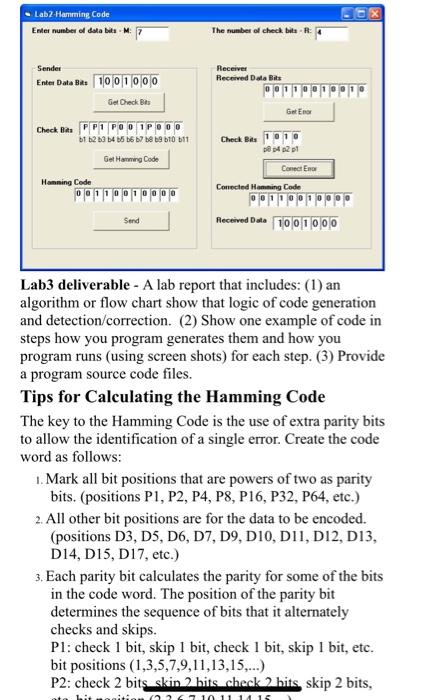
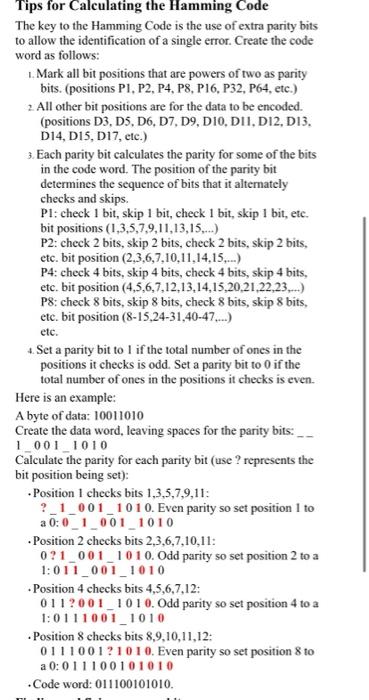
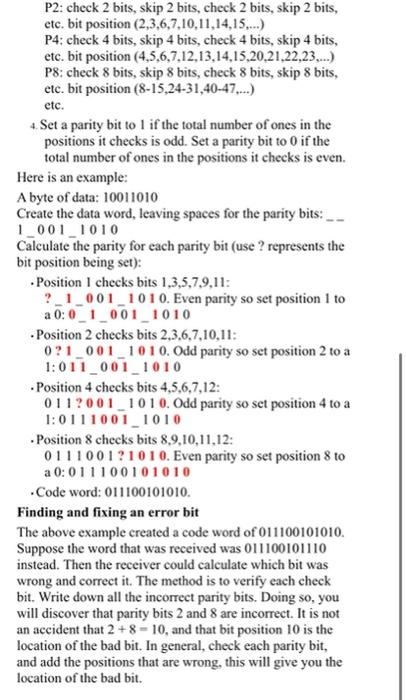
- Lab2 Hamming Code Enter number of data bila-M7 The number of check bita - R Sender Enter Data Bas 100 1 0 0 0 Receiver Received Data Bits Get Check Bits Get Eno Check Bas PP1 POD IPOD 1 2 3 4 5 6 7 8 9 10 11 Check Bas DA 21 Get Hawg Code Hanning Code 0 0 0 Conect End Conected Homming Code 0 Send Received Data 10 0 1 0 0 0 Lab3 deliverable - A lab report that includes: (1) an algorithm or flow chart show that logic of code generation and detection correction. (2) Show one example of code in steps how you program generates them and how you program runs (using screen shots) for each step. (3) Provide a program source code files. Tips for Calculating the Hamming Code The key to the Hamming Code is the use of extra parity bits to allow the identification of a single error. Create the code word as follows: 1. Mark all bit positions that are powers of two as parity bits. (positions P1, P2, P4, P8, P16, P32, P64, etc.) 2. All other bit positions are for the data to be encoded. (positions D3, D5, D6, D7, D9, DIO, DII, D12, D13, D14, D15, D17, etc.) 3. Each parity bit calculates the parity for some of the bits in the code word. The position of the parity bit determines the sequence of bits that it alternately checks and skips. Pl: check 1 bit, skip 1 bit, check 1 bit, skip 1 bit, etc. bit positions (1,3,5,7,9,11,13,15,...) P2: check 2 bits skin 2 hits check2 hits skip 2 bits, 2010 11 14 15 Tips for Calculating the Hamming Code The key to the Hamming Code is the use of extra parity bits to allow the identification of a single error. Create the code word as follows: 1. Mark all bit positions that are powers of two as parity bits. (positions P1, P2, P4, P8, P16, P32, P64, etc.) 2. All other bit positions are for the data to be encoded. (positions D3, DS, D6, D7, D9, DIO, DII, D12, D13. D14, D1S, D17, etc.) 3. Each parity bit calculates the parity for some of the bits in the code word. The position of the parity bit determines the sequence of bits that it alternately checks and skips. Pl: check 1 bit, skip 1 bit, check 1 bit skip 1 bit, etc. bit positions (1,3,5,7,9,11,13,15,...) P2: check 2 bits, skip 2 bits, check 2 bits, skip 2 bits, etc. bit position (2,3,6,7,10,11,14,15...) P4: check 4 bits, skip 4 bits, check 4 bits, skip 4 bits, etc. bit position (4,5,6,7,12,13,14,15,20,21,22,23,...) P8: check 8 bits, skip 8 bits, check 8 bits, skip 8 bits, etc. bit position (8-15,24-31,40-47...) etc. 4. Set a parity bit to 1 if the total number of ones in the positions it checks is odd. Set a parity bit to 0 if the total number of ones in the positions it checks is even. Here is an example: A byte of data: 10011010 Create the data word, leaving spaces for the parity bits: 1_001_1010 Calculate the parity for each parity bit (use ? represents the bit position being set): Position I checks bits 1,3,5,7,9,11: ?_1_001_1010. Even parity so set position 1 to a 0:01_001_1010 Position 2 checks bits 2,3,6,7,10,11: 0?1_001_1010. Odd parity so set position 2 to a 1:011_001_1010 Position 4 checks bits 4,5,6,7,12: 0112001_1010. Odd parity so set position 4 to a 1:0111001_1010 Position 8 checks bits 8,9,10,11,12: 01110011010. Even parity so set position 8 to a 0:011100101010 Code word: 011100101010 P2: check 2 bits, skip 2 bits, check 2 bits, skip 2 bits, etc. bit position (2,3,6,7,10,11,14,15...) P4: check 4 bits, skip 4 bits, check 4 bits, skip 4 bits, etc. bit position (4,5,6,7,12,13,14,15,20,21,22,23,...) P8: check 8 bits, skip 8 bits, check 8 bits, skip 8 bits, etc. bit position (8-15,24-31,40-47....) etc. 4. Set a parity bit to 1 if the total number of ones in the positions it checks is odd. Set a parity bit to 0 if the total number of ones in the positions it checks is even. Here is an example: A byte of data: 10011010 Create the data word, leaving spaces for the parity bits: _ 1_001_1010 Calculate the parity for each parity bit (use ? represents the bit position being set): Position I checks bits 1,3,5,7,9,11: ?_1_001_1010. Even parity so set position 1 to a 0:0_1_001_1010 Position 2 checks bits 2,3,6,7,10,11: 0?1_001_1010. Odd parity so set position 2 to a 1:011_001_1010 - Position 4 checks bits 4,5,6,7,12: 0112001_1010. Odd parity so set position 4 to a 1:0111001_1010 Position 8 checks bits 8,9,10,11,12: 0111001?10 10. Even parity so set position 8 to a 0:011100101010 Code word: 011100101010. Finding and fixing an error bit The above example created a code word of 011100101010. Suppose the word that was received was 011100101110 instead. Then the receiver could calculate which bit was wrong and correct it. The method is to verify each check bit. Write down all the incorrect parity bits. Doing so, you will discover that parity bits 2 and 8 are incorrect. It is not an accident that 2 +8 -10, and that bit position 10 is the location of the bad bit. In general, check each parity bit, and add the positions that are wrong, this will give you the location of the bad bit. - Lab2 Hamming Code Enter number of data bila-M7 The number of check bita - R Sender Enter Data Bas 100 1 0 0 0 Receiver Received Data Bits Get Check Bits Get Eno Check Bas PP1 POD IPOD 1 2 3 4 5 6 7 8 9 10 11 Check Bas DA 21 Get Hawg Code Hanning Code 0 0 0 Conect End Conected Homming Code 0 Send Received Data 10 0 1 0 0 0 Lab3 deliverable - A lab report that includes: (1) an algorithm or flow chart show that logic of code generation and detection correction. (2) Show one example of code in steps how you program generates them and how you program runs (using screen shots) for each step. (3) Provide a program source code files. Tips for Calculating the Hamming Code The key to the Hamming Code is the use of extra parity bits to allow the identification of a single error. Create the code word as follows: 1. Mark all bit positions that are powers of two as parity bits. (positions P1, P2, P4, P8, P16, P32, P64, etc.) 2. All other bit positions are for the data to be encoded. (positions D3, D5, D6, D7, D9, DIO, DII, D12, D13, D14, D15, D17, etc.) 3. Each parity bit calculates the parity for some of the bits in the code word. The position of the parity bit determines the sequence of bits that it alternately checks and skips. Pl: check 1 bit, skip 1 bit, check 1 bit, skip 1 bit, etc. bit positions (1,3,5,7,9,11,13,15,...) P2: check 2 bits skin 2 hits check2 hits skip 2 bits, 2010 11 14 15 Tips for Calculating the Hamming Code The key to the Hamming Code is the use of extra parity bits to allow the identification of a single error. Create the code word as follows: 1. Mark all bit positions that are powers of two as parity bits. (positions P1, P2, P4, P8, P16, P32, P64, etc.) 2. All other bit positions are for the data to be encoded. (positions D3, DS, D6, D7, D9, DIO, DII, D12, D13. D14, D1S, D17, etc.) 3. Each parity bit calculates the parity for some of the bits in the code word. The position of the parity bit determines the sequence of bits that it alternately checks and skips. Pl: check 1 bit, skip 1 bit, check 1 bit skip 1 bit, etc. bit positions (1,3,5,7,9,11,13,15,...) P2: check 2 bits, skip 2 bits, check 2 bits, skip 2 bits, etc. bit position (2,3,6,7,10,11,14,15...) P4: check 4 bits, skip 4 bits, check 4 bits, skip 4 bits, etc. bit position (4,5,6,7,12,13,14,15,20,21,22,23,...) P8: check 8 bits, skip 8 bits, check 8 bits, skip 8 bits, etc. bit position (8-15,24-31,40-47...) etc. 4. Set a parity bit to 1 if the total number of ones in the positions it checks is odd. Set a parity bit to 0 if the total number of ones in the positions it checks is even. Here is an example: A byte of data: 10011010 Create the data word, leaving spaces for the parity bits: 1_001_1010 Calculate the parity for each parity bit (use ? represents the bit position being set): Position I checks bits 1,3,5,7,9,11: ?_1_001_1010. Even parity so set position 1 to a 0:01_001_1010 Position 2 checks bits 2,3,6,7,10,11: 0?1_001_1010. Odd parity so set position 2 to a 1:011_001_1010 Position 4 checks bits 4,5,6,7,12: 0112001_1010. Odd parity so set position 4 to a 1:0111001_1010 Position 8 checks bits 8,9,10,11,12: 01110011010. Even parity so set position 8 to a 0:011100101010 Code word: 011100101010 P2: check 2 bits, skip 2 bits, check 2 bits, skip 2 bits, etc. bit position (2,3,6,7,10,11,14,15...) P4: check 4 bits, skip 4 bits, check 4 bits, skip 4 bits, etc. bit position (4,5,6,7,12,13,14,15,20,21,22,23,...) P8: check 8 bits, skip 8 bits, check 8 bits, skip 8 bits, etc. bit position (8-15,24-31,40-47....) etc. 4. Set a parity bit to 1 if the total number of ones in the positions it checks is odd. Set a parity bit to 0 if the total number of ones in the positions it checks is even. Here is an example: A byte of data: 10011010 Create the data word, leaving spaces for the parity bits: _ 1_001_1010 Calculate the parity for each parity bit (use ? represents the bit position being set): Position I checks bits 1,3,5,7,9,11: ?_1_001_1010. Even parity so set position 1 to a 0:0_1_001_1010 Position 2 checks bits 2,3,6,7,10,11: 0?1_001_1010. Odd parity so set position 2 to a 1:011_001_1010 - Position 4 checks bits 4,5,6,7,12: 0112001_1010. Odd parity so set position 4 to a 1:0111001_1010 Position 8 checks bits 8,9,10,11,12: 0111001?10 10. Even parity so set position 8 to a 0:011100101010 Code word: 011100101010. Finding and fixing an error bit The above example created a code word of 011100101010. Suppose the word that was received was 011100101110 instead. Then the receiver could calculate which bit was wrong and correct it. The method is to verify each check bit. Write down all the incorrect parity bits. Doing so, you will discover that parity bits 2 and 8 are incorrect. It is not an accident that 2 +8 -10, and that bit position 10 is the location of the bad bit. In general, check each parity bit, and add the positions that are wrong, this will give you the location of the bad bit
Step by Step Solution
There are 3 Steps involved in it

Get step-by-step solutions from verified subject matter experts
 Study Help