







Question: C# poker game using System; using System.Collections.Generic; using System.Linq; using System.Text; using System.Threading.Tasks; using CardLibrary; namespace PokerProject { class Program { const int INITIAL_BALANCE =
C# poker game
![= 1; const int BETAMOUNT_PERHAND = 1; static void Main(string[] args) {](https://dsd5zvtm8ll6.cloudfront.net/si.experts.images/questions/2024/09/66f3316db6c62_93366f3316d2bb47.jpg)
using System; using System.Collections.Generic; using System.Linq; using System.Text; using System.Threading.Tasks; using CardLibrary; namespace PokerProject { class Program { const int INITIAL_BALANCE = 1; const int BETAMOUNT_PERHAND = 1; static void Main(string[] args) { // a. Create an instance of your CardSet class, and name it myDeck. CardSet myDeck = new CardSet();
int howManyCards = 5; int balance = INITIAL_BALANCE;
Console.ForegroundColor = ConsoleColor.Yellow; Console.BackgroundColor = ConsoleColor.DarkBlue;
Console.WriteLine("Welcome to the Poker game"); Console.WriteLine("Your starting balance is $" + balance + " and you will bet $" + BETAMOUNT_PERHAND + " for each hand"); Console.Write("Press any key to start"); Console.ReadLine();
//while (balance > 0) //{ // SuperCard[] computerHand = myDeck.GetCards(howManyCards); // SuperCard[] playersHand = myDeck.GetCards(howManyCards); // //Array.Sort(computerHand); // //Array.Sort(playersHand); // DisplayHands(computerHand, playersHand); // bool won = CompareHands(computerHand, playersHand); // balance = won ? balance + BETAMOUNT_PERHAND : balance - BETAMOUNT_PERHAND; // if (won) // { // Console.WriteLine(" You won. Your balance is $" + balance); // } // else // { // Console.WriteLine(" You lost. Your balance is $" + balance); // } // Console.WriteLine("Press any key to play next hand (press q to quit)"); // string ans = Console.ReadLine().ToLower(); // if (ans.StartsWith("q")) // { // break; // }
//} if (balance == 0) Console.WriteLine("Your balance is 0, game over. Press any key to exit"); else Console.WriteLine("Good bye. Press any key to exit");
// end of program
Console.ReadLine();
}
private static bool CompareHands(SuperCard[] computerHand, SuperCard[] playersHand) {
throw new NotImplementedException();
}
private static void DisplayHands(SuperCard[] computerHand, SuperCard[] playersHand) { throw new NotImplementedException(); } } }
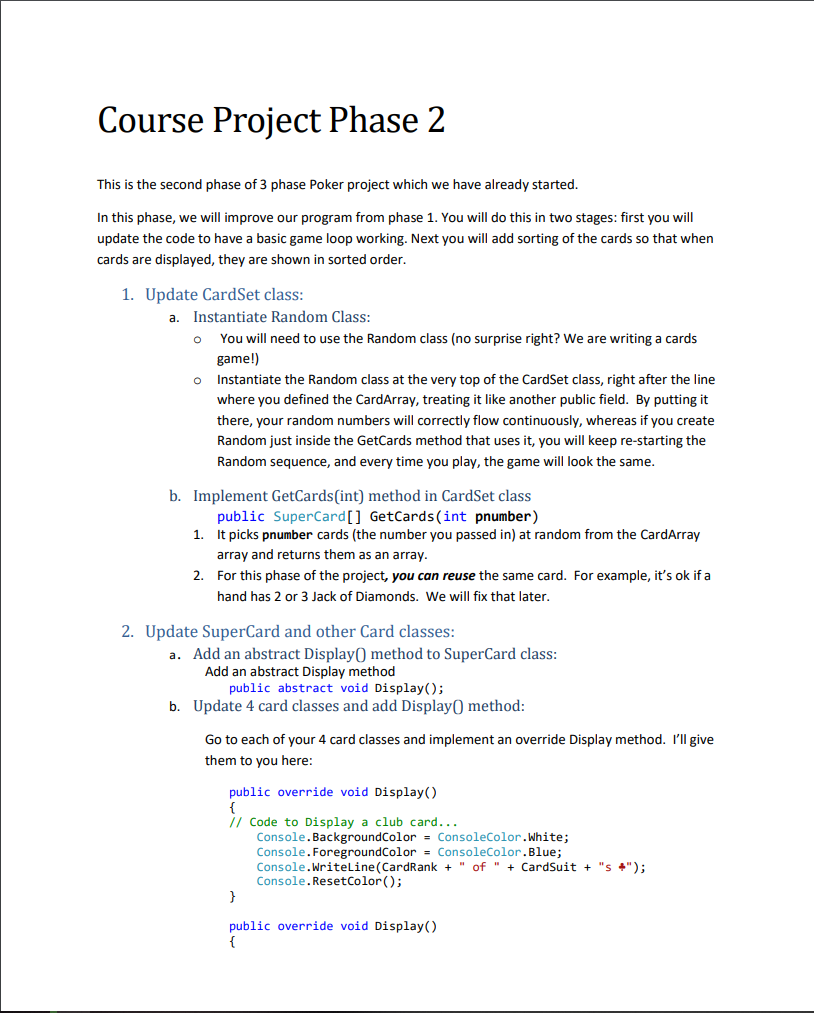
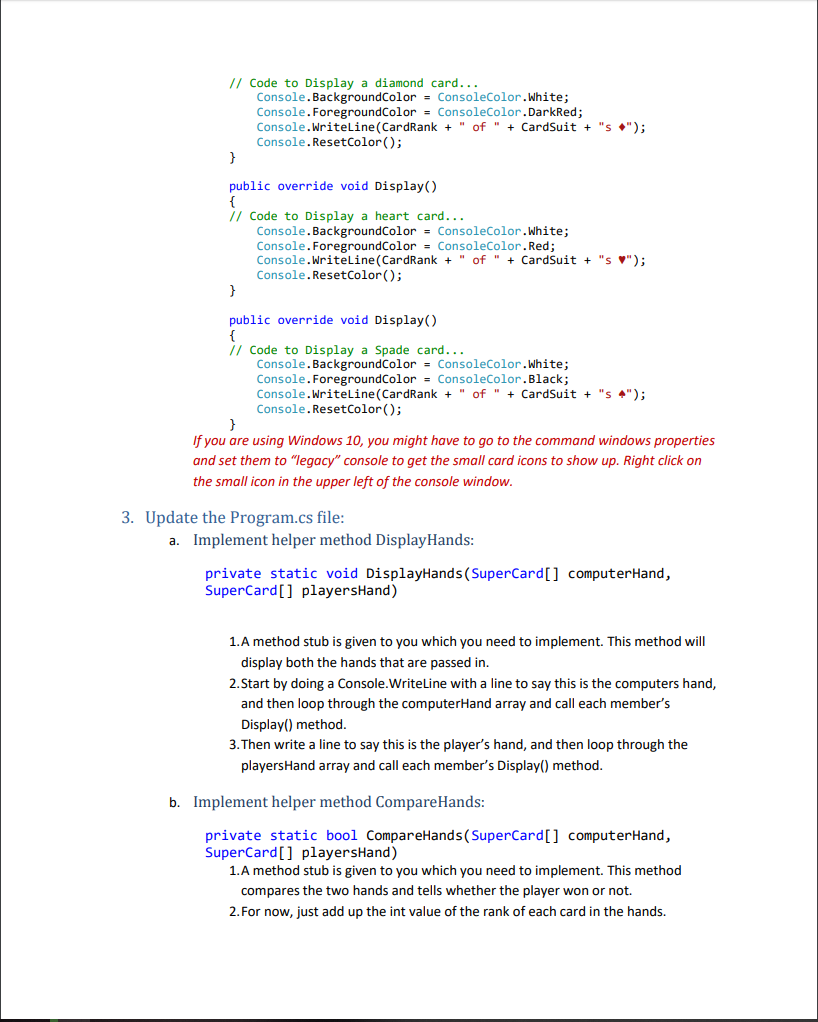
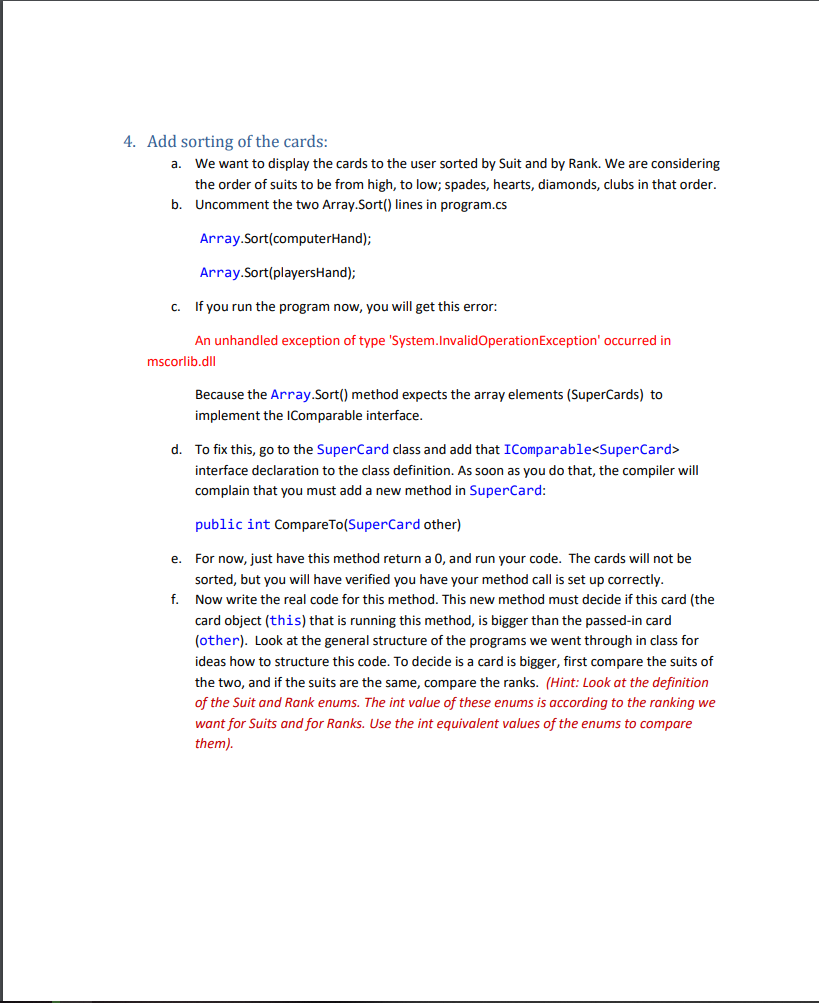
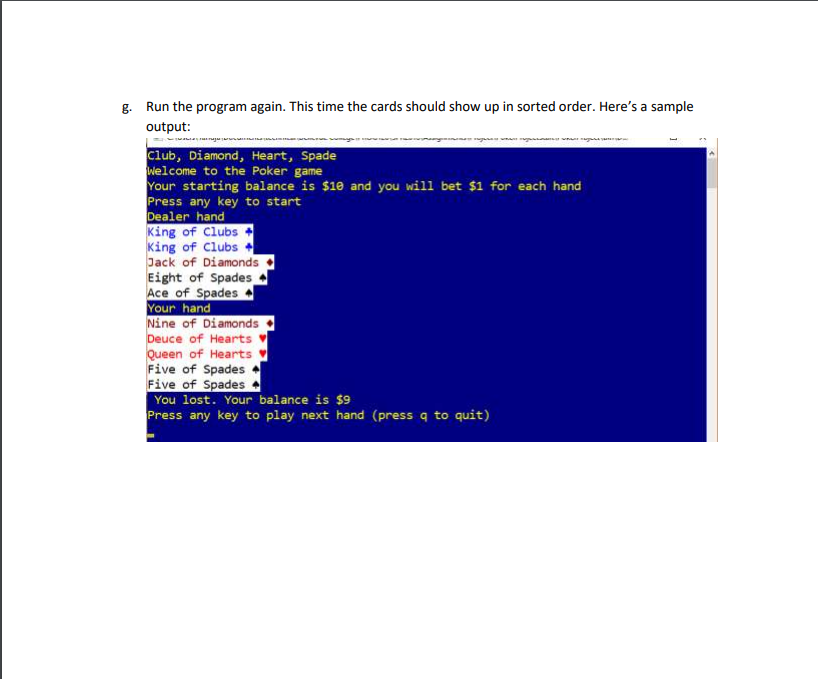
Course Project Phase 2 This is the second phase of 3 phase Poker project which we have already started In this phase, we will improve our program from phase 1. You will do this in two stages: first you will update the code to have a basic game loop working. Next you will add sorting of the cards so that when cards are displayed, they are shown in sorted order 1. Update CardSet class a. Instantiate Random Class You will need to use the Random class (no surprise right? We are writing a cards game!) Instantiate the Random class at the very top of the CardSet class, right after the line where you defined the CardArray, treating it like another public field. By putting it there, your random numbers will correctly flow continuously, whereas if you create Random just inside the GetCards method that uses it, you will keep re-starting the Random sequence, and every time you play, the game will look the same o o b. Implement GetCards(int) method in CardSet class public SuperCard[] GetCards(int pnumber) It picks pnumber cards (the number you passed in) at random from the CardArray array and returns them as an array For this phase of the project, you can reuse the same card. For example, it's ok if a hand has 2 or 3 Jack of Diamonds. We will fix that later 1. 2. 2. Update SuperCard and other Card classes Add an abstract Display0 method to SuperCard class a. Add an abstract Display method public abstract void Display); b. Update 4 card classes and add DisplayO method Go to each of your 4 card classes and implement an override Display method. I'll give them to you here public override void Display() // Code to Display a club card... Console.BackgroundColor- ConsoleColor.White; Console.ForegroundColor- ConsoleColor.Blue; Console.WriteLine (CardRank"of" CardSuit "S"); Console.ResetColor); public override void Display()
Step by Step Solution
There are 3 Steps involved in it

Get step-by-step solutions from verified subject matter experts
 Study Help