







Question: C++ Program Complete the following instructions for adding arrays to your serendipity project. The only modification that I'm making is that your arrays can not
C++ Program
Complete the following instructions for adding arrays to your serendipity project. The only modification that I'm making is that your arrays can not be global arrays, (i.e. they must be local arrays to main). You must be able to copy/paste the data in the txt file below.
Step 1: Declare all of your parallel arrays in main.cpp
Step 2: Modify the following Modules from the previous Serendipity assignment....
a. void cashier(); // No change
b. void invmenu(parallel arrays ...); // Pass all of your parallel arrays to this module.
i. lookUpBook(parallel arrays ...); // Pass them here too
ii. addBook(parallel arrays ...); // Pass them here too
iii. editBook(parallel arrays ...); // Pass them here too
iv. deleteBook(parallel arrays ...); // Pass them here too
c. void reports(); // No change
Extra Credit: 2 pts add publisher and author arrays to search.
Extra Credit: 2.5 pts search ignores case.
Extra Credit: 5 pts search matches substrings
Here's most of the code from the previous chapter assignment. But now it's not compiling. I also attached an image of the outputs
#include
#include"mainmenu.h" #include
const int DBSIZE = 20;
int main() { mainMenu(); }
// Main Menu void mainMenu() { string bookTitle[DBSIZE]; string isbn[DBSIZE]; string author[DBSIZE]; string publisher[DBSIZE]; string dateAdded[DBSIZE]; int qtyOnHand[DBSIZE]; double wholesale[DBSIZE]; double retail[DBSIZE]; int bookCount = 0; char choice;
do { system("cls"); cout Cashier Module" Inventory Module" Reports Module" Exit"
cout > choice;
switch (choice) { case '1': cashier(); break; case '2': inventory(bookTitle, isbn, author, publisher, dateAdded, qtyOnHand, wholesale, retail, &bookCount); break; case '3': reports(); break; case '4': break; default: cout
while (!found && index > qtyOnHand[index]; cout > wholesale[index]; cout > retail[index];
cout
} else cout
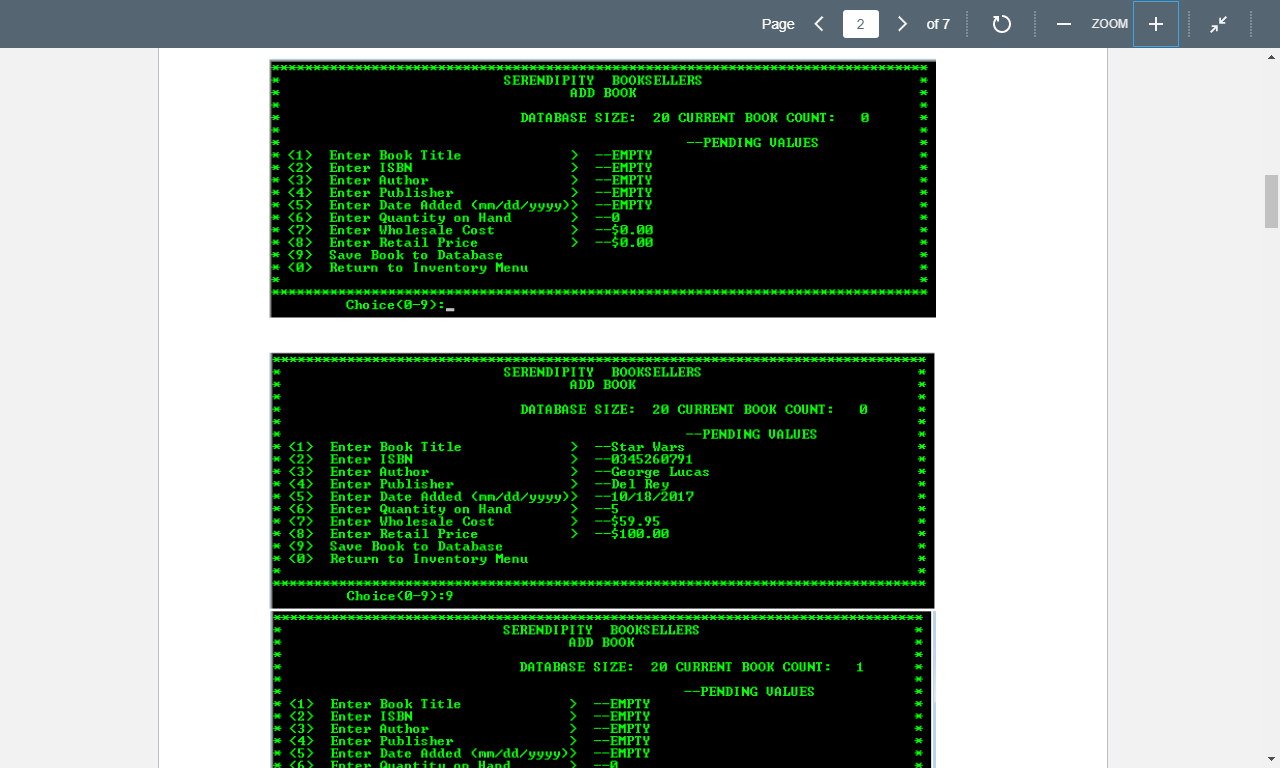
Page of 7 0 - ZOOM + K * * @ * * * SERENDIPITY BOOKSELLERS ADD BOOK DATABASE SIZE: 20 CURRENT BOOK COUNT: --PENDING VALUES Enter Book Title --EMPTY Enter ISBN --EMPTY Enter Author --EMPTY Enter Publisher --EMPTY Enter Date Added (mm/dd/yyyy --EMPTY Enter Quantity on Hand Enter Wholesale Cost --$0.09 Enter Retail Price --$0.00 Save Book to Database Return to Inventory Menu * * * * (8) Choice (0-9):- *********** *** 0 ** SERENDIPITY BOOKSELLERS ADD BOOK DATABASE SIZE: 20 CURRENT BOOK COUNT: --PENDING VALUES Enter Book Title --Star Wars Enter ISBN --0345260791 Enter Author --George Lucas Enter Publisher --Del Rey Enter Date Added (mm/dd/yyyy --10/18/2017 Enter Quantity on Hand --5 * Enter Wholesale Cost --$59.95 * Enter_Retail Price --$100.00 * Save Book to Database *
Step by Step Solution
There are 3 Steps involved in it

Get step-by-step solutions from verified subject matter experts
 Study Help