







Question: c program Non-Functional Requirements 1. Your project name must follow the pattern: {FLname}NucleotideCounter, where {FLname} is replaced by the first letter of your first name
 c program
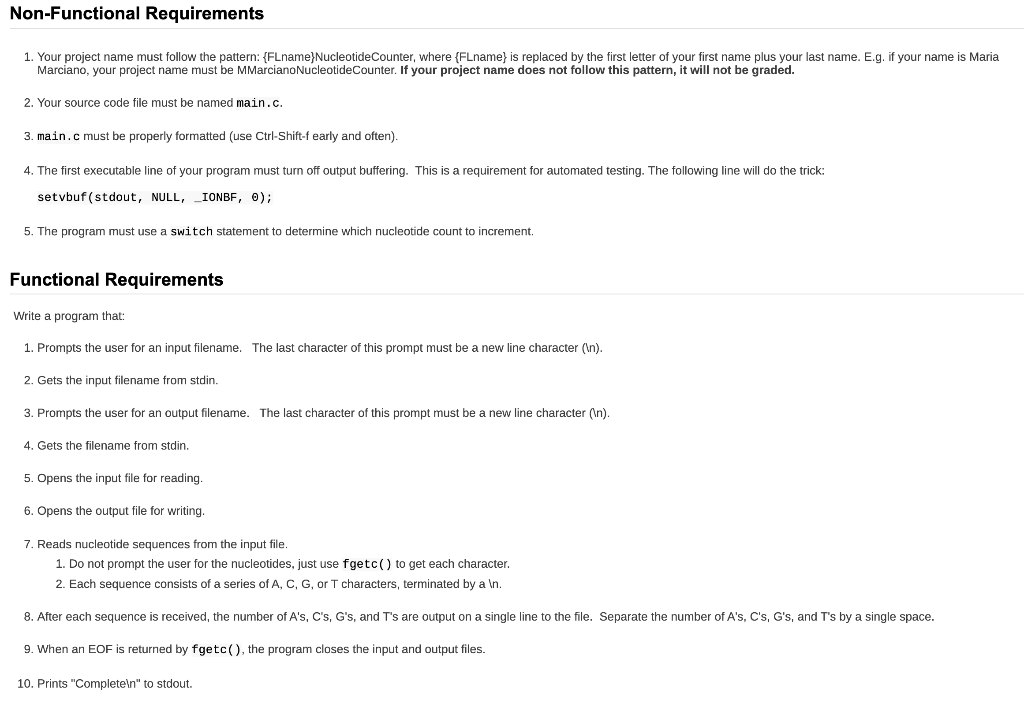
Non-Functional Requirements 1. Your project name must follow the pattern: {FLname}NucleotideCounter, where {FLname} is replaced by the first letter of your first name plus your last name. E.g. if your name is Maria Marciano, your project name must be MMarcianoNucleotide Counter. If your project name does not follow this pattern, it will not be graded. 2. Your source code file must be named main.c. 3. main.c must be properly formatted (use Ctrl-Shift-f early and often). 4. The first executable line of your program must turn off output buffering. This is a requirement for automated testing. The following line will do the trick: setvbuf(stdout, NULL, IONBF, 0); 5. The program must use a switch statement to determine which nucleotide count to increment. Functional Requirements Write a program that: 1. Prompts the user for an input filename. The last character of this prompt must be a new line character ( ). 2. Gets the input filename from stdin. 3. Prompts the user for an output filename. The last character of this prompt must be a new line character (In). 4. Gets the filename from stdin. 5. Opens the input file for reading. 6. Opens the output file for writing. 7. Reads nucleotide sequences from the input file. 1. Do not prompt the user for the nucleotides, just use fgetc() to get each character. 2. Each sequence consists of a series of A, C, G, or T characters, terminated by a In. 8. After each sequence is received, the number of A's, C's, G's, and T's are output on a single line to the file. Separate the number of A's, C's, G's, and T's by a single space. 9. When an EOF is returned by fgetc(), the program closes the input and output files. 10. Prints "Completeln" to stdout
Step by Step Solution
There are 3 Steps involved in it

Get step-by-step solutions from verified subject matter experts
 Study Help