







Question: C+++ PROGRAM Objectives : The major advantage of using structs is to make the C++ code simpler, easier to read, and easier to work with.
C+++ PROGRAM
Objectives: The major advantage of using structs is to make the C++ code simpler, easier to read, and easier to work with. After completing this assignment, students will be able to:
- use structs to create and/or introduce new custom data types
- implement structs to group fixed numbers of pieces of data of different types
- implement structs within structs
- chaining using the dot operators to access nested fields
- create an array of a structured data type
- combine structs and arrays with one another
Program Description: You have just started working in a video-game company. The designers are experimenting with different maps, which consist of various elements (characters, animals, rocks, trees, etc.). The various elements have been grouped in three separate files (fauna.txt, characters.txt, and structures.txt). The program allows the user, to load elements and their attributes from provided files, and print them on the screen for closer inspection before experimenting with the map.
The elements belong to one of three categories.
Fauna:
- id (integer) - identifies the element
- texture (string) - specifies the appearance of the element (rabbit, fox, etc.)
- color (integer)
- health (double)
- Dimensions length, width, and height. All three values are doubles
- Hostile (Boolean) determines if the animal is hostile (1) or peaceful (0)
Character:
- Id
- First name
- Last name
- Health (double)
- Dimensions
Structure:
- ID
- Texture
- Dimensions
Dimension
- Length
- Width
- Height
Task 1
While the element categories have many similarities in terms of attributes, each category has a different bundle of attributes. Create four structs, Structure, Character, Fauna, and Dimension (to be utilized be the first three structs). Each struct should have the attributes mentioned above.
Task 2
Create three arrays with the following types: Fauna, Structure, Character, and populate them by reading the respective file. Then print the arrays, as they appear in the file.
The first line in all three files, is a number indicating the number of elements in the file.
Task 3
Calculate the average length, width, and height of all elements in each category. Then display the average for metric for each category, in the following manner.
| Fauna | Structures | Characters | |
| Length | |||
| Width | |||
| Height |
Task 4
Create a function PrintHealthRange that prompts the user to insert a maximum and minimum value for a characters health attribute. Proceed to print all characters whose health falls in that range. The function must not allow the minimum value to be larger than the maximum.
Task 5
Create a Menu function that allows the user to select which category of elements to print. The menu options should be the following:
- Exit
- Print Fauna
- Print Characters
- Print Structures
- Print Averages
- Print Health in Range
The main() function should only contain the Menu() function, which must display the available options. The program must only terminate upon the users command. The rest of the functionality should be invoked through functions from within Menu().
Hints: Unless you read the file every time you want to operate on an array (which is very inefficient), you will have to pass an array as parameter to the function. You can read it once before the Menu actions are invoked. You will need to read the array size from the file to do so.
Do NOT use global variables. If you do so there will be a deduction of 10 points from your total points.
Please check the attached Grading Rubric for the grading criteria.
Submission notes for Task:
- Zip the entire Code::Blocks project containing all the .cpp, .h, .cbp files and name the zipped file Assg1_cslogin.zip, where the cslogin is your login ID for the computers at the Department of Computer Science at ODU
- Submit the zipped file using the appropriate Blackboard link.
Sample output of Menu: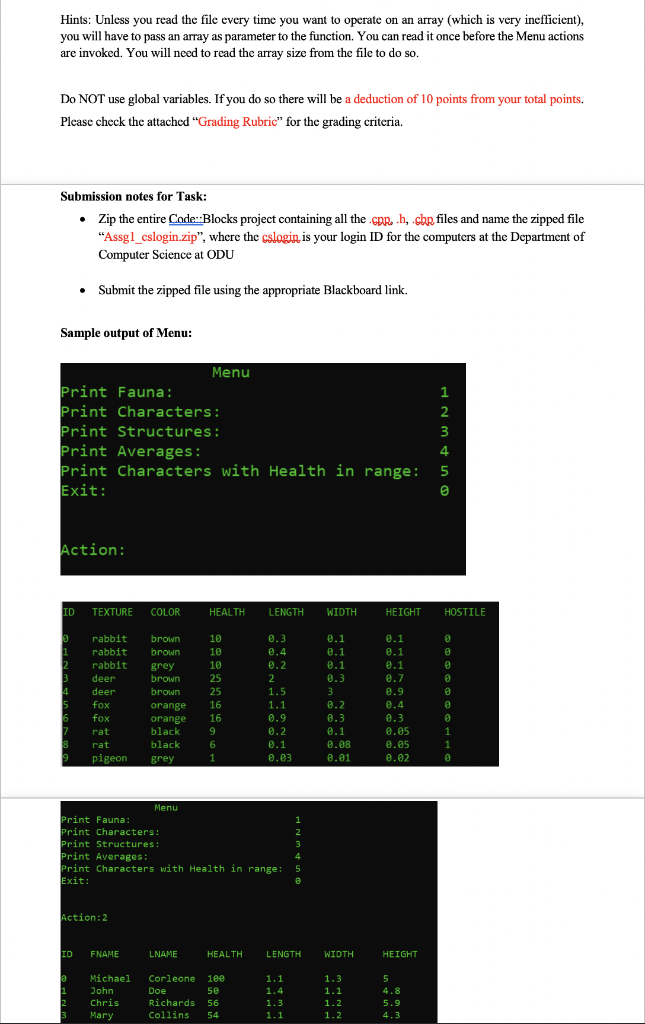
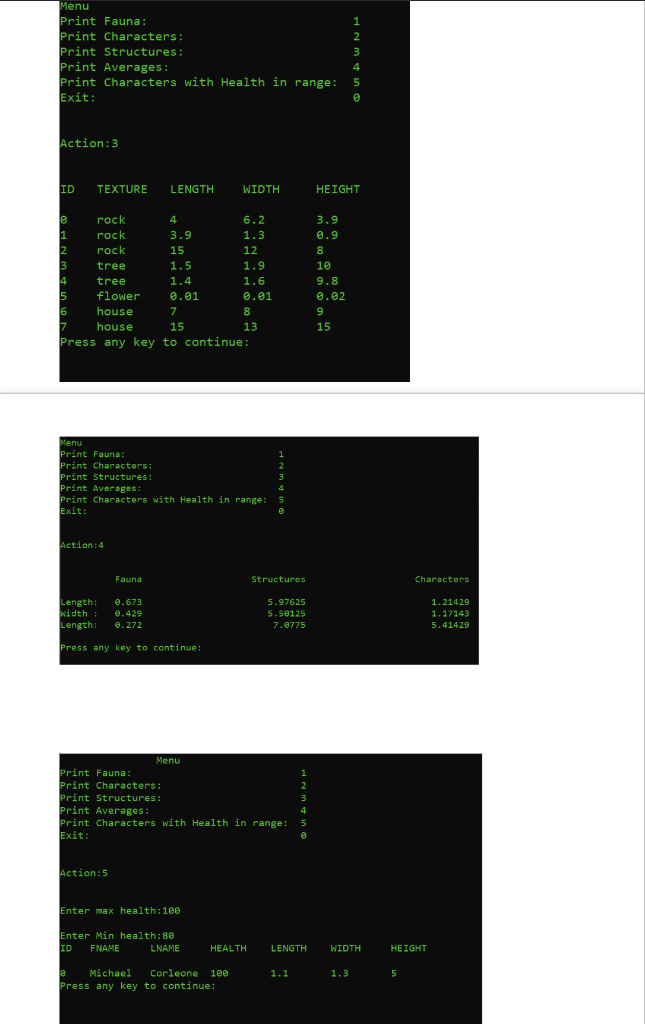
Here are the files:
characters.txt
7 0 Michael Corleone 100 1.1 1.3 5.0 1 John Doe 50 1.4 1.1 4.8 2 Chris Richards 56 1.3 1.2 5.9 3 Mary Collins 54 1.1 1.2 4.3 4 Gus Evans 64 1.3 1.3 6.4 5 George Weiss 39 1.2 1.1 5.6 6 Eustace Smith 64 1.1 1.0 5.9
Fauna.txt
10 0 rabbit brown 10 .3 .1 .1 0 1 rabbit brown 10 .4 .1 .1 0 2 rabbit grey 10 .2 .1 .1 0 3 deer brown 25 2 .3 .7 0 4 deer brown 25 1.5 3 .9 0 5 fox orange 16 1.1 .2 .4 0 6 fox orange 16 .9 .3 .3 0 7 rat black 9 .2 .1 .05 1 8 rat black 6 .1 .08 .05 1 9 pigeon grey 1 .03 .01 .02 0
Structures.txt
10 0 rabbit brown 10 .3 .1 .1 0 1 rabbit brown 10 .4 .1 .1 0 2 rabbit grey 10 .2 .1 .1 0 3 deer brown 25 2 .3 .7 0 4 deer brown 25 1.5 3 .9 0 5 fox orange 16 1.1 .2 .4 0 6 fox orange 16 .9 .3 .3 0 7 rat black 9 .2 .1 .05 1 8 rat black 6 .1 .08 .05 1 9 pigeon grey 1 .03 .01 .02 0
Hints: Unless you read the file every time you want to operate on an array (which is very ineflicient), you will have to pass an array as parameter to the function. You can read it once before the Menu actions are invoked. You will need to read the array size from the file to do so. Do NOT use global variables. If you do so there will be a deduction of 10 points from your total points. Please check the attached "Grading Rubric" for the grading criteria. Submission notes for Task: Zip the entire Code::Blocks project containing all the prh, cbp files and name the zipped file "Assgl_cslogin.zip", where the cslogin is your login ID for the computers at the Department of Computer Science at ODU Submit the zipped file using the appropriate Blackboard link. Sample output of Menu: Menu Print Fauna: Print Characters: Print Structures: Print Averages: Print Characters with Health in range: Exit: Action: ID TEXTURE COLOR HEALTH LENGTH WIDTH HEIGHT HOSTILE 10 0.3 0.4 0.2 0.1 0.1 0.1 0.1 10 0.1 2.2 1.5 rabbit rabbit rabbit deer deer fox fox rat rat pigeon brown brown grey brown brown orange orange black black grey 16 1.1 8.9 0.9 0.4 0.3 0.05 0.05 0.02 0.2 8.3 8.1 0.98 0.01 9 6 1 0.2 0.1 0.03 S 9 Menu Print Fauna: Print Characters! Print Structures: Print Averages: Print Characters with Health in range: Exit: HNM Action:2 ID FNAME LNAME HEALTH LENGTH WIDTH HEIGHT 1.3 1 Michael John Chris Mary Corleone nee Doe 50 Richards 56 Collins 54 1.1 1.4 1.3 1.1 1.1 1.2 5.9 Menu Print Fauna: Print Characters: Print Structures : Print Averages: Print Characters with Health in range: Exit: OU AWNE Action: 3 ID TEXTURE LENGTH WIDTH HEIGHT 3.9 0.9 1.3 rock 6.2 rock 3.9 rock 12 tree 1.5 1.9 tree 1.4 1.6 5 flower 0.01 0.01 6 house house 15 Press any key to continue: 9.8 0.02 Menu Print Fauna: Print Characters: Print Structures: Print Averages: print Characters with Health in range: Exit: Action: 4 Fauna Structures Characters Length: Width: Length: 0.673 0.429 0.272 5.97625 5.50125 7.8775 1.21429 1.17143 5.41429 Press any key to continue: Menu Print Fauna: Print Characters: Print Structures: Print Averages: print Characters with Health in range: Exit: Nmin Action: Enter max health:100 Enter Min health:80 ID FNAME LNAME HEALTH LENGTH WIDTH HEIGHT e Michael Corleone 188 Press any key to continue: 1.1 1. 3 5
Step by Step Solution
There are 3 Steps involved in it

Get step-by-step solutions from verified subject matter experts
 Study Help