Question: C Program ONLY: Also, when the file compiles, the executable is placed in the project's debug directory and is called greetings. The links of greetings
C Program ONLY:
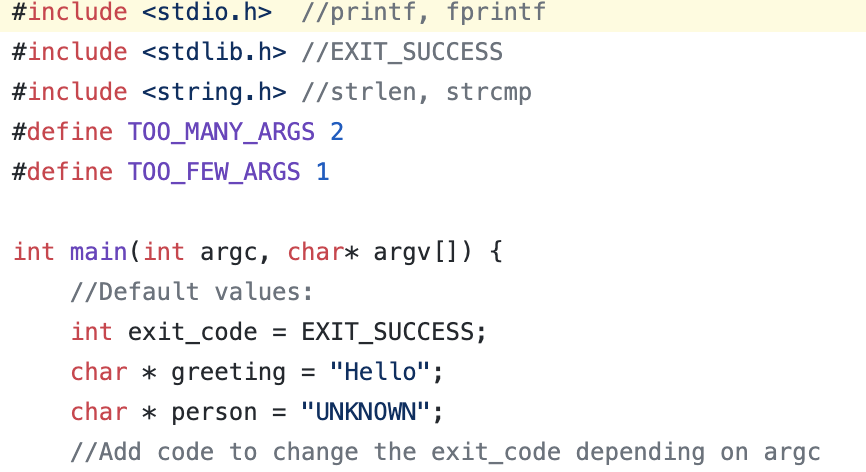

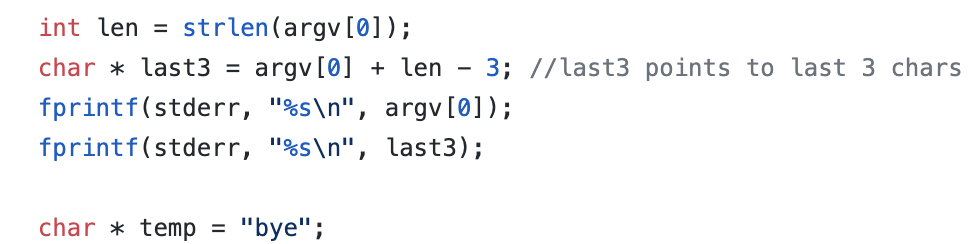
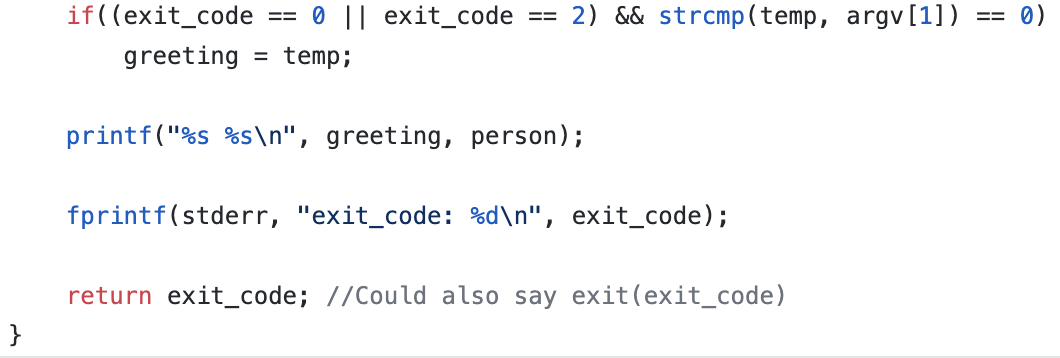
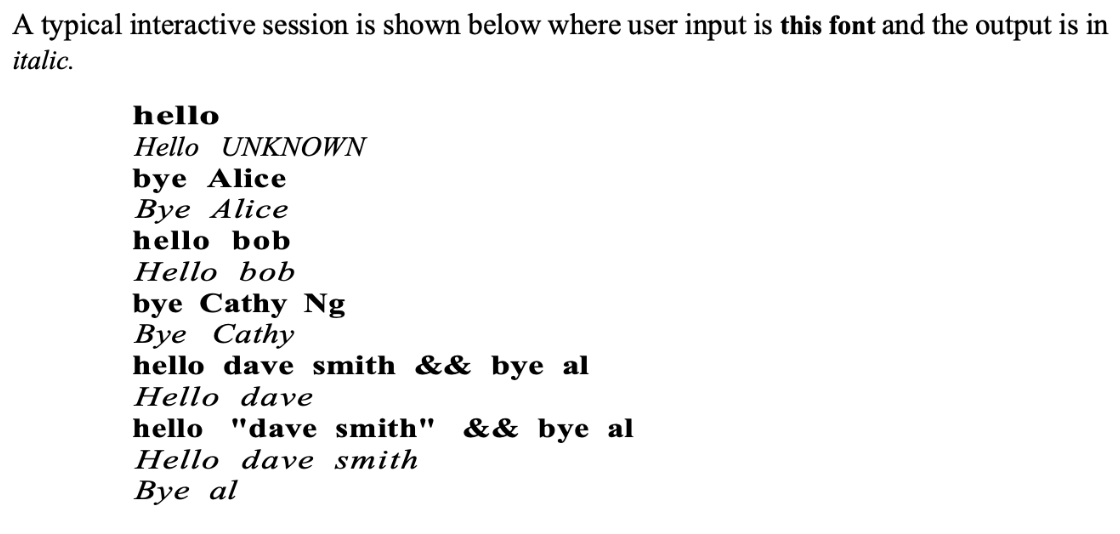
Also, when the file compiles, the executable is placed in the project's debug directory and is called greetings. The links of greetings command is made using the shell commands: ln greetings hello and ln greetings bye. How do you access that the hello and bye commands at the same time? Can what you type in the command line after the links are made to show that the code works?
Modify the body of the main function so that it has the following behaviour: It prints a string in the form "greeting person". The greeting is Hello (by default) or Bye if the program is invoked with a command that ends in the string bye. If there is exactly one argument to the command main should return 0 (zero) as the exit code. Otherwise, it should return 1 if there are no arguments and 2 if there is more than one argument. #include //printf, fprintf #include //EXIT_SUCCESS #include //strlen, strcmp #define TOO_MANY_ARGS 2 #define TOO_FEW_ARGS 1 int main(int argc, char* argv[]) { //Default values: int exit_code = EXIT_SUCCESS; char * greeting "Hello"; char * person = "UNKNOWN"; // Add code to change the exit_code depending on argo = // Add code to change 'person' if one is given on command line int len = strlen(argv[0]); char * last3 = argv[0] + len 3; //last3 points to last 3 chars fprintf(stderr, "%s ", argv[0]); fprintf(stderr, "%s ", last3); char * temp "bye"; 2) && strcmp(temp, argv[1]) 0) if((exit_code 0 || exit_code greeting = temp; printf("%s %s ", greeting, person); fprintf(stderr, "exit_code: %d ", exit_code); return exit_code; //Could also say exit(exit_code) } A typical interactive session is shown below where user input is this font and the output is in italic. hello Hello UNKNOWN bye Alice Bye Alice hello bob Hello bob bye Cathy Ng Bye Cathy hello dave smith && bye al Hello dave hello "dave smith" && bye al Hello dave smith Bye al Modify the body of the main function so that it has the following behaviour: It prints a string in the form "greeting person". The greeting is Hello (by default) or Bye if the program is invoked with a command that ends in the string bye. If there is exactly one argument to the command main should return 0 (zero) as the exit code. Otherwise, it should return 1 if there are no arguments and 2 if there is more than one argument. #include //printf, fprintf #include //EXIT_SUCCESS #include //strlen, strcmp #define TOO_MANY_ARGS 2 #define TOO_FEW_ARGS 1 int main(int argc, char* argv[]) { //Default values: int exit_code = EXIT_SUCCESS; char * greeting "Hello"; char * person = "UNKNOWN"; // Add code to change the exit_code depending on argo = // Add code to change 'person' if one is given on command line int len = strlen(argv[0]); char * last3 = argv[0] + len 3; //last3 points to last 3 chars fprintf(stderr, "%s ", argv[0]); fprintf(stderr, "%s ", last3); char * temp "bye"; 2) && strcmp(temp, argv[1]) 0) if((exit_code 0 || exit_code greeting = temp; printf("%s %s ", greeting, person); fprintf(stderr, "exit_code: %d ", exit_code); return exit_code; //Could also say exit(exit_code) } A typical interactive session is shown below where user input is this font and the output is in italic. hello Hello UNKNOWN bye Alice Bye Alice hello bob Hello bob bye Cathy Ng Bye Cathy hello dave smith && bye al Hello dave hello "dave smith" && bye al Hello dave smith Bye al









 Study Help