







Question: c++ program (only use Char array and loop and if/else condition.. don't use interception or vector because I am a beginner so make the program
c++ program (only use Char array and loop and if/else condition.. don't use interception or vector because I am a beginner so make the program only beginner level.)
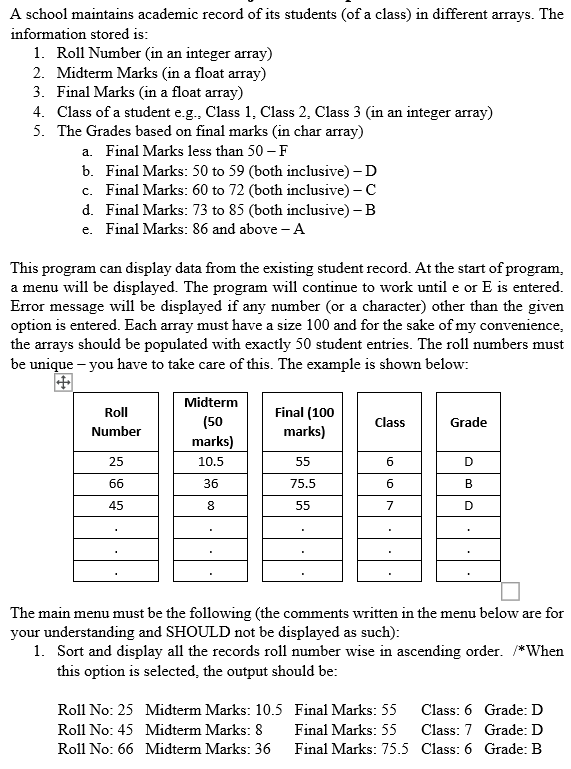
A school maintains academic record of its students (of a class) in different arrays. The information stored is: 1. Roll Number (in an integer array) 2. Midterm Marks (in a float array) 3. Final Marks (in a float array) 4. Class of a student e.g., Class 1. Class 2. Class 3 (in an integer array) 5. The Grades based on final marks (in char array) a. Final Marks less than 50-F b. Final Marks: 50 to 59 (both inclusive)-D c. Final Marks: 60 to 72 (both inclusive)-C d. Final Marks: 73 to 85 (both inclusive) - B e. Final Marks: 86 and above - A This program can display data from the existing student record. At the start of program, a menu will be displayed. The program will continue to work until e or E is entered. Error message will be displayed if any number (or a character) other than the given option is entered. Each array must have a size 100 and for the sake of my convenience, the arrays should be populated with exactly 50 student entries. The roll numbers must be unique - you have to take care of this. The example is shown below: Roll Number Final (100 marks) Class Midterm (50 marks) 10.5 Grade 25 55 6 D 66 36 75.5 6 B 45 8 55 7 D The main menu must be the following (the comments written in the menu below are for your understanding and SHOULD not be displayed as such): 1. Sort and display all the records roll number wise in ascending order. /*When this option is selected the output should be: Roll No: 25 Midterm Marks: 10.5 Final Marks: 55 Class: 6 Grade: D Roll No: 45 Midterm Marks: 8 Final Marks: 55 Class: 7 Grade: D Roll No: 66 Midterm Marks: 36 Final Marks: 75.5 Class: 6 Grade: B
Step by Step Solution
There are 3 Steps involved in it

Get step-by-step solutions from verified subject matter experts
 Study Help