







Question: C++ program, please follow the instructions on these 3 pictures. The following is the code teacher given. please write the code with the following. a/**
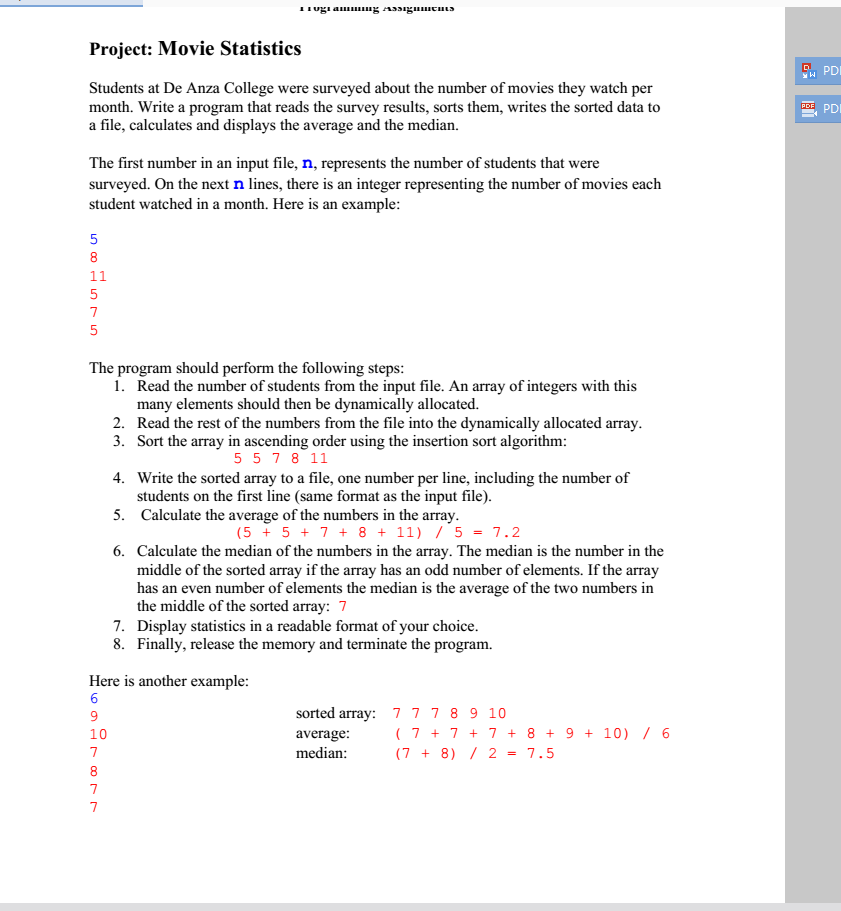
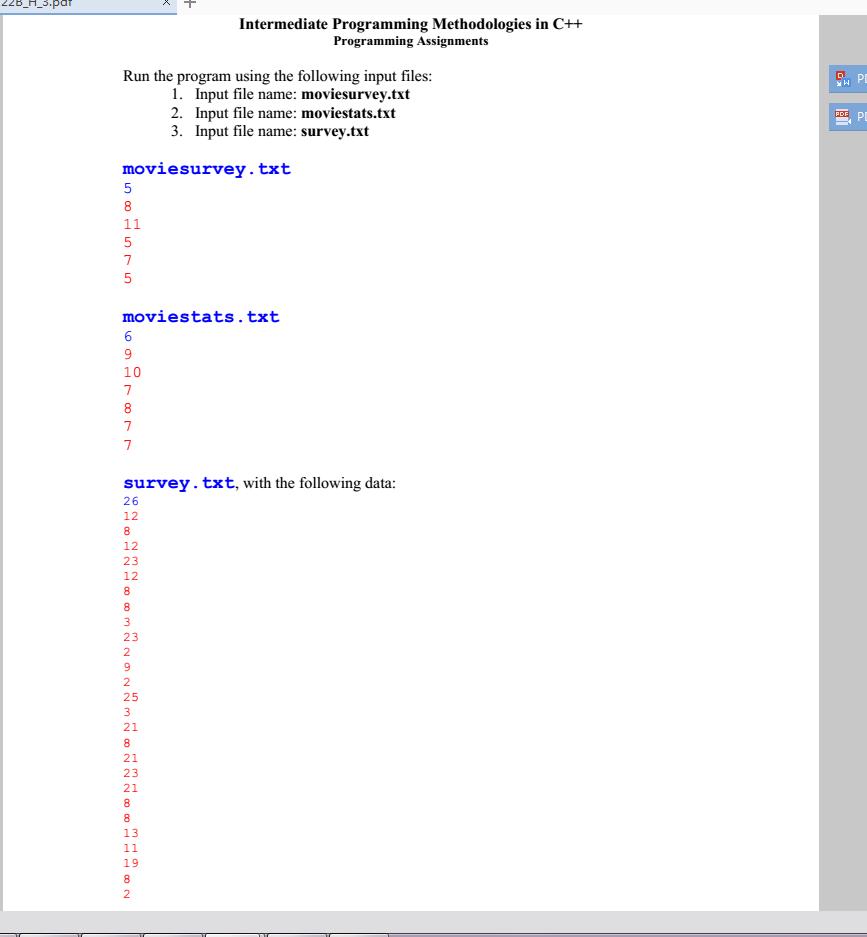
C++ program, please follow the instructions on these 3 pictures. The following is the code teacher given. please write the code with the following.
a/** CIS 22B: Homework 3C
Survey Statistics
NAME: */ #include
#ifdef _MSC_VER #include
// Function prototypes int *readSurveyData(string filename, int &n); void insertionSort(int *pAry, int *pLast); void writeArray(string filename, int *pAry, int *pLast); double calcAvg(int *pAry, int *pLast); double calcMedian(int *pAry, int *pLast); void displayStats(int n, double avg, double median);
int main() {
string inFileName[] = {"moviesurvey.txt", "moviestats.txt", "survey.txt", "testempty.txt", ""}; string outFileName[] = {"surveyOut.txt", "statsOut.txt", "out.txt", "testemptyOut.txt", ""}; int choice = 1; // to stop the program to allow the user to see the results one file at a time
int n; int *pAry; double avg, median;
// test loop: takes the names of 4 input files from an array for (int i = 0; choice == 1 && inFileName[i] != ""; i++) { pAry = readSurveyData(inFileName[i], n); int *pLast = pAry + n - 1; insertionSort(pAry, pLast); writeArray(outFileName[i], pAry, pLast); avg = calcAvg(pAry, pLast); median = calcMedian(pAry, pLast); displayStats(n, avg, median);
cout > choice; }
#ifdef _MSC_VER cout
return 0; }
/*************************************************************** This function reads data from an input file into a dynamically allocated array filename - the name of the input file n - the array size (an output parameter) Return - the dynamically allocated array */ int *readSurveyData(string filename, int &n) { return NULL; }
/*************************************************************** This function performs an ascending order insertion sort on array. pList - points to the first element in array pLast - points to the last element in array */ void insertionSort(int *pAry, int *pLast) {
}
/*************************************************************** This function writes the contents of array to a file filename - name of the output file pList - points to the first element in array pLast - points to the last element in array */ void writeArray(string filename, int *pAry, int *pLast) {
}
/*************************************************************** This function calculates and returns the average of the numbers in array pList - points to the first element in the array pLast - points to the last element in the array */ double calcAvg(int *pAry, int *pLast) { double avg = 0;
return avg; }
/*************************************************************** This function calculates and returns the median of the numbers in array pList - points to the first element in the array pLast - points to the last element in the array */ double calcMedian(int *pAry, int *pLast) { double median = 0;
return median; }
/*************************************************************** This function displays the movie statistics pList - points to the first element in the array pLast - points to the last element in the array */ void displayStats(int n, double avg, double median) {
}
/*************************************************************** Save the OUTPUT below
*/
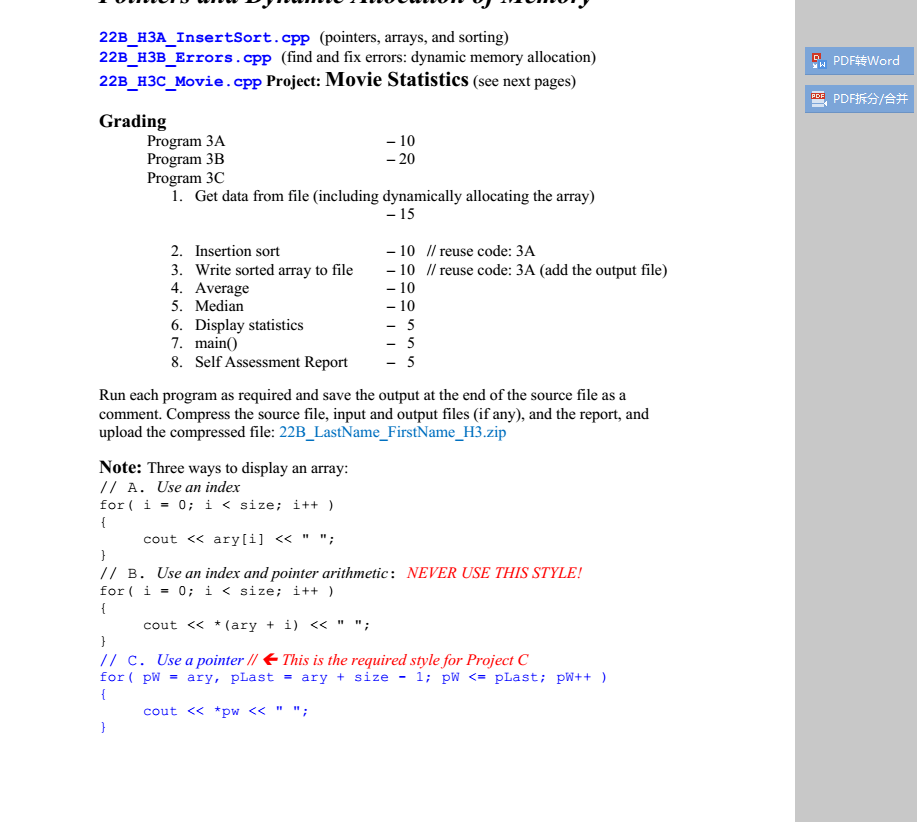
22B H3A InsertSort.cpp (pointers, arrays, and sorting) 22B H3B Errors.cpp (find and fix errors: dynamic memory allocation) 22B H3C Movie. cpp Project: Movie Statistics (see next pages) PDFWord .PDF/ Grading Program 3A Program 3B Program 3C 10 20 1. Get data from file (including dynamically allocating the array) 15 10 10 2. Insertion sort 3. Write sorted array to file 4. Average 5. Median 6. Display statistics 7. main0 8. Self Assessment Report I/ reuse code: 3A 10 // reuse code: 3A (add the output file) 10 Run each program as required and save the output at the end of the source file as a comment. Compress the source file, input and output files (if any), and the report, and upload the compressed file: 22B_LastName_FirstName_H3.zip Note: Three ways to display an array: // A. Use an index for0 i
Step by Step Solution
There are 3 Steps involved in it

Get step-by-step solutions from verified subject matter experts
 Study Help