







Question: C PROGRAM processor.c #include processor.h MESSAGE messageCache[CACHE_SIZE]; void addMessageToCache(char *inputLine) { // TODO } void messageDispatcher(void) { // TODO } void processMessage(MESSAGE *message) { //
![C PROGRAM processor.c #include "processor.h" MESSAGE messageCache[CACHE_SIZE]; void addMessageToCache(char *inputLine) { //](https://dsd5zvtm8ll6.cloudfront.net/si.experts.images/questions/2024/09/66f92a4220498_31366f92a419322e.jpg)
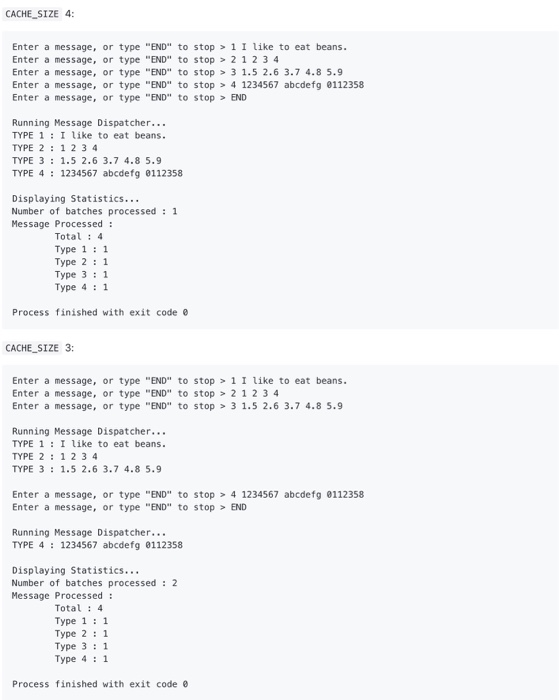
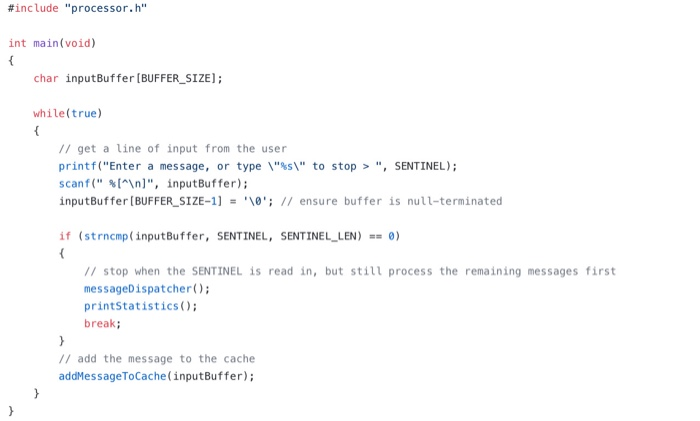
Your task is to implement a program that processes batches of messages. Messages will come in 4 types: MSG_TYPE_1 : An arbitrary string MSG_TYPE_2 : 4 integers, separated by spaces MSG_TYPE_3 : 5 doubles, separated by spaces MSG_TYPE_4 : 3 words, each containing 7 characters, separated by spaces Each entered message will be preceded by an integer representing a type of message. A couple examples: 1 I like to eat beans. Denotes a message of type MSG_TYPE_1 whose content is "I like to eat beans." 2 1 2 3 4 Denotes a message of type MSG_TYPE_2 whose content is the 4 integers "1234". You will need to implement (in processor.c) a function addMessageToCache which reads a message in string form from the input Line (where the user's input is placed) and parses it to populate an instance of the MESSAGE struct. Note that addMessage ToCache will need to know where in the messageCache array the new message should be populated, so you will need an integer to track the current index in the messageCache. Also note that addMessage ToCache will first need to ensure that there is room in the cache! If the cache is full, it should call the messageDispatcher (discussed below) to process / empty the cache. These message will be stored in a cache (an array of messages with a preset size). When the cache is full (or the user quits), the messages in the cache will need to be processed. This will be done with two functions: processMessage: takes a MESSAGE * as an argument prints the message type and message contents o increments counters (tracking how many of each message type has been processed). o frees any manually allocated message contents messageDispatcher: o processes all new messages in the cache o increments a counter for the number of batches processed resets the messageCache index to 0; now that all messages in the cache have been processed, we can overwrite them. Finally, you will need to implemente the printStatistics function, which will be called at the end of a run and which should display: The number of batches processed The total number of messages processed The number of each type of message processed Your task is to complete the 4 functions described above, whose empty definitions are provided in processor.c. Everything in processor_test.c and in processor.h is done, and does not need to be edited (though you may wish to make the CACHE_SIZE in processor.h smaller, to make it easier to test with a full cache). You can see 2 sample runs below, the only difference between these sample runs is that one has CACHE_SIZE 3 and the other has CACHE_SIZE 4. CACHE SIZE 4: Enter a message, or type "END" to stop > 1 I like to eat beans. Enter a message, or type "END" to stop > 21234 Enter a message, or type "END" to stop > 3 1.5 2.6 3.7 4.8 5.9 Enter a message, or type "END" to stop > 4 1234567 abcdefg 0112358 Enter a message, or type "END" to stop > END Running Message Dispatcher... TYPE 1 : I like to eat beans. TYPE 2 : 1 2 3 4 TYPE 3: 1.5 2.6 3.7 4.8 5.9 TYPE 4 : 1234567 abcdefg 0112358 Displaying Statistics... Number of batches processed : 1 Message Processed : Total : 4 Type 1 : 1 Type 2 : 1 Type 3 : 1 Type 4:1 Process finished with exit code o CACHE_SIZE 3: Enter a message, or type "END" to stop > 1 I like to eat beans. Enter a message, or type "END" to stop > 2 1 2 3 4 Enter a message, or type "END" to stop > 3 1.5 2.6 3.7 4.8 5.9 Running Message Dispatcher... TYPE 1 : I like to eat beans. TYPE 2 : 1 2 3 4 TYPE 3: 1.5 2.6 3.7 4.8 5.9 Enter a message, or type "END" to stop > 4 1234567 abcdefg 0112358 Enter a message, or type "END" to stop > END Running Message Dispatcher... TYPE 4 : 1234567 abcdefg 0112358 Displaying Statistics... Number of batches processed : 2 Message Processed: Total : 4 Type 1 : 1 Type 2 : 1 Type 3 : 1 Type 4:1 Process finished with exit code 0 #include "processor.h" int main(void) char inputBuffer (BUFFER_SIZE); while(true) // get a line of input from the user printf("Enter a message, or type " \" to stop > ", SENTINEL); scanf("%[^ ]", inputBuffer); inputBuffer (BUFFER_SIZE-1) = '\0'; // ensure buffer is null-terminated if (strncmp(inputBuffer, SENTINEL, SENTINEL_LEN) == 0) // stop when the SENTINEL is read in, but still process the remaining messages first messageDispatcher(); printStatistics(); break; // add the message to the cache addMessageToCache(inputBuffer)
Step by Step Solution
There are 3 Steps involved in it

Get step-by-step solutions from verified subject matter experts
 Study Help