







Question: C Program using Pure Pointer Notation Take the following code (with example output) and replace all methods of filling arrays with PURE POINTER NOTATION. The
C Program using Pure Pointer Notation
Take the following code (with example output) and replace all methods of filling arrays with PURE POINTER NOTATION.
The purpose of this code is to generate a one time random sequence, then have the user enter up to20 characters they would like to replace in that code, then enter a character to replace all of those. The below code declares arrays then fills them with array notation. Tis process must be replaced and all arrays MUST BE FILLED USING PURE POINTER NOTATION.
***********************BEGIN SAMPLE CODE********************
#include #include #include #include
void getRandomString(char str[]){ int i; for(i = 0; i
int getUserInput(char str[]){ printf("Enter a string: "); scanf("%s", str); int len = strlen(str); if(len 20){ return 0; } else{ return 1; } }
void strfilter(char s1[], char s2[], char ch){ int len1 = strlen(s1), len2 = strlen(s2), i, j; for(i = 0; i
int main(){ srand(time(NULL)); char s1[41], s2[41], s3[41]; char ch; getRandomString(s1); while(1){ strcpy(s3, s1); if(getUserInput(s2)){ printf("Enter a replacement character: "); scanf(" %c", &ch); strfilter(s3, s2, ch); printf("s1 = {\"%s\"} ", s1); printf("s2 = {\"%s\"} ", s2); printf("c = {\"%c\"} ", ch); printf("filtered s1 = {\"%s\"} ", s3); printf("Do you want to try again: "); scanf(" %c", &ch); if(ch != 'Y' && ch != 'y'){ break; } } else{ printf("Error: Input string is too large "); } }
****************END SAMPLE CODE********************
Example of output for above code, yours should work the same and have the same process but all arrays sould only be declared and then filled with pure pointer notation. NOT array notation.
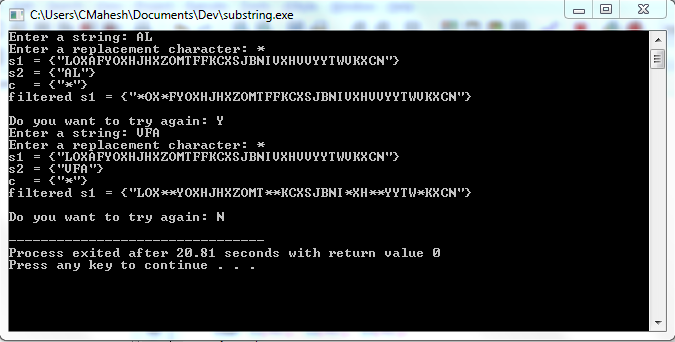
CAUsers CMahesh Documents\Devlsubstring.exe nter a string: AL Enter a replacement character: Do you want to try again: Y Enter a string: UFA Enter a repiagenenf character Enter a replacement character: Do you want to try again: N 8.81 seconds with Press any key to continue
Step by Step Solution
There are 3 Steps involved in it

Get step-by-step solutions from verified subject matter experts
 Study Help