







Question: C++ program: you will design three global functions that work with a two-dimensional array of characters. The array will represent a screen on the console.
C++ program:
you will design three global functions that work with a two-dimensional array of characters. The array will represent a "screen" on the console.
Create a source and a header file for the functions and name them screen.cpp and screen.h, respectively. You can find a file main.cpp with this post. Make sure to use the names exactly as typed, otherwise the TAs may return the files to you.
Define a function printScreen that accept the two-dimensional array for the screen by reference. Notice that you need to define global variables g_width and g_height in your header file for screen. I have used g_width = 40 and g_height = 20in my example but different values could be used. Notice further that as we pass the fixed-sized array by reference we do not need to pass dimensions. The function printScreen is to print the array line-by-line to the console.
Define a function clearScreen that accept the two-dimensional array for the screen by reference and sets all the characters in the 2D array to the empty space ' '.
Define a function gridScreen that accept the two-dimensional array for the screen by reference and two parameters for the horizontal and vertical lines in the grid, respectively. The number of vertical lines is optional and if the number is not specified, your function should use the same number of vertical than horizontal lines. Your function is to degrade gracefully if the number of lines exceeds the number of rows or columns available. Also inputs of 0 lines have to work and negative numbers should be treated as 0.
Main Program:
int main() { char screen[g_height][g_width]{}; clearScreen( screen ); int hLines, vLines; cout > hLines; cout > hLines; cout > vLines; cout
Sample output:
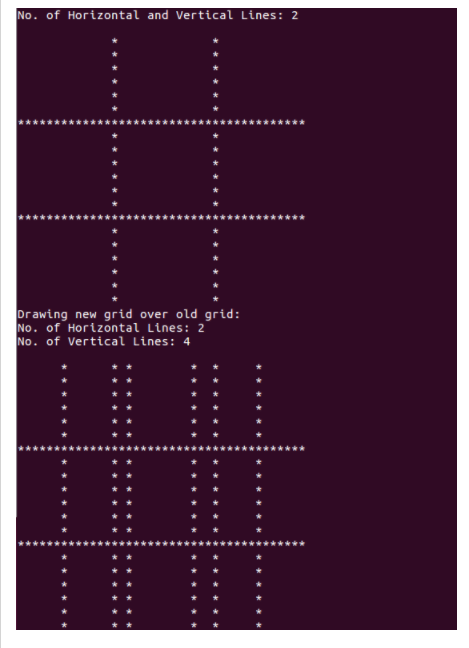
No. of Horizontal and Vertical Lines:2 Drawing new grid over old grid: No. of Horizontal Lines: 2 No. of Vertical Lines: 4
Step by Step Solution
There are 3 Steps involved in it

Get step-by-step solutions from verified subject matter experts
 Study Help